This discussion has been locked.
You can no longer post new replies to this discussion. If you have a question you can start a new discussion

HTTP issues after Astaro gateway upgrade 7.402

Dear All, 

First of all I would like to tell you that I am new to the Astaro Gateway system.
I just started working in a company that a friend of mine runs and he is using the Astaro Gateway V7.

One of my first task was to update the firmware to 7.402, so yesterday I completed this task but noticed that when we try to acces a certain site with the following ipadress: 62.72.109.235 we end up with a blanc page...

on the other hand when we try to reach the website from an external pc (so outside our domain) we get normal results.


There is a NAT rule setup for this adress that should bounce the website internally to it's destination, but apperantly this isn't working any more...


Could somebody please advice ? 
Or let me know if I have to add more information (I probably will)


This thread was automatically locked due to age.

Parents Reply Children
  • When you try to reach it from outside the domain it does indeed.

    But when you try to access mail2.ibf.be from within the domain you end up with a blanc page...
  • Hi,
    please post the configuration of your ASG, eg what proxies and in what mode, nat type - MASQ or DNAT/SNAT, packet filter rules etc

    From there we can help you fix the problem.

    Ian M
  • Hey All, 

    I figured out the problem ...
    Apperently there was no Masquerade rule for LAN to DMZ 
    After adding this rule the forwarding works again.

    Still i would like to thank all we responded / looked into this matter

    Regards,
    Eli DS
  • Eli DS, that works, but I don't think you should need to do that.  If you are tracking IPs in the DMZ or accessing that server, all of your internal accesses will now show the IP of 'DMZ (Address)'.

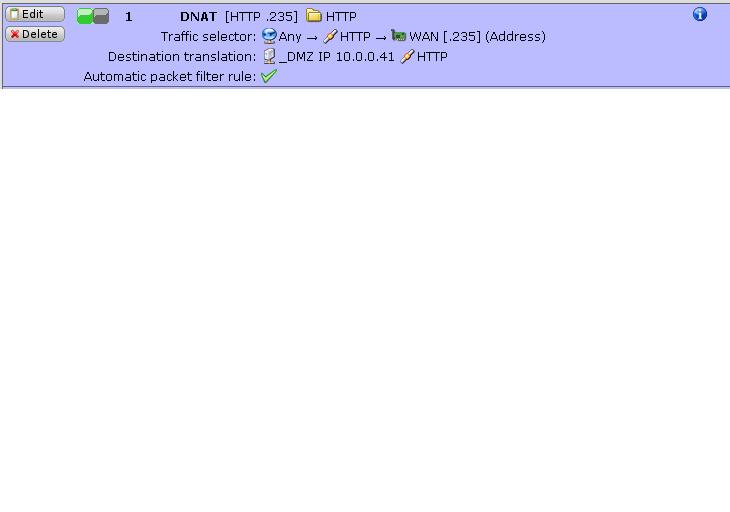
    If you would like to pursue this further, please [Go Advanced] and attach a pic of the DNAT that should have redirected the traffic.

    Cheers - Bob
     
    Sophos UTM Community Moderator
    Sophos Certified Architect - UTM
    Sophos Certified Engineer - XG
    Gold Solution Partner since 2005
    MediaSoft, Inc. USA
  • Dear Bob, 

    What you say is indeed true.

    But the strange thing is that the rules we implemented before where left untouched... (before the firmware update it worked)

    after the update, the rules for forwarding where completely ignored(?) and where only picked up after the Masquerade was setup.

    To be honest, it is fine the way it works now.
    But it would be intresting ofcourse to know wheter this could be solved in another way.


    Ill try to upload some pics later of the current setup.


    Regards,
    Eli
  • Hello all,

    Sorry for the late reply but it was very busy over here :-)

    The screenshot with the current setup for forwarding has been added.
    The DMZ to which is should be redirected is running the website.


    Thanks in advance.
  • Although it shouldn't affect the reliability of your DNAT, you should leave the service translation empty when there's no change in the service.

    You can get rid of the masq on the DMZ if you just add a Static Entry in 'Network >> DNS': mail2.ibf.be -> 10.*.*.41. (I used * to conceal your actual internal subnet here)

    Alternatively, depending on your internal DNS server and the configuration of the Astaro DNS proxy, you could create a forward lookup zone for ibf.be on your internal DNS server.

    Cheers - Bob
     
    Sophos UTM Community Moderator
    Sophos Certified Architect - UTM
    Sophos Certified Engineer - XG
    Gold Solution Partner since 2005
    MediaSoft, Inc. USA
  • Hey Bob,

    Thanks for the suggestions.

    I have tried adding static entries and they seems to run fine :-) 


    @DNS

    We use this for certain websites but forwarding in astaro is just much faster / easier to do :-)
    but it indeed is an option 


    Again, thanks alot for your assistance!

    Regards,

    Eli_DS