This discussion has been locked.
You can no longer post new replies to this discussion. If you have a question you can start a new discussion

seriously SLOW!

I've just created a new server with the following specifications:

P4 3Ghz 4mb L2 Cache 
2 Gig ddr2 800mhz ram
160gig Sata HD

i also bought two Intel Corporation 82557/8/9/0/1 Ethernet Pro 100 and two 3Com Corporation 3c905B 100BaseTX [Cyclone]. i decided to mix the two brands and use One 3Com which i made for the lan and the intel i used for the net

The setup went through with no problems.

after i rebooted the server I went through the wizard. then it showed Eth1 (the one that should be for the net) as UNUSED. I have no idea why.

Eth0 (the one for the lan) works just fine.

So I figured fine. I'll setup Eth1 manually.
I followed the quickstart guide and I gave Eth1 the Internet IP, I added a DNS forwrder, i enabled NAT Masquerdating   and I thought i was done.
I also enabled DHCP on the lan.
Now Whenever i try to open a web page it takes literally 30 seconds to even resolve the IP for the website.

So first question is: why is the wizard not adding my internet interface?
second question: what am i missing thats making my manual configuration so slow?

Please help!

i've also attached lspci output


This thread was automatically locked due to age.

Parents
  • There is a known display bug that makes some interfaces appear as down, even though they are enabled (and are working)... this was introduced in 7.300... I even have a customer 320 that shows active interfaces as down, although they are working fine, I'll be that's at least your display issue.  As to speed, make sure your DNS resolution is working OK.  Also, try setting the speed and duplex of the ethernet ports manually (100MB Half Duplex almost always words)... sometimes auto-negotiation does not work well (I've had this problem with Intel and 3COM cards on both Windows and Linux systems before).

    CTO, Convergent Information Security Solutions, LLC

    https://www.convergesecurity.com

    Advice given as posted on this forum does not construe a support relationship or other relationship with Convergent Information Security Solutions, LLC or its subsidiaries.  Use the advice given at your own risk.

  • There is a known display bug that makes some interfaces appear as down, even though they are enabled (and are working)... this was introduced in 7.300... I even have a customer 320 that shows active interfaces as down, although they are working fine, I'll be that's at least your display issue.  As to speed, make sure your DNS resolution is working OK.  Also, try setting the speed and duplex of the ethernet ports manually (100MB Half Duplex almost always words)... sometimes auto-negotiation does not work well (I've had this problem with Intel and 3COM cards on both Windows and Linux systems before).


    Thanks but the problem is not a dispaly bug.

    I've gone back and done two things; i redownloaded the iso again but this time i grabbed the 7.302 iso so i dont have to sit there updating 7.300. 

    I've also decided to dump the two 3com card and install the Intel cards... Now the wizard worked for some unknown reason...
    In regards to the Half Duplex mode... i've actually decided to do full duplex. besides, isnt half sort of bad?

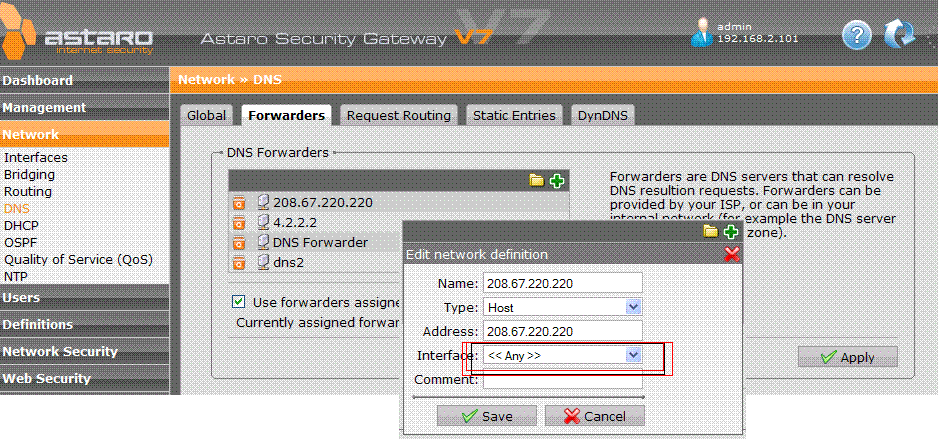
    for the DNS i decided to add public dns (forwarders) servers like opendns (208.67.222.222) and i noticed if i set the interface to "External" it would delay. if i set it to ANY it would resolve quickly. go figure. ((See attached image))

    currently though my main issue has become the http proxy is just too darn slow at times. i've even go as far as disabling the antivirus for http and its still crappy performance.

    pls advise.
  • Cy,

    Bruce made a similar suggestion and helped someone else.

    You say that the HTTP Proxy's slow at times.  Is that just an impression, or are you measuring throughput with a tool?  Please give details.

    Cheers - Bob
     
    Sophos UTM Community Moderator
    Sophos Certified Architect - UTM
    Sophos Certified Engineer - XG
    Gold Solution Partner since 2005
    MediaSoft, Inc. USA
  • I havent used a measuring tool ... just a feeling i guess.
    i am on satellite internet to start with so i can tell if things are slow or not...
  • Try Speedtest.net - The Global Broadband Speed Test

    If the same test is substantally slower through the Astaro than without it, then something is wrong.  When the slow-down appears, does the Astaro Dashboard show 100% CPU usage?

    Cheers - Bob
     
    Sophos UTM Community Moderator
    Sophos Certified Architect - UTM
    Sophos Certified Engineer - XG
    Gold Solution Partner since 2005
    MediaSoft, Inc. USA
  • Try Speedtest.net - The Global Broadband Speed Test

    If the same test is substantally slower through the Astaro than without it, then something is wrong.  When the slow-down appears, does the Astaro Dashboard show 100% CPU usage?

    Cheers - Bob


    its about the same...
    with ASG:  1450/304


    Without ASG: 1469/302


    no. the cpu usage on dashboard is always in the low numbers


    as i said earlier basically with asg the dns resolving takes a few seconds extra (sometimes 5-7 seconds passby before a dns is resolved in Firefox) whereas if i connect directly to the satellite modem i can resolve fairly fast.

     [edit: update]
    well this maybe a problem
    loginuser@asgbox:/home/login > cat /etc/resolv.conf
    nameserver 127.0.0.1
    but i do have dns forwarders set up. i wonder why this file is empty?

    i also found a few other resolv.conf files but from my linux knowledge i know the /etc/resolv.conf is what the system depends on to do its resolving. i wonder why /etc/resolv.conf shows no dns servers...

    also i suspect maybe this is a cause?
    http://img442.imageshack.us/done.php?l=img442/8296/pfilterdailyyj9.png
    if so, how do i disable this "feature"?
  • 'Network Security >> Intrusion Protection'

    On the 'Global' tab, in 'Global IPS Settings', make sure that contains your internal network and nothing else.  If you aren't having 100% CPU usage, then I don't think that's a problem, but you should check it anyway.

    So, if I understand correctly, your problem is with your satellite service as far as throughput is concerned, but you still have a delay issue with DNS.  Have you tried just using the same addresses in DNS Forwarders as you have configured in your computer when you connect directly?

    Cheers - Bob
     
    Sophos UTM Community Moderator
    Sophos Certified Architect - UTM
    Sophos Certified Engineer - XG
    Gold Solution Partner since 2005
    MediaSoft, Inc. USA
  • 'Network Security >> Intrusion Protection'

    On the 'Global' tab, in 'Global IPS Settings', make sure that contains your internal network and nothing else.

    it does. 

     If you aren't having 100% CPU usage, then I don't think that's a problem, but you should check it anyway.

    no. i dont see 100% at all. its always in the low numbers like it never rises to 10%

    So, if I understand correctly, your problem is with your satellite service as far as throughput is concerned, but you still have a delay issue with DNS.  Have you tried just using the same addresses in DNS Forwarders as you have configured in your computer when you connect directly?


    Delay in DNS resolving but i think i managed to fix it by doing the following:
    (this is after scouring the forum of course and it appears the IPS system drops dns queries)
    So in Network Security » Intrusion Protection --> Advanced I put in my main two DNS servers under "DNS Servers".

    so far so good ..

    on to problem set #501383 (j/k)
  • You're welcome
     
    Sophos UTM Community Moderator
    Sophos Certified Architect - UTM
    Sophos Certified Engineer - XG
    Gold Solution Partner since 2005
    MediaSoft, Inc. USA
  • You're welcome


    sorry.

    Thank you very much for your assistance.

    I'll be opening a new thread with the new issue i have...
Reply Children
No Data