This discussion has been locked.
You can no longer post new replies to this discussion. If you have a question you can start a new discussion

Linksys AP: Don't Understand Internet Setup Section

I have ASG ver 7.301.  The computer running ASG has 3 NIC cards.  eth0 is connected to my home LAN, eth1 is connected to my cable modem and eth2 is connected to a Linksys wireless access point.  I use eth2 as a DMZ so visitors can connect their laptops to the access point, but they will be isolated from the my home LAN on eth1.  The eth2 is on a different subnet then eth1.

Everything works okay, but I wanted to better understand the setup of my Linksys AP on the eth2/DMZ (Model WRT54GX).  In the Basic Setup screen their is a section called Internet Setup.  I can choose from DHCP, Static IP, PPPoE and some others.  I have it setup as DHCP, but I don't understand when I should use DHCP and when I should use static IP.  I'm not really clear on what this section is doing under the setup I have.  There is another section called Router IP and here I have a static IP set for the access point, this is the IP I put in my browser to get to the linksys interface.  Can someone explain how the Internet Setup section works?  I don't even know if it's used in my scenario.

--Scott


This thread was automatically locked due to age.

Parents
  • I have DHCP enabled on ASG for eth2 where my linksys is connected (range is ...10-50).  If I look at the DHCP lease table, it's empty right now.  The linksys doesn't seem to be pulling an IP from DHCP.  Also, in my Active IPs in the licensing section, it shows the static router IP (192.168.7.7) I set in the linksys, but nothing else for the linksys.  

    eth2 in ASG is configured as: 192.168.7.1
    Static router IP of the linksys is 192.168.7.7

    From what you said, it sounds like I should have set the linksys router IP to 192.168.7.1

    Something else I don't don't really understand is why the linksys IP (192.168.7.7) is showing up in the Active IP licenses table, but another wireless access point I have on my regular LAN (eth1) is not showing up in the Active IP licensing table.

    --Scott
  • If the Linksys is has a static ip assigned, it will not show in the ASG's DHCP table.  Clients connected to the Linksys will get their DHCP from the Linksys, not the ASG (unless the Linksys supports and is configured for DHCP forwarding).
    If eth2 in ASG is configured as: 192.168.7.1 and the linksys is 192.168.7.7, it should work fine- the two systems cannot have the same IP.  The default gateway on the Linksys needs to be set to the ASGs IP.

    As far as the other access point, if it is a true access point, not a wireless router, it may not be communicating through the ASG or pulling an IP from it- thus the ASG is unaware of the AP.
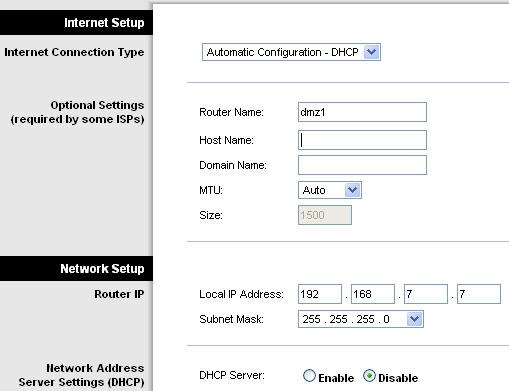
  • There are two parts of the linksys setup: Internet Setup: which is configured for DHCP and NetworkSetup: Which has a static IP for the router.  See attached JPG of linksys screenshot showing this.

    The Network DHCP is turned off on the linksys, so the linksys is not providing any IPs to clients, ASG is going this.  DHCP is enabled for eth2 on ASG; eth2 is where the linksys is connected.

    The default gateway on the linksys is set to the IP of eth2 on ASG, which makes sense to me.  

    So I'm still confused about the Internet Setup section on the linksys.  From Linksys's perspective, the internet is the ASG box.  The internet section on the Linksys is set to DHCP, but I don't think its actually pulling an IP from ASG.  It seems to me that the linksys just needs to have two IP defined, the IP that reflects it's identity (192.168.7.7)  and the default gateway (192.168.7.1).  I don't see how the internet IP is used, maybe it's not used in this setup.  There is nothing plugged into the internet port on the linksys; the ASG is connected to one of the 4 LAN ports.

    Is this the best way to setup my linksys, or should I be using the internet port?

    --Scott
  • You have it setup the correct way.

    When you have the ASG plugged into a LAN port, and not the Internet port, that makes the Linksys act as a simple AP instead of a Router/AP.

    This is a good thing, or else you would be into double NAT, and other pains.
Reply
  • You have it setup the correct way.

    When you have the ASG plugged into a LAN port, and not the Internet port, that makes the Linksys act as a simple AP instead of a Router/AP.

    This is a good thing, or else you would be into double NAT, and other pains.
Children