This discussion has been locked.
You can no longer post new replies to this discussion. If you have a question you can start a new discussion

memory usage increases

This is on ASG 7 on several systems.

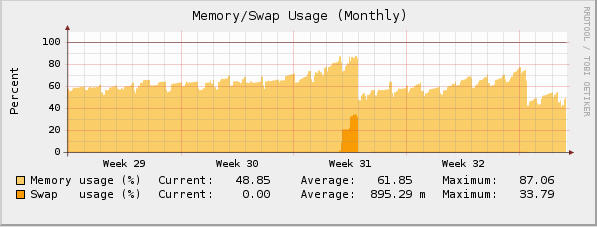
After one of the updates, it might have started at 7.2 the memory usage of the system slowly increases over time and doesn't level off. 

Examples:

System one starts at 19% in the first 30 min. and increases to 47% after 8 days (2GB RAM).

System two starts at 11% in the first 30 min. and increases to 34% after 10 days (3GB RAM).

Both systems (I actually have 7 doing this) are at 7.202, 25 user and have SMTP virus protection as well.


This thread was automatically locked due to age.

Parents
  • as long as you aren't using swap you are fine.  Linux in general will grab all your available free memory for caching purposes which increases speed significantly.  Seeing 95% memory usage is not uncommon in a Linux mahcine..as long as you aren't using swap everything is fine.

    Owner:  Emmanuel Technology Consulting

    http://etc-md.com

    Former Sophos SG(Astaro) advocate/researcher/Silver Partner

    PfSense w/Suricata, ntopng, 

    Other addons to follow

  • Hi Michael

    It's look like i have the same problem (sinze 7.201 or 7.202 ?) and taking swap (see attachement).

    Maybe i do an downgrade (new Inst. with 7.200 or 7.104) to see wath happens.

    Peter
  • PeterE, Astaro's had some problems in the past week with the anti-spam daemon experiencing unusual memory growth due to an issue with CommTouch's spam definition servers... try rebooting and seeing if the growth stops, those problems should be solved by now.

    CTO, Convergent Information Security Solutions, LLC

    https://www.convergesecurity.com

    Advice given as posted on this forum does not construe a support relationship or other relationship with Convergent Information Security Solutions, LLC or its subsidiaries.  Use the advice given at your own risk.

  • Hi BrucekConvergent

    Thanks for Info

    Will reboot and wait

    Cheers Peter
Reply Children
  • In case the thread is searched in the future, thanks Copyright for the correct thread link and William your memory assesmant is simply wrong. A system, be it Linux, Unix, WIndows, etc. WILL start using swap well before it gets 95% memory usage. Linux will use memory but none of my systems will show much over 25% constant usage.
  • In case the thread is searched in the future, thanks Copyright for the correct thread link and William your memory assesmant is simply wrong. A system, be it Linux, Unix, WIndows, etc. WILL start using swap well before it gets 95% memory usage. Linux will use memory but none of my systems will show much over 25% constant usage.


    Wrong.  A properly tuned Linux system will go up to 95% w/o using swap.  Astaro's kernel is not tuned to use all available memory as it has to be tuned to fit inside a 256 or 512 meg envelope when 1 gigabyte of ram should really be the absolute minimum for a Linux system of this complexity.

    Many Linux 2.6 Linux distros for some reason have their kernels set to swap early.  This setting is called vm.swappiness and the average setting i have found is 50.  If you change that to vm.swappiness=0 the system will not swap until it has absolutly no room in physical memory(with some exceptions..but they are few).  I have posted several times about vm.swappiness and it's improvement on the kernel's memory usage.  The problem is to change it requires root mods and voiding of support.  Those with a support contract are rightfully loathe to void their support..[:)]  Try it on your other Linux servers.  You'll see a drastic increase in buffers and cache if the software you are running(beyond the OS) is able to take care of it.

    Case in point one webserver that i manage would use 30% swap with 2 gigs of ram installed.  Cached ram was around 500 megs and buffers around 250 megs.  Simply by doing vm.swappiness=0 here is what the system looks like now:

    Tasks: 120 total,   1 running, 119 sleeping,   0 stopped,   0 zombie
    Cpu0  :  0.6%us,  0.0%sy,  0.0%ni, 99.4%id,  0.0%wa,  0.0%hi,  0.0%si,  0.0%st
    Cpu1  : 13.5%us,  0.6%sy,  0.0%ni, 85.9%id,  0.0%wa,  0.0%hi,  0.0%si,  0.0%st
    Cpu2  :  0.6%us,  0.0%sy,  0.0%ni, 99.4%id,  0.0%wa,  0.0%hi,  0.0%si,  0.0%st
    Cpu3  :  1.2%us,  1.2%sy,  0.0%ni, 97.7%id,  0.0%wa,  0.0%hi,  0.0%si,  0.0%st
    Mem:   2075592k total,  1498520k used,   577072k free,   138508k buffers
    Swap:  1052248k total,      124k used,  1052124k free,   855380k cached

    If i wanted to chew up the remaining .5 gig i could use a php accelerator and drastically reduce my free memory.  right now there's not enough users of the machine to require caching php initializations.

    Here's the same mahcine looked at under the free command:
     free
                 total       used       free     shared    buffers     cached
    Mem:       2075592    1495544     580048          0     138520     855504
    -/+ buffers/cache:     501520    1574072
    Swap:      1052248        124    1052124


    When i first fired it up I would be using 30% swap with waaay more than 50% free memory(not much in buffers or cache).  Windows has a totally different memory mangement model that isn't the subject here.

    In closing if you don't do some basic tuning your system won't utilize memory correctly.

    Owner:  Emmanuel Technology Consulting

    http://etc-md.com

    Former Sophos SG(Astaro) advocate/researcher/Silver Partner

    PfSense w/Suricata, ntopng, 

    Other addons to follow