This discussion has been locked.
You can no longer post new replies to this discussion. If you have a question you can start a new discussion

7.202

What does this firmware update correct for DNS?


-J


This thread was automatically locked due to age.

Parents
  • 7.202 updates to the patched version of BIND to resolve the DNS cache poisoning vulnerability.  7.202 does require a reboot.
  • Jack,

    My Up2Date says it does not require a reboot, is this wrong?


    -J
  • Hello,

    I've the same logs in "kernel messages"...

    I notice also that i can't access to any https, since this update !...  [:O]
    It is broken since the update... even after a reboot...

    Ulong
  • The same logfile entries in "kernel messages" since the update to V2.202 here, but everything ist running fine, as far as I can see:

    2008:08:05-10:29:12 (none) kernel: net_enable_timestamp [named]: netstamp_needed=10
    2008:08:05-10:29:12 (none) kernel: net_disable_timestamp [named]: netstamp_needed=9
    2008:08:05-10:29:12 (none) kernel: net_enable_timestamp [named]: netstamp_needed=10
    2008:08:05-10:29:12 (none) kernel: net_disable_timestamp [named]: netstamp_needed=9
    2008:08:05-10:29:13 (none) kernel: net_enable_timestamp [named]: netstamp_needed=10
    2008:08:05-10:29:13 (none) kernel: net_disable_timestamp [named]: netstamp_needed=9
    2008:08:05-10:29:13 (none) kernel: net_enable_timestamp [named]: netstamp_needed=10
    2008:08:05-10:29:13 (none) kernel: net_disable_timestamp [named]: netstamp_needed=9
    2008:08:05-10:29:14 (none) kernel: net_enable_timestamp [named]: netstamp_needed=10
    2008:08:05-10:29:14 (none) kernel: net_disable_timestamp [named]: netstamp_needed=9
    2008:08:05-10:29:15 (none) kernel: net_enable_timestamp [named]: netstamp_needed=10
    2008:08:05-10:29:15 (none) kernel: net_disable_timestamp [named]: netstamp_needed=9
    2008:08:05-10:29:15 (none) kernel: net_enable_timestamp [named]: netstamp_needed=10
    2008:08:05-10:29:15 (none) kernel: net_disable_timestamp [named]: netstamp_needed=9
    2008:08:05-10:29:15 (none) kernel: net_enable_timestamp [named]: netstamp_needed=10
    2008:08:05-10:29:15 (none) kernel: net_disable_timestamp [named]: netstamp_needed=9
    2008:08:05-10:29:16 (none) kernel: net_enable_timestamp [named]: netstamp_needed=10
    2008:08:05-10:29:16 (none) kernel: net_disable_timestamp [named]: netstamp_needed=9
  • These errors are purely informational, and are expected. They do not cause any problems, except for numerous of log entries. They will be cleaned up in the release of 7.300.

    Ulong, this update could not cause you to lose access to https. There must be something else happening there.
  • For me it was very strange : 

    Following the update, everything concerning the packet filter was "broke", but the http proxy was fully functional ( as i add my thread to the forum...)...

    To overcome :
    - I reboot the firewall : no efect
    - I reboot the adsl router, no effect
    - I restore a backup made before the update : and nothing...
    Same case : only http access through the firewall...

    and later(2hours), with nothing else : everything was ok ???

    I noticed during the problem that my access are in green on the packet filter, but everytime I get no answer... On this box i've a site2site vpn access using this was good ( https / pop with no proxy ).

    Regards
    ulong
  • I experienced the same sort of issue after applying 7.202. 

    I rolled back to 7.200 and the issue has seemed to stop. The other thing is I have two 425a's in HA\Cluster mode, does anybody have the 7.202 firmware applied with ASG's in HA\Cluster mode?


    -J
  • The same logfile entries in "kernel messages" since the update to V2.202 here, but everything ist running fine, as far as I can see:

    2008:08:05-10:29:12 (none) kernel: net_enable_timestamp [named]: netstamp_needed=10
    2008:08:05-10:29:12 (none) kernel: net_disable_timestamp [named]: netstamp_needed=9
    2008:08:05-10:29:12 (none) kernel: net_enable_timestamp [named]: netstamp_needed=10
    2008:08:05-10:29:12 (none) kernel: net_disable_timestamp [named]: netstamp_needed=9
    2008:08:05-10:29:13 (none) kernel: net_enable_timestamp [named]: netstamp_needed=10
    2008:08:05-10:29:13 (none) kernel: net_disable_timestamp [named]: netstamp_needed=9
    2008:08:05-10:29:13 (none) kernel: net_enable_timestamp [named]: netstamp_needed=10
    2008:08:05-10:29:13 (none) kernel: net_disable_timestamp [named]: netstamp_needed=9
    2008:08:05-10:29:14 (none) kernel: net_enable_timestamp [named]: netstamp_needed=10
    2008:08:05-10:29:14 (none) kernel: net_disable_timestamp [named]: netstamp_needed=9
    2008:08:05-10:29:15 (none) kernel: net_enable_timestamp [named]: netstamp_needed=10
    2008:08:05-10:29:15 (none) kernel: net_disable_timestamp [named]: netstamp_needed=9
    2008:08:05-10:29:15 (none) kernel: net_enable_timestamp [named]: netstamp_needed=10
    2008:08:05-10:29:15 (none) kernel: net_disable_timestamp [named]: netstamp_needed=9
    2008:08:05-10:29:15 (none) kernel: net_enable_timestamp [named]: netstamp_needed=10
    2008:08:05-10:29:15 (none) kernel: net_disable_timestamp [named]: netstamp_needed=9
    2008:08:05-10:29:16 (none) kernel: net_enable_timestamp [named]: netstamp_needed=10
    2008:08:05-10:29:16 (none) kernel: net_disable_timestamp [named]: netstamp_needed=9


    We had the same messages, and our ASG (7.202) stalled last night / this morning. At least a bunch of services didn't work anymore. (appearently all that depend on logging)

    General IP (ICMP), SSH and probably some more still worked, but e.g. Webadmin, SMTP-Proxy and any shell-(bash-)commands didn't work.

    We just got some patch which should resolve this issue. (hopefully)
  • for AlanT:

    I found what cause my trouble :
    I've a problem in my configuration file !

    A/ If I reboot :
    - HTTP Proxy is fine, SMTP also, SITE2SITE 
    but
    Everything that is linked to packet filter doesn't work ( HTTPS etc...) !!!

    B/ If I do a OFF, and ON on my NAT RULE #8 
    everything is ok !!!!

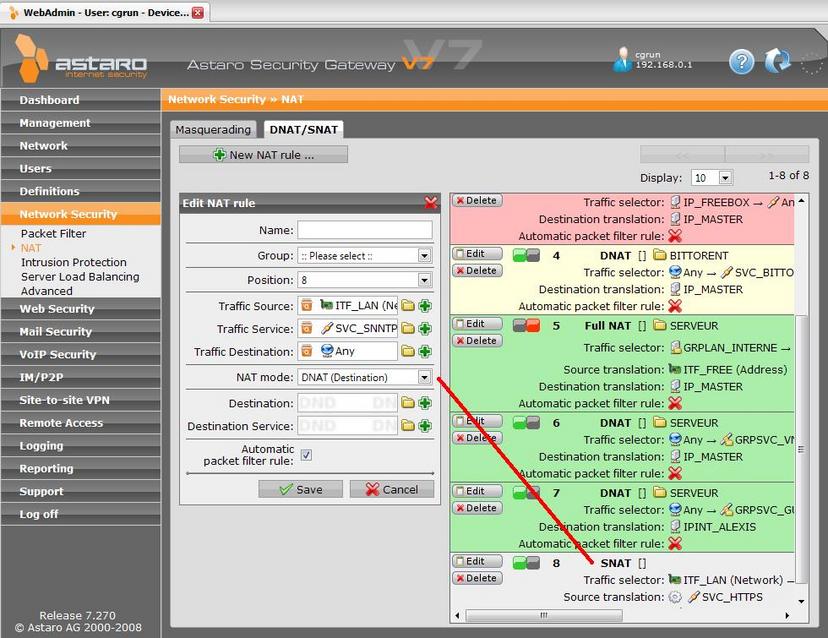
    I noticed that SNAT rule has a problem : when I edit it it switch to a DNAT rule !, i need to change it to SNAT in the drop down and next I can save it ...
    See .jpg, when i click EDIT and nothing else...

    So,
    Do you to check this issue ? ( backup? access ?)

    Sincerely
    Ulong
  • I have seen that kind of issue with a couple of systems upgraded from V6 to V7.  Can you delete and recreate the problem NAT rule?
  • Hi Jack Daniel,

    First it is not an upgrade : the configuration was first done on the 7.200 beta.

    I do the following :
    - delete the rule
    - re-create exactly the same snat at the same position
    - I click edit and it display as a DNAT ! 
    - I reboot : same trouble, no packet filter ( please notice: if i use the livelog of the packet filter, i see my attemps en green : so it is not my rules that forbidden my attemps ...)
    - I OFF next on the rule #8 ==> Everything OK !...

    Sincerely
    Ulong
  • I missed the details at first glance- your configuration won't work, we can't SNAT an entire network out to "any" for a specific service.  It will work if you create a SNAT rule for each host, but not as bulk rule.

    As a general rule of thumb, the more specific the better for NAT rules.
Reply
  • I missed the details at first glance- your configuration won't work, we can't SNAT an entire network out to "any" for a specific service.  It will work if you create a SNAT rule for each host, but not as bulk rule.

    As a general rule of thumb, the more specific the better for NAT rules.
Children
  • Yes, 

    but this rule work fine, because actually only one host on the network need it...
    For test I change the source ITF_LAN(Network) by a specific IP.

    A/ When I do that the problem is the same : when I click edit in the SNAT rule, the editor show it as a DNAT and I need to reselect SNAT in the dropdown...
    Please noticed that I've several other SNAT rule (#2, #1) and when I click edit for them no problem...

    B/ I will reboot this evening to see it the rule won't block my packet filter on reboot as before. I will post the result later.
    --> it doesn't work: after reboot(i've done the 7.290update) I need to OFF/ON my rule as before...

    Ulong
  • Hi. 
    Same for me here: HTTPS does not work anymore with .202. 
    Deleted the HTTPS rule and recreated, no luck. 
    Does anybody have a quick solution to that?

    Thanks and regards
    Danny