This discussion has been locked.
You can no longer post new replies to this discussion. If you have a question you can start a new discussion

Swap goes over the top possibly bad Up-2-Date

Hello,

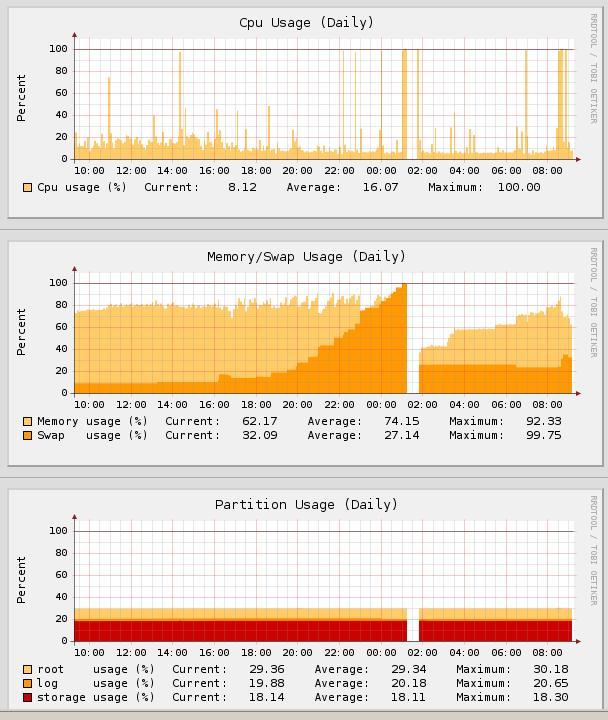
yesterday all the gateways I'm administering started to show the very same problem. Approximately starting at 18:00 CET the memory usage started to go up and swap usage started to grow until it reached 100% and the gateway just died...

Anyone else seeing this? All gateways I have administrative access to are having the same problem (about 10 boxes, different configs and license states).

Something stinks here and I really need this resolved ASAP because it brings down even HA configs... [:(]


This thread was automatically locked due to age.

  • The complete command to execute is

    /var/mdw/scripts/ctasd restart
  • The complete command to execute is

    /var/mdw/scripts/ctasd restart


    That did the trick. Thanks
  • I don;'t have this path on 7.201. There is no /etc/mdw directory. and I can not find any scripts directory

     
    you search in the /etc directory and I posted the /var/ directory [;)]
  • An additional observation- if the system is already heavily swapping, it may be best to restart the Astaro to clear swap.  After the reboot, monitor and restart ctasd as needed.
  • yep, restarting ctasd has an immediate impact on swap usage. However, the correct path is /var/mdw/scripts
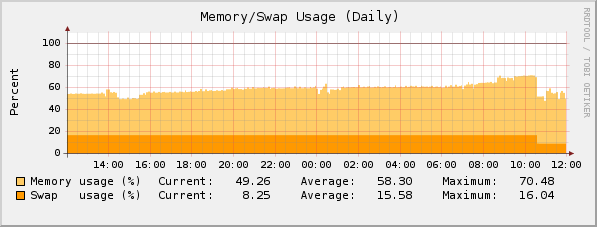
  • It appears that the issue is fixed... the memory usage at 2 customer sites that were having a problem has stayed below 10% for the past 20 minutes or so... it was growing to almost 50% within an hour just a little while ago.

    CTO, Convergent Information Security Solutions, LLC

    https://www.convergesecurity.com

    Advice given as posted on this forum does not construe a support relationship or other relationship with Convergent Information Security Solutions, LLC or its subsidiaries.  Use the advice given at your own risk.

  • Yes, the offending servers are now offline.  You should see memory level off, if you restart ctasd now the memory use should be normal (and stay there).
  • If you are still experiencing problems, please restart ctasd as mentioned previously- the issue has been resolved and should not return.

    Here is an excerpt from the vendor's statement on the issue from yesterday:

    --------------------------------------------------------------------
    As of 12:30 PM Pacific time Commtouch Detection Centers are back to
    their full capacity.

    Initial investigation of the issue, showed that the problem started at
    4:30 AM Pacific time. It was a result of a fault in the Proactive
    Pattern system that caused excessive downloads/updates, by some of the
    clients. This caused additional load on the Data Centers. In turn some
    of the clients experienced intermittency while communicating with the
    Commtouch Data Centers.

    The fault in the Proactive Pattern update system was fixed.

    During the upcoming week we will look into adding additional measures in
    order to prevent such issues in the future.
    We are sorry for any inconvenience,
    -----------------------------------------------------
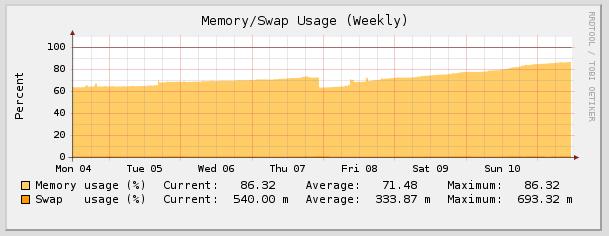
  • Well it seems there is still some problem with the ctasd or Comtouch servers because the memory allocation on my box is slowly going up and over the top to swap again...

    Maybe it would be better to let the middleware to restart the ctasd daemon on a regular basis in order to prevent excessive memory/swap use... ?

    I just restarted the daemon in question manually from the shell and it freed some 300M of memory.

    Zdenek
  • The same symptoms here. I also had to restart the smtp and pop proxys to fix this issue with ctasd temporary.