This discussion has been locked.
You can no longer post new replies to this discussion. If you have a question you can start a new discussion

How to install from USB stick?

I reckon ASG 7 is installable from a USB stick for those PCs that either have an unsupported CD-ROM (SATA) or no CD-ROM at all. I was pointed in the direction of the Slax distribution, and have fiddled a little with the syslinux-command and some cfg-files, but to no avail so far. Most likely because of my virtually non-existent knowledge of Linux.

Can anyone please point me in the right direction on how to make the PC boot from the USB stick and install ASG 7? Or, better yet, provide a short, step-by-step tutorial? :-)

Thank you!


This thread was automatically locked due to age.

Parents
  • Interesting question; back when 7.0 was released, my channel rep (I'm a reseller) sent me a USB stick that had just what you describe, a bootable, installable Version 7 image.  It looked like they just setup a CDFS filesystem on the stick, and wrote the standard ISO to it.  I never tried to duplicate it, as we carry around a USB CDROM Drive to installs, but it can't be too tough.

    CTO, Convergent Information Security Solutions, LLC

    https://www.convergesecurity.com

    Advice given as posted on this forum does not construe a support relationship or other relationship with Convergent Information Security Solutions, LLC or its subsidiaries.  Use the advice given at your own risk.

  • From what I've gathered, it's something along the lines of just copying the ISO contents to the USB stick, and then running syslinux.exe in a certain way, possibly accompanied by the fiddling with some configuration files belonging to syslinux.

    But, as I initially stated, my severely limited knowledge of Linux has so far prevented me from succeeding.

    BTW, I believe the USB stick has to be formatted with the FAT file system, and then made bootable. No CDFS.
  • I don't know what happened to that USB stick I had, but it was formatted as CDFS (I couldn't edit it).... at least that's what my desktop OS said (that's Linux and Windows XP)..

    CTO, Convergent Information Security Solutions, LLC

    https://www.convergesecurity.com

    Advice given as posted on this forum does not construe a support relationship or other relationship with Convergent Information Security Solutions, LLC or its subsidiaries.  Use the advice given at your own risk.

Reply
  • I don't know what happened to that USB stick I had, but it was formatted as CDFS (I couldn't edit it).... at least that's what my desktop OS said (that's Linux and Windows XP)..

    CTO, Convergent Information Security Solutions, LLC

    https://www.convergesecurity.com

    Advice given as posted on this forum does not construe a support relationship or other relationship with Convergent Information Security Solutions, LLC or its subsidiaries.  Use the advice given at your own risk.

Children
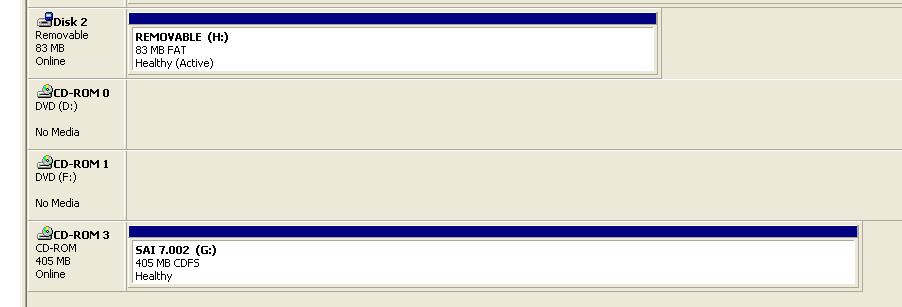
  • Aha, dug around in the "drawer of doom" in my desk and found it... plugged it in and got a screen shot of what shows up ... it has 2 "partitions", a CDFS one (and no, it is a 512MB USB Stick), and 80-something meg of FAT space...  Check out the screen shot.  The image that boots off of this thing (I recall using it on an old 220 that was lying about) is for the Appliances.  See the H: and G: drives in the screenshot...

    CTO, Convergent Information Security Solutions, LLC

    https://www.convergesecurity.com

    Advice given as posted on this forum does not construe a support relationship or other relationship with Convergent Information Security Solutions, LLC or its subsidiaries.  Use the advice given at your own risk.