This discussion has been locked.
You can no longer post new replies to this discussion. If you have a question you can start a new discussion

Problem setting up a DMZ

Hi guys I have been browsing this forum for awhile now and just decided to register because of a problem I am running into.

I have Astaro Security Gateway software running on a Pentium II 700 Mhz, 376mb ram, 20gb HDD.

I have the following configuration but for some reason all computers on the DMZ cannot access the internet?

Eth0-LAN-192.168.2.100/24 -->wireless access point with WPA encyption
Eth1-WAN-ISP provided IP --> cable modem 
Eth2-DMZ-10.32.16.0/8 --> Netgear LAN router configured as a switch

DNS:
Allowed networks are LAN and DMZ

DHCP Scopes:
IP:192.168.2.1-192.168.2.255 DNS:192.168.2.100 DGW: 192.168.2.100
IP:10.32.16.1-10.32.16.100 DNS1:68.87.75.194 DGW: 10.32.16.0

Packet Filter:
DMZ Network --> ANY --> WAN Network
WAN Network --> ANY --> DMZ Network

Masquerading:
LAN Network --> WAN
DMZ Network --> WAN

So the only thing I can think of is that I need a DNAT or SNAT rule defined to allow the DMZ network to access the internet? The whole point of the DMZ is to allow people unrestricted access to the internet through my network and at the same time keep them from accessing the LAN network or the Astaro Server.

Any help would be greatly appreciated!


This thread was automatically locked due to age.

Parents

  • Eth0-LAN-192.168.2.100/24 -->wireless access point with WPA encyption
    Eth1-WAN-ISP provided IP --> cable modem 
    Eth2-DMZ-10.32.16.0/8 --> Netgear LAN router configured 

    Packet Filter:
    DMZ Network --> ANY --> WAN Network
    WAN Network --> ANY --> DMZ Network


    That should be 
    DMZ -> ANY -> LAN - DROP (with logging)
    DMZ -> ANY -> ANY - Allow
    and 
    LAN Net -> ANY -> ANY - Allow

    Barry
Reply

  • Eth0-LAN-192.168.2.100/24 -->wireless access point with WPA encyption
    Eth1-WAN-ISP provided IP --> cable modem 
    Eth2-DMZ-10.32.16.0/8 --> Netgear LAN router configured 

    Packet Filter:
    DMZ Network --> ANY --> WAN Network
    WAN Network --> ANY --> DMZ Network


    That should be 
    DMZ -> ANY -> LAN - DROP (with logging)
    DMZ -> ANY -> ANY - Allow
    and 
    LAN Net -> ANY -> ANY - Allow

    Barry
Children
  • That should be 
    DMZ -> ANY -> LAN - DROP (with logging)
    DMZ -> ANY -> ANY - Allow
    and 
    LAN Net -> ANY -> ANY - Allow

    Barry


    Ok so wait will this seclude the DMZ network from the LAN. As I don't want the possibility of someone on the DMZ with open access bringing in a virus on the LAN network. From what I can tell it should in theory work But I am not positive.
  • That should be 
    DMZ -> ANY -> LAN - DROP (with logging)
    DMZ -> ANY -> ANY - Allow
    and 
    LAN Net -> ANY -> ANY - Allow

    Barry


    Also doing Lan Net -> ANY -> Any- allow wont that open up everything to the LAN? 

    and one more thing should DMZ and LAN be the address not the Net?

    Thanks for your help so far Barry
  • ok so I did what berry said to do and it worked but I am wondering do I need all the other stuff I did as well?

    Like DNS and Masquerading? If anyone could let me know it would be greatly appreciated.
  • Those rules are allowing OUTGOING traffic from the LAN, not INCOMING. If you don't want the LAN to have unrestricted access to the internet, you'll need to tighten that down and/or use access profiles in the proxies.

    You need Masquerading if you're using 10.x.x.x or 192.x.x.x  or 172.16-31.x.x addresses to use the Internet unless you're ONLY using proxies.

    I don't know what you're asking about DNS... you need to allow access to a DNS server SOMEWHERE, and Astaro has a safe DNS proxy, so just use it.

    Barry
  • Those rules are allowing OUTGOING traffic from the LAN, not INCOMING. If you don't want the LAN to have unrestricted access to the internet, you'll need to tighten that down and/or use access profiles in the proxies.

    You need Masquerading if you're using 10.x.x.x or 192.x.x.x  or 172.16-31.x.x addresses to use the Internet unless you're ONLY using proxies.

    I don't know what you're asking about DNS... you need to allow access to a DNS server SOMEWHERE, and Astaro has a safe DNS proxy, so just use it.

    Barry


    Sorry to bring this thread back from the dead but still having issues here. 

    First thing doing those packet rules opened up the lan to ALL outgoing connections? If so I didn't want that just wanted the DMZ open both ways.

    Second of all I did everything you said to do barry. But obvisouly something didn't work because if I have a computer on the DMZ and try to boot limewire or any other application that uses p2p and it cannot aquire a connection. So this means the DMZ is not completely opened to the internet like I want it to be.

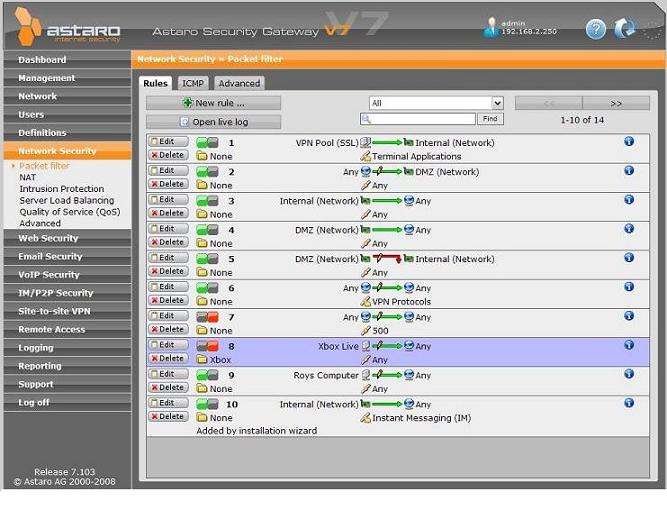
    I have attached a screenshot of my packet filter rules if that helps.

    Thanks in advance.