This discussion has been locked.
You can no longer post new replies to this discussion. If you have a question you can start a new discussion

Update to 7.101 "kills" VM installation

Hi all,

I just made an upgrade from V6 to V7 (running "productive" in VMware for a long time).
The clean installation of V7.100 and the import of the V6 configuration worked like a charm.

As a precise administrator I also wanted to update to the latest available Up2Date version 7.101... which didn´t work :-(

What happens is that after the reboot the interfaces of the VMware are gone! I tried it two times (thanx to "Revert" :-) but without success. So before digging much more deeper I´d like to know if there is someone else out there who has similiar issues with 7.101.


techno.kid


This thread was automatically locked due to age.

Parents
  • So... I´m still stuck on this and found out that after a reboot of a clean ASL 7.100 installation on VMware (Server) the interfaces are not detected as "pcnet32" but "vmxnet" which causes the problem...

    You say this is no ASL issue? You´re probably right and I unfortunately have to troubleshoot VMware now :-)


    techno.kid
Reply
  • So... I´m still stuck on this and found out that after a reboot of a clean ASL 7.100 installation on VMware (Server) the interfaces are not detected as "pcnet32" but "vmxnet" which causes the problem...

    You say this is no ASL issue? You´re probably right and I unfortunately have to troubleshoot VMware now :-)


    techno.kid
Children
  • Are you aware that there are some pre-built VMWare images of ASL?
    They might have the right driver for vmxnet, and I believe they have the VMWare "tools".
    I don't know if there is one for 7.100 or not.

    Barry
  • What version of VMWare are you using (ESX, Server, etc.)?  I have a production environment or 2 that use VMWare Server 1.04, and both update from 7.011 to 7.100 to 7.101 just fine... did you start with the special VMWare image, or build your own?  You should start with the special VMWare images and then apply the up2dates.

    CTO, Convergent Information Security Solutions, LLC

    https://www.convergesecurity.com

    Advice given as posted on this forum does not construe a support relationship or other relationship with Convergent Information Security Solutions, LLC or its subsidiaries.  Use the advice given at your own risk.

  • Hi BarryG and BrucekConvergent,

    I do have the "old" GSX-Server 3.1 running... which worked fine in the past (for ASL 6).
    Like for ASL 6 I did a "clean install" for ASL 7 from the CD (image).

    The odd: after the installation process you have to reboot... which obviously worked in the first place. Meanwhile I isolated the issue as the problem occurs *not* after the update from 7.100 to 7.101 but after updating the pattern... and after a reboot the interfaces are gone.

    Regarding your advice to use the VMware image as a basis: I did not try this because in my environment I do need 4 interfaces an do not know how many there are. Also I´m no friend of "hacking" the ASL to extend the number interfaces afterwards (which was neccessary in former ASL version AFAIR).

    About the VMware-Tools: when I check the startup screen I see that VMware Tools are started... so I assume that they are also in the ASL image.

    However... since I´m the only one that has this issues I have to do some "homework" to find out why it does not work properly :-)


    techno.kid

  • Like for ASL 6 I did a "clean install" for ASL 7 from the CD (image).


    There's your first problem; Astaro does not support using it under VMWare unless you use their VMWare image... backup your config, go download the preconfigured VMWare image from one of Astaro's FTP sites...


    Regarding your advice to use the VMware image as a basis: I did not try this because in my environment I do need 4 interfaces an do not know how many there are. Also I´m no friend of "hacking" the ASL to extend the number interfaces afterwards (which was neccessary in former ASL version AFAIR).


    I've used the new V7 VMWare image under VMWare Server 1.03 and 1.04, and have had good success (when I needed more than 2 NICs) by just specifying the extra ones in the VMWare management app.  The special image automatically adds the additional ones to Webadmin, no "hacking" needed--so you can have your 3 or 4 NICs.

    Good Luck!

    CTO, Convergent Information Security Solutions, LLC

    https://www.convergesecurity.com

    Advice given as posted on this forum does not construe a support relationship or other relationship with Convergent Information Security Solutions, LLC or its subsidiaries.  Use the advice given at your own risk.

  • Hi folks,

    some weeks ago I opened this threat regarding my problem running ASL 7 with VMware.
    There were some good advices... which I unfortunately can not follow because of one major feature of GSX-Server: VMWare Server does not support the snapshot function

    Also I can not 100% agree with  BrucekConvergent that Astaro does not support VMWare - at least in the sense that "support" referres to issues that I have but not technicaly speaking.
    Why I´m in that oppinion? Because the installation works without errors and after the initial (first) reboot ASL comes up and detects the NIC with pcnet32.

    So I´m still stuck in this situation and looking for hints how I can dig deeper to find out why the next boot process of ASL will no more detect the interfaces.

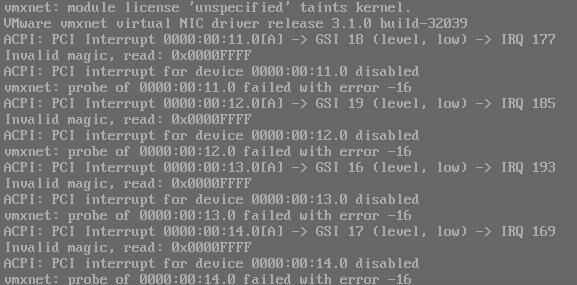
    To give you an idea, here is the interesting dmseg part (as screenshot).

    I appreciate any further hint or direction to look for. Better: one of you who has ASL 7 running on GSX-Server 3.x :-)


    techno.kid