This discussion has been locked.
You can no longer post new replies to this discussion. If you have a question you can start a new discussion

Adding new NIC???

OKay. I just drop in another virtual network card in for a total of 3 network cards in this Astaro VM image. But after rebooting it doesn't appear the OS just auto detected the network card as existing. Is there some Linux command I need to run to have for Linux to scan for any new hardware so astaro can start using what I would consider eth2?

Thanks.


This thread was automatically locked due to age.

Parents
  • You're using VMWare Server, I take it... sounds like you've defined the interface in VMWare itself... make sure you have that adapter associated with a properly configure vmnet ... I haven't had a problem adding adapters to VM images in the past.

    CTO, Convergent Information Security Solutions, LLC

    https://www.convergesecurity.com

    Advice given as posted on this forum does not construe a support relationship or other relationship with Convergent Information Security Solutions, LLC or its subsidiaries.  Use the advice given at your own risk.

Reply
  • You're using VMWare Server, I take it... sounds like you've defined the interface in VMWare itself... make sure you have that adapter associated with a properly configure vmnet ... I haven't had a problem adding adapters to VM images in the past.

    CTO, Convergent Information Security Solutions, LLC

    https://www.convergesecurity.com

    Advice given as posted on this forum does not construe a support relationship or other relationship with Convergent Information Security Solutions, LLC or its subsidiaries.  Use the advice given at your own risk.

Children
  • I added the virtual adapter to the VM. There is still really only one network card in the computer. I just want the VM itself to see the 3rd network card. Under the VMWare settings for this vm I have 3 network cards all in bridge mode. However the newest one isn't displayed on the console for Astaro. I figured I would need to add the interface through the webadmin. However I fear there is some command I will need to type or something while at the console as root to get this darn thing to see the new network card. I don't believe it just "auto detects" like windows does when it boots.

    Any ideas?
  • Oh, you just don't see it in webadmin... have you tried defining a new interface in Webadmin... I bet eth2 shows up in that list...

    CTO, Convergent Information Security Solutions, LLC

    https://www.convergesecurity.com

    Advice given as posted on this forum does not construe a support relationship or other relationship with Convergent Information Security Solutions, LLC or its subsidiaries.  Use the advice given at your own risk.

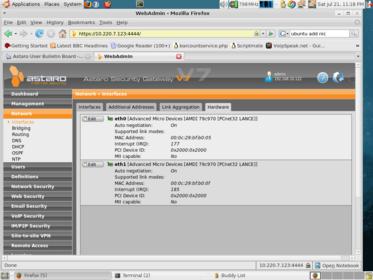
  • Nope its not. I don't think the web admin can see it yet because I don't think the OS under it sees the card yet. I need a way to initialize the card in the linux side.

    Here are the screen shots but I'm pretty sure I'm not missing anything:
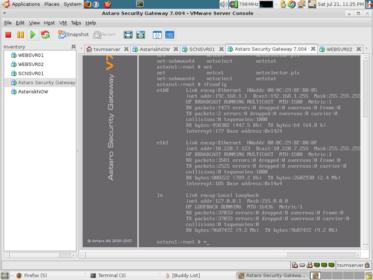
  • From the console, what does ifconfig show?  Also, how about a dump from lspci?

    CTO, Convergent Information Security Solutions, LLC

    https://www.convergesecurity.com

    Advice given as posted on this forum does not construe a support relationship or other relationship with Convergent Information Security Solutions, LLC or its subsidiaries.  Use the advice given at your own risk.

  • What host OS are you running VMware on --- out of curiosity -- I run all mine on OpenSUSE 10.2 ,  don't know that would make a difference.

    CTO, Convergent Information Security Solutions, LLC

    https://www.convergesecurity.com

    Advice given as posted on this forum does not construe a support relationship or other relationship with Convergent Information Security Solutions, LLC or its subsidiaries.  Use the advice given at your own risk.

  • ifconfig doesn't list a eth2. 

    It looks like the lspci shows the 3rd network card. 

    I've attached the contents of the outputted commands.

    Sorry for the screen shots and not the copy and pastes of the console screens. I don't have ssh access to the box where I am at currently so this is straight from the vmware console screens.
  • Don't know why this is... I'll check it out on a test system tomorrow and see what  I get... All our VMWare images (production) are still Version 6.x, because we've had problems migrating the configs to Version  7.005 (a bug that Astaro will have fixed in 7.006).  I'm pretty darn sure that adding a VMWare interface in Version 6 works as expected, can't say that I've actually done the same in Version 7, may be a bug, I'll see if I can reproduce it.

    CTO, Convergent Information Security Solutions, LLC

    https://www.convergesecurity.com

    Advice given as posted on this forum does not construe a support relationship or other relationship with Convergent Information Security Solutions, LLC or its subsidiaries.  Use the advice given at your own risk.

  • The eth has to be aliased in /etc/modules.conf before linux will make use of it.

    This is from my working system with 3 Intel cards in it...

    vpngw:/root # cat /etc/modules.conf
    alias eth0 e100
    alias eth1 e100
    alias eth2 e100
  • That did it!! I added the alias eth2 vmxnet and now the web admin see's the correct nic with the right mac address as eth2.

    THank you very much for all the help! I've been googling for two hours trying to figure this out.

    Thanks