This discussion has been locked.
You can no longer post new replies to this discussion. If you have a question you can start a new discussion

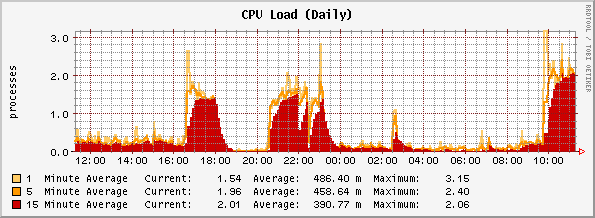
Unstable system, high CPU, middleware restarting constantly

Big problems, and am logging a support case for this as well.  Will advise as the case progresses, but in the meantime, if anyone can shed light on the issue please??

CPU usage is erratic, middleware seems to be restarting or caught in a reload loop.  This causes license daemon (alicd) to reload internal IP routes, so licenses are not collected properly.  Accounting data appears to be affected although this is unconfirmed.

See attached file for CPU graph.

Attached is a portion of the middleware log, basically it loops around and throws errors regarding "not enough arguments" and "no target given".

Attached is a portion of the license log, as you can see it constatly removes and re-adds the internal networks for license capturing purposes.  I suspect this is a symptom, not the cause.

I have found a few articles regarding this sort of problem, and have not been able to get a result using the suggestions:
 - disable HT on CPU
 - reduce iptables by not using groups for source/service/destination
 - reset license count

Box is a P4 2.8GHz HT, Intel 1450 1U server, 80GB SATA, 2GB RAM, DLINK 4-port 10/100 NIC + 2x onboard Intel NIC's.  ASLv6.303 fully patched, clean build.


This thread was automatically locked due to age.

  • OK, Astaro support has sorted this out and they did it really quick, thanks!!

    Issue is config-related (as always [:)] ), indicated by the middleware loop.  Process indicated it was reloading interface information, so an issue with MTU or addressing, netmask, gateway or other interface definition.

    We had the default gateway specified out through an "additional interface", needs to be through a standard interface only.  The WebAdmin lets you do this, but it causes issues.

    We moved the gateway to the standard interface (even though the next hop router is on a different subnet to that actual interface) and the whole things was resolved instantly.

    FYI, we had this setup because of a historical IPSec VPN where the remote peer could not be altered easily - therefore we had to put the old IP on the standard interface when we moved service provider.  I mistakenly believed the gateway definition must be associated with the interface that will be used to contact that gateway.  Turns out you should NEVER put a default gateway on a sub-interface!