This discussion has been locked.
You can no longer post new replies to this discussion. If you have a question you can start a new discussion

[6.303] Very unstable since update, 5 crashes in 24 hours

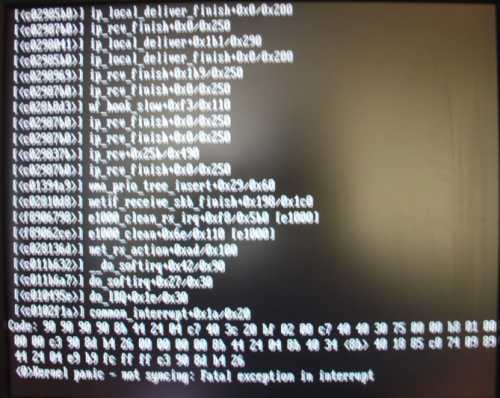
Since updating to 6.303 (not the reloaded one) we have one firewall which has crashed 5 times in the past 24 hours since the update.

I don't have the exact error message (the fw is not next to me so I have to have the message relayed), but the screen will say something like "not synchronizing" and "fatal error".

The machine has 2 e1000 nics, 2 8129 nics and an e100 nic.

Anyone else seeing something like this? I've seen plenty of other problems with 6.303, but nothing quite like this. Out of 5 firewalls running 6.303 (not the reload) this is the only one with problems so far...

In the mean time we are going to try putting a switch between the external nic/router and if that doesn't work luckily we have spare hardware we can load a backup onto.


This thread was automatically locked due to age.

Parents
  • After closer analysis of the logs, it appears to be the PPTP crash problem mentioned in this thread https://community.sophos.com/products/unified-threat-management/astaroorg/f/52/t/25758

    2006:09:15-09:41:48 (none) pptpd[24922]: CTRL: Received PPTP Control Message (type: 15)
    2006:09:15-09:41:48 (none) pptpd[24922]: CTRL: Got a SET LINK INFO packet with standard ACCMs
    2006:09:15-09:41:48 (none) pppd-pptp[24923]: rcvd [LCP TermReq id=0x8 "}\37777777744m\37777777666\000


    That's the last thing I see in the logs, then the thing gets hung.

    So how can I install the new 6.303 so I don't have to swap out hardware and reinstall from scratch?
  • I reinstalled 6.303 and it looks OK now.

    But the kernel did oops when shutting down for the update, see the attachment.
  • You can tell if you are running the reloaded version by looking at the kernel version number.

    Log into the console and run `uname -a`. If the version is 2.6.10-57 you are running the original 6.303. If the version is 2.6.10-58 you are running the reloaded version.

    Example:
    [FONT="Fixedsys"]Linux firewall.example.com 2.6.10-57-smp #1 SMP Mon Sep 4 09:29:26 UTC 2006 i686 i686 i386 GNU/Linux
    Linux firewall.example.com 2.6.10-58-smp #1 SMP Thu Sep 14 16:09:00 UTC 2006 i686 i686 i386 GNU/Linux[/FONT]
  • Just did what was suggested in an esrlier post on this thread and the system behaved in a very similar way to the original upgrade in that it stopped part the way through the reboot cycle and had to be manually rebooted.

    Something that I think has only started since 6.303 was installed is this in the kernel log. It doesn't show up during the build until after 6.303 is installed

    2006:09:16-10:24:30 (none) kernel: HTB init, kernel part version 3.17
    2006:09:16-10:24:30 (none) kernel: HTB: quantum of class 20001 is big. Consider r2q change.
    2006:09:16-10:24:30 (none) kernel: HTB: quantum of class 20008 is big. Consider r2q change.
    2006:09:16-10:24:30 (none) kernel: HTB: quantum of class 20003 is big. Consider r2q change.
    2006:09:16-10:24:30 (none) kernel: HTB: quantum of class 20005 is big. Consider r2q change.
    2006:09:16-10:24:30 (none) kernel: Ingress scheduler: Classifier actions prefered over netfilter

    I am running the 2.6.10-58-default version.
  • When the fw fails to reboot, do you see anything on the console?
  • Yes, it gets as far as checking the drives or disks can't remember which it is in blue.
    System stopped about an hour ago, stopped processing anything using the virus/proxies. I couldn't logon via the console to find out what is happening.

    Rebooted, looked in the logs and the only thing I can find is this in up2date report that might be relevant. I have the full set of virus/spam updates active (paid for).

    2006:09:16-12:32:45 (none) pattern_install[8746]: Pattern Up2Date failed: Kaspersky Virus Protection Pattern chroot is missing
    2006:09:16-12:32:45 (none) pattern_install[8746]: Pattern Up2Date: type='', status='failed'
    2006:09:16-12:32:46 (none) pattern_install[8746]: Pattern Up2Date exiting: 

    2 of my eth cards are e1000.

    This time I have root logged on running "top" to see if I can catch what ever it is.

    Looks like tomorows job is re-build it back to 6.302

    Ian M
  • Sounds like your system is seriously borked.
  • That is after a fresh install from 6.300 iso and add each update. The current install is only a day old. This has only happened since 6.303 was installed.

    Looks like the cure is worse than the disease.

    Ian M
  • I checked using the "uname -a" command.. I am running the 2.6.10-57-default version. Is there any way to upgrade to the 2.6.10-58 version without doing a reinstall and repatch?
  • Log into the console, edit (via vi) the /etc/version file.. set it back to 6.302.  Re-run the System Up2Date prefetch via Webadmin, then install.

    CTO, Convergent Information Security Solutions, LLC

    https://www.convergesecurity.com

    Advice given as posted on this forum does not construe a support relationship or other relationship with Convergent Information Security Solutions, LLC or its subsidiaries.  Use the advice given at your own risk.

  • I don't know what has been going on with Astaro lately but their recent patches have been very shoddy.  This is very unfortunate as their products are promising.
  • Log into the console, edit (via vi) the /etc/version file.. set it back to 6.302.  Re-run the System Up2Date prefetch via Webadmin, then install.
    Thank you. I have followed your advice (except that I used joe to edit the /etc/version script), and I was then able to retrieve and install the updated version of the 6.303 patch. Hopefully, our office firewall will now be stable again.

    Prior to repatching it, we have had a total of nine firewall crashes these last few days. Each time the Astaro console would display the message Kernel panic - not syncing: Fatal exception in interrupt.
Reply
  • Log into the console, edit (via vi) the /etc/version file.. set it back to 6.302.  Re-run the System Up2Date prefetch via Webadmin, then install.
    Thank you. I have followed your advice (except that I used joe to edit the /etc/version script), and I was then able to retrieve and install the updated version of the 6.303 patch. Hopefully, our office firewall will now be stable again.

    Prior to repatching it, we have had a total of nine firewall crashes these last few days. Each time the Astaro console would display the message Kernel panic - not syncing: Fatal exception in interrupt.
Children
  • No problem.. we didn't see anyone with the crash issue on the customer units we updated, or our lab units.. but I did update the few that got the "older" 6.303 update in the same manner as I described for you.  By any chance did you start a ticket with Astaro?  I sure would be interested in what they had to say about your crashes.

    CTO, Convergent Information Security Solutions, LLC

    https://www.convergesecurity.com

    Advice given as posted on this forum does not construe a support relationship or other relationship with Convergent Information Security Solutions, LLC or its subsidiaries.  Use the advice given at your own risk.

  • No, I haven't opened a support ticket on this issue. However, if installing the new 6.303 patch on top of the old one as we did today, doesn't solve this problem, I will talk to support.

    I also run ASG ver 6.3 on a much older and slower machine at home. That one received the updated 6.303 patch, and I have not had any problems with it afterwards.
  • Yep, look at the picture I attached to post #3 in this thread, exactly the same as me.

    I have one machine that is running the old 6.303, which isn't crashing, but it's not doing any PPTP connections. It does seem to get "stuck" once a day or so and stop moving packets for a few minutes, we are still trying to schedule the 6.303 reload. Nothing in the logs.

    We've had problems with 2 machines getting stuck when booting up 6.303 and never come back online, one with the old 6.303 one with the new 6.303.
  • Will someone open a ticket for this?  A few of my boxes with the recent 6.303 are starting to hang a lot.
  • Already did last week. The suggested fix is in this thread. No more hangs after applying the latest update.
  • Follow up.

    The Astaro firewall machine in our office has now been running flawlessly for three days since we updated the 6.303 patch to the new version.
  • Just curious.. those of you who had a "hang" issue before the "final" 6.303 update.. did you have PPTP Server enabled?

    CTO, Convergent Information Security Solutions, LLC

    https://www.convergesecurity.com

    Advice given as posted on this forum does not construe a support relationship or other relationship with Convergent Information Security Solutions, LLC or its subsidiaries.  Use the advice given at your own risk.

  • Yes. Was actively using PPTP connections. Have one running the original 6.303 which seems to be mostly stable but not using PPTP on it.
  • I figured the PPTP thing was the issue.. that is a kernel change that they made to "fix" some connect issues... explains why none of my customer's units had an issue with the old 6.303 --- I don't use PPTP, only IPSEC.

    CTO, Convergent Information Security Solutions, LLC

    https://www.convergesecurity.com

    Advice given as posted on this forum does not construe a support relationship or other relationship with Convergent Information Security Solutions, LLC or its subsidiaries.  Use the advice given at your own risk.

  • Just curious.. those of you who had a "hang" issue before the "final" 6.303 update.. did you have PPTP Server enabled?
    Yes. We have a number of sales people who run the Microsoft Outlook email client over a PPTP VPN connection. I suspect it was the VPN connections that triggered the random crashes. With the original (bad) version of the 6.303 patch, the firewall kept running all of last weekend. But it started crashing early Monday morning, which is when the sales people started checking their email.