This discussion has been locked.
You can no longer post new replies to this discussion. If you have a question you can start a new discussion

Wireless Access Point

I have a music media server which I am hooking up to my network.  It works perfect with the wired network but I am having problems with the wireless side of it.

I have a 3COM Wireless AP which I had hooked up to my previous firewall and it worked fine but cannot get it to work with ASL 5.  I have read the documentation and can only fnd the section on Wireless LAN which talks about the PCMCIA Card wireless.  I can use the 3COM Discovery application and it finds the AP and give me the IP address but when I use IE and enter the IP address I get nothing and should be getting the 3COM admin screen.

I have several NIC cards installed in my ASL box which I can use to plug in the AP point but do not know the rest oh how to configure ASL to work with the AP.  Any help or links would be appreciated as I would like to move the Squeezebox into another room and use the wireless downstairs.


Thanks in advance


This thread was automatically locked due to age.

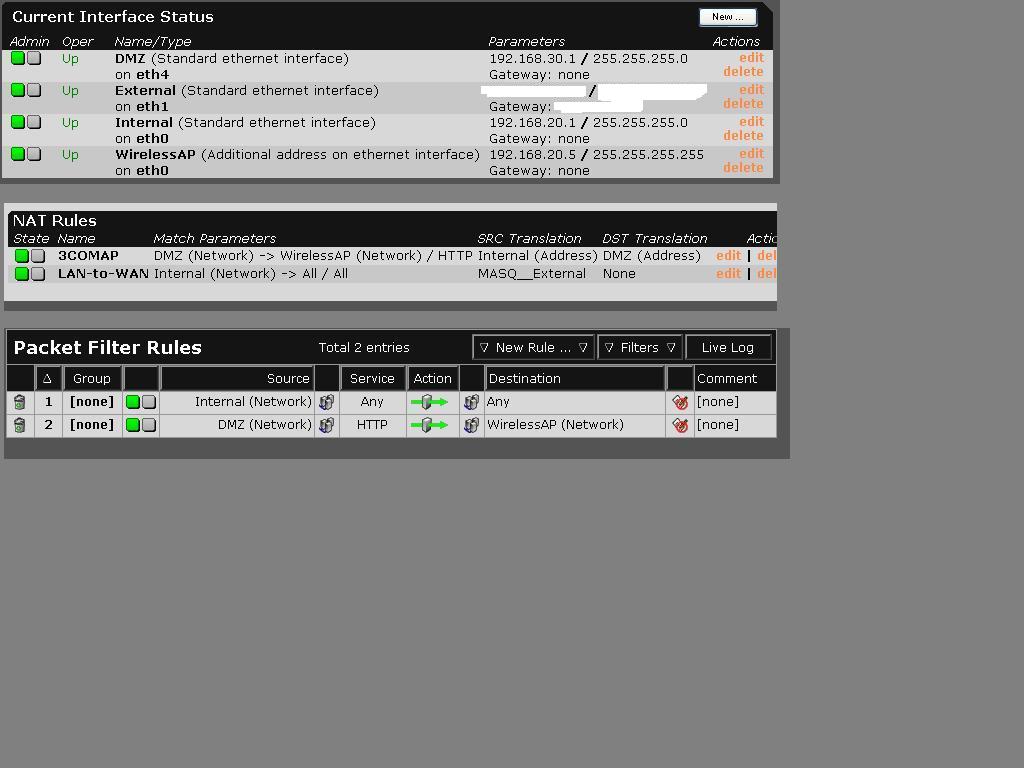
  • I have taken a shot at the binding, DNAT and packet filter.  I am pretty sure that I did something wrong as I still cannot get to the files on the server computer.  I am getting a valid IP address from the AP and a connection is made.  I am using a crossover cable on the DMZ NIC to the AP.

    I think that about all that I may have gotten right is the IP binding if that.  Anyway, if you would please take a look and give me some direction on what is incorrect I would appreciate it.


    Thanks
  • Either add a seperate NIC for the wireless access point, or get rid of that additional address on the Internal interface...

    Giving it a network number that's different might also get it to work, but having such a configuration would be meaningless from a security standpoint. If you're going to seperate the networks, they have to be on separate NICs and wires...

    Or is the Internal interface dedicated for WAP use?
    If it is, just define the Class C network on the NIC and set the WAP as the NIC's gateway.

    The additional interface trick would only be used if you were constrained to supporting two sets of network addresses on one interface; but that is not the case here. We can program the WAP as we see fit; and we're going to choose a simpler network topology that reflects what you are actually doing.

    If other machines that don't go through the WAP are on the Internal network, there is no real firewalling going on between them in the configuration you lay out there.

    And by using an overlapping network number on different virtual interfaces, the routing kernel does not know which one to use (that 255.255.255.255 for the WAP Virtual interface address also exists on the Internal virtual interface). Interfaces should have mutually exclusive network numbers on Astaro (and that goes for Virtuial Interfaces too...).

  • The Access Point is on its own dedicated NIC card with an address of 192.168.30.1 and is connected straight to the ASL box NIC card using a cross over cable.

    The internal network is also on its own NIC card and is 192.168.20.1 and is connected to my internal lan.

    The external interface is connected to the WAN.

    The Access Point has two purposes.  The main one is to connect my SlimDevices media server via wireless so that the SlimDevices media server can access another computer on the 192.168.20.1 internal network to stream out my music.  The other purpose would be to allow access of my work laptop so that I can use it and the SlimDevice media server anywhere in the house.  

    If I had added an internal PCMCIA wireless card that is on the ASL hardware list would I still have these problems?

    I am getting more confused as what do do.
  • Relax!

    Why is "WirelessAP" showing on eth0, the same physical interface as "Internal"?

    Shouldn't "WirelessAP" be on its own interface, like eth3??
  • If you read the message about 5 up from VelvetFog this was to be a solution so that I could access the AP admin screen.  For some reason being on 192.168.20.1 I could not access the AP on the 192.168.30.1 network by starting IE and typing in the AP IP Address.

    This was just an additional IP address to the internal NIC per the referenced message.  The AP is on its own NIC.
  • The access point is on its own NIC card.  If you look up about 5 messages this was a fix recommended by VelvetFog on how to access the AP Admin screen.  I was having problems since the internal LAN is 192.168.20.1 and the AP is on 192.168.30.1.

    The AP is actuall hooked into the interface with a name of DMZ.
  • I don't know if that's what he meant you to do, but that configuration is not going to work.
    Delete the additional interface on Internal.

    Is the WAP hooked up to interface "DMZ"?
    What is its current IP and netmask?

    Get rid of the 3COMAP NAT rule for now.
  • Ok, I have deleted the WirelessAP interface and deleted the packet filter and DNAT rule.  All that I have now is the DMZ interface where the AP is connected to.

    The DMZ  interface is 192.168.30.1 with a netmask of 255.255.255.0

    The actual AP has a static IP of 192.168.30.10 and a netmask of 255.255.255.0
  • And I presume:
    • The Internal to Any rule is still in place
    • The WAP uses HTTP and not HTTPS
    • The AP's gateway is set to 192.168.30.1
    • The Internal machine you are trying to access the AP from also has its gateway set to 192.168.20.1
    • You understand that a "crossover cable" is not just any type of network cable, but is specially wired for NIC to NIC connections (as opposed to NIC to hub or switch...)
    [/list]
    If all ICMP options are enabled on Astaro, can you ping the AP from that PC on Internal whose gateway is set to Astaro?
    Can you browse to the AP from that machine in Internal??
  • And to simplify matters, you have disabled the HTTP proxy for now...