This discussion has been locked.
You can no longer post new replies to this discussion. If you have a question you can start a new discussion

connect: No buffer space available

Hi,

I just the following error on the firewall:
[ QUOTE ]
 loginuser@gate:/home/login > su -
Password:
gate:/root # ping 172.16.2.1
connect: No buffer space available 

[/ QUOTE ] 

This is from the kernel log and repeats several times until the point where the system was restarted:
[ QUOTE ]
2004:10:05-10:52:49 gate kernel: Neighbour table overflow.
2004:10:05-10:52:49 gate kernel: MASQUERADE: No route: Rusty's brain broke! 

[/ QUOTE ] 

Even though today is the first time I noticed these error messages, the problem is quite old. What usually happens is that after the fw has been up for one week (+/- a day or two), its connectivity rapidly degrades, i.e. the latency increases/throughput decreases up to the point that there's no outside connectivity at all any more. Finally I'm even unable to log in via WebAdmin/ssh. Only a reboot or restarting the MiddleWare seems to help.

Currently it's running on 5.023, but the problems have started quite some time and several versions ago. 

This is the current configuration:
Intel Celeron 1200MHz, 256MB RAM
NIC1: D-Link DFE-580 (D-Link System Inc DL10050 Sundance Ethernet is what /proc/pci says)
NIC2: RealTek RTL-8139

The box has 5 interfaces, 4 of them being on the D-Link card.
It's doing some NAT (Masquerading as well as SNAT and DNAT), packet filtering and some IPsec Roadwarrior connections (~1 per day).
Proxies: DNS, Socks, SMTP (SMTP only running since a few days). Nothing spectacular at all.

I think it's understandable that a firewall that needs a reboot once a week is not really what I'd expect from it. Can anybody help please?

Thanks,
Sascha


This thread was automatically locked due to age.

Parents
  • Your Realtek 8139 ethernet adaptor is not a supported card under Astaro 5.0+.  The chart on the HCL is 'e' which is 'expected to work but not tested'.

    Change your adaptor to a supported and tested one, see if the problem goes away.
Reply
  • Your Realtek 8139 ethernet adaptor is not a supported card under Astaro 5.0+.  The chart on the HCL is 'e' which is 'expected to work but not tested'.

    Change your adaptor to a supported and tested one, see if the problem goes away.
Children
  • [ QUOTE ]
    Your Realtek 8139 ethernet adaptor is not a supported card under Astaro 5.0+.  The chart on the HCL is 'e' which is 'expected to work but not tested'.

    Change your adaptor to a supported and tested one, see if the problem goes away. 

    [/ QUOTE ]
    Thanks, this is what I will do next, but I have a feeling that this is a high-level software problem that is not directly related to the NIC. But trying it is better than doing nothing.   

    Sascha

    PS: There are two other RTL 8139 cards that are supported, so why should another one cause problems?
  • Why shouldn't the RTL8039 be supported by ASL V5.x?
    It's one of the most popular NIC-Chips at the moment.
  • Hi,

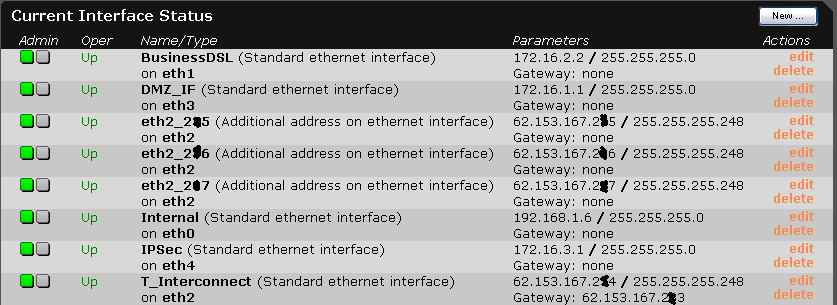
    could you please post the size of the subnetz of your interfaces? A screenshot of the Webadmin menu Network->Interfaces would be great.

    cheers
    Xeno
  • Sure. Here ya go.

    So, it may be possible that the subnets are too large? I thought this wouldn't matter as long as nobody tries to contact any non-existing hosts in those subnets. I've been running tcpdump to verify that and it came out negative. 

    I also didn't think that 4*255 + 1*8 possible addresses might be too much for a single box to handle, but I don't have any experience with that...

    However, some of those subnets can be reduced to just a few hosts. They have been set like this just for convenience. I will try if reducing them helps. Thanks for the hint.

    Sascha
  • 4*255 is not much. The magic number is 2000. If there are subnets bigger than 2000 possible address there might be problems at the moment somebody portscans your network. Assume you have public IPs behind ASL.

    So questions are:
    1) Do you have only Class-C Networks? Maybe there is a Class B Network. 
    2) Are there portscans or any other kind of traffic which could create more than 2000 arp requests?
    3) Do you have public IPs behind ASL?

    Xeno
  • 1) Do you have only Class-C Networks? Maybe there is a Class B Network. 
    No. I double checked that.

    2) Are there portscans or any other kind of traffic which could create more than 2000 arp requests?
    I don't think so. 

    3) Do you have public IPs behind ASL?
    No. ASL takes all of the public IPs itself and forwards some of them to machines in the 172.16.1.0 subnet via SNAT/DNAT.

    As I said, I'll cut the subnets down a bit. Since the problem usually happens at least once every other week, I'll post the results then. I'm not too optimistic though [:(]

    Is there any way to monitor the amount of used arp entries? The output of 'cat /proc/net/arp' and 'route -C' as someone else suggested doesn't show anything out of the ordinary, even if the machine is kinda dead and only accessible through the console.

    Thanks,
    Sascha