This discussion has been locked.
You can no longer post new replies to this discussion. If you have a question you can start a new discussion

Rebuild UTM - confirm steps

Am newbie with Sophos UTM Home Edition (9.7) that spent 2-3 weeks fighting through intermittent problems setting up the unit because, it turns out, I have bad RAM. Have fixed that and things have stabilized in general. I'm still having a few problems that may well be rookie issues but I also wonder if there might have been permanent corruption so am thinking of taking a backup, reinstalling the restoring the backup.

A couple of questions:

1. Is it fair/accurate to think there's been some hidden corruption from past bad RAM? 

2. Will the following process work for this:

i) use webadmin to do factory reset

ii). take a USB drive and "write the backup file to the root of a USB stick and rename it to 'restore.abf'. Plug the USB pen drive into the UTM and reboot it to automatically restore the config to the UTM." taken from this support page

Or am I better for step i) to do a reinstall from original boot CD I created instead? (will the unit boot from CD first automatically?)

3. Anything missing?

4. Will this remove any corruption?

Anh info would be appreciated


This thread was automatically locked due to age.

Top Replies

  • For me, a catastrophe was when even after fixing the issue the UTM, would not boot up, wipe it, it returned with a reboot of the UTM, like in 9.6, and again for me in 9.7 (which was a NIC driver incompatibility with UTM that's been a problem for years).  It would be to the point where functionality of the device is severely hindered or just not working correctly/at all.

    If you feel you need to clean up, the factory reset is the way to go.  It will clear out:

    • System configuration
    • Web Filter cache
    • Logs and reporting data
    • Databases
    • Update packages
    • Licenses
    • Passwords
    • High availability status

    Factory reset will be just like when you got the system loaded and were in the UTM for the first time, and it will shut down.  It should be the original configuration as you set it up when you filled in the information when loading from CD/USB the first time, so your ports would be back to that original config.  Once you do restore from your backup.abf file, your configuration will reload the UTM with your set up information and how you had your setup, but things that you edit with SSH may not be part of that backup, like any special SSH commands you ran to modify the UTM (if it even applies, most likely not).

    Jump to answer
Parents
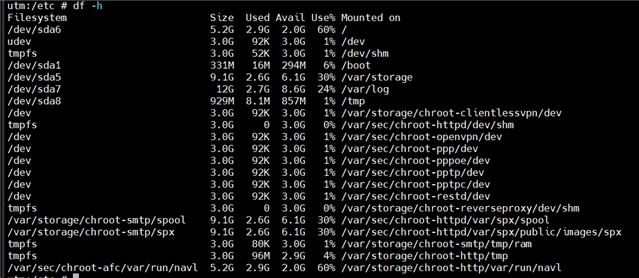
  • I just went through this myself a few weeks ago.  I didn't have any issue or corruption with the old system. I had allocated too much space 3 years ago and was now moving all my vm's to a ssd so needed to consolidate.  Turns out 250GB is way too much. 35GB is plenty.

    This is the partition sizing on the new system

    Several keys items needed to be saved.

    1) Logs for the past year
    2) Reporting database
    3) Config file backups (all of them if possible)
    4) Wpasupplicant data (required for att fiber gateway bypass)

    1) Log archives were saved then restored using tar command in the old/new installations.

    2) See post by @DavidRocha in this thread    . There's a few steps omitted, but if one has some basic knowledge, the provided info lays a good ground work on the process.

    3) See this post -    .  Similar to #1, I did a tar on the old then extracted to the new. More information about backups here -   .

    4) Tar again.  I simply backed up the entire folder containing scripts and certs, then restored on the new.  Given this is triggered by a cronjob at /etc/crontab-static I had to duplicate it on the new system.  *** this is not part of a normal config, only for those doing a gateway bypass on att/fiber configurations (  ).

    Depending how complicated the previous config was, I'd probably start over from scratch entirely. There's no telling what got corrupted in the configuration which was then carried over to the config file. I have mine set to generate and email a config backup file weekly. Now that there's a nas involved, I will set up some sort of cron job (with commands from #3) to create one daily on the nas.  It's cheap insurance for when trouble strikes.

  •  Jay,i already backed up the entire folder containing scripts. certs and employee monitoring software reports  

Reply Children
No Data