This discussion has been locked.
You can no longer post new replies to this discussion. If you have a question you can start a new discussion

Exchange Push (iphone etc..)

Hallo,

frage mich derzeit wie es wol mit der Astaro zu realisieren ist. einen NAT Forward von https scheint keine Wirkung zu haben. 

Hat jemand von euch das schon konfiguriert ? 


lieben gruß 

MM


This thread was automatically locked due to age.

Parents Reply Children
  • Wenn man SSL VPN nicht hat dann sollte das mit DNAT klappen.  Hast du einen PF Regel eingelegt?  'Any' -> [HTTP & HTTPS] -> [Exchange Server] : 'Allow'

    [Sorry, have to switch back to English ... brain not writing in German.]

    There are several settings on the Exchange server that are important.  First, I don't know if Exchange 2007 works yet with the iPhone.  In Active Directory, each user must have 'Outlook Mobile Access' enabled and perhaps 'Allow access' on the 'Dial-in' tab.  If the "Routing and Remote Access" service is not installed and running, push won't work.

    mfG - Bob
     
    Sophos UTM Community Moderator
    Sophos Certified Architect - UTM
    Sophos Certified Engineer - XG
    Gold Solution Partner since 2005
    MediaSoft, Inc. USA
  • Wenn man SSL VPN nicht hat dann sollte das mit DNAT klappen.  Hast du einen PF Regel eingelegt?  'Any' -> [HTTP & HTTPS] -> [Exchange Server] : 'Allow'

    [Sorry, have to switch back to English ... brain not writing in German.]

    There are several settings on the Exchange server that are important.  First, I don't know if Exchange 2007 works yet with the iPhone.  In Active Directory, each user must have 'Outlook Mobile Access' enabled and perhaps 'Allow access' on the 'Dial-in' tab.  If the "Routing and Remote Access" service is not installed and running, push won't work.

    mfG - Bob


    Hi its okay in english, we are talking about exchange 2003. Before the astero i use a Zywall 2 with NAT https -> exchange and it Works fine. 

    Now it isn't working with this https forwarding. 

    lg

    mm
  • Vielleicht sollte man zuerst schauen ob das https für normales owa funktioniert.
    Existiert für den Exchange Server ein "richtiges/gültiges" Zertifikat ?

    Gregor Kemter
  • Vielleicht sollte man zuerst schauen ob das https für normales owa funktioniert.
    Existiert für den Exchange Server ein "richtiges/gültiges" Zertifikat ?

    Gregor Kemter


    ist ein selbst signiertes Zertifikat.

    auf OWA komme ich auch mit https redireckt nicht drauf. 


    lg
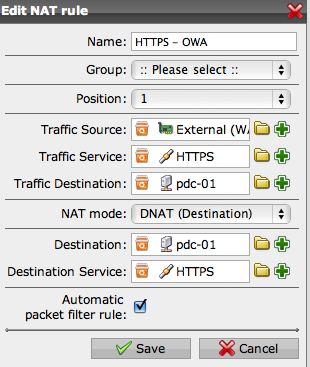
  • Ich hänge mal ein Bild mit an, I attache a image,
  • Du brauchst nicht auf Englisch für mich, aber danke für die Rücksichtnahme!  Es ist dass jetzt, wenn ich Englisch ausschalte, Französisch springt vor.

    I suggest that you don't use automatic packet filter rule and that you leave the translated service empty.  Use the Packet filter rule I suggested.  If it all worked before with the Zywall, then this will fix the problem.

    mfG - Bob
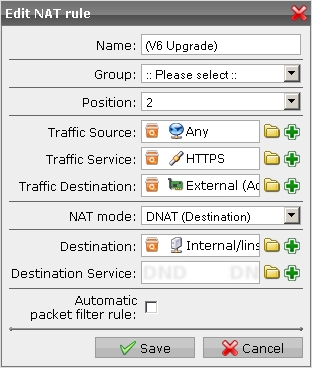
    PS You also need the corrected DNAT shown by ralix below.  I apologize for not looking closely at the image the first time.  The pic below from ralix is exactly as I described in the post I linked to on the first page.  Vielen Dank, ralix!
     
    Sophos UTM Community Moderator
    Sophos Certified Architect - UTM
    Sophos Certified Engineer - XG
    Gold Solution Partner since 2005
    MediaSoft, Inc. USA
  • Also ich habe intern noch einen Webserver laufen, der von extern über HTTPS erreichbar ist, funktioniert einwandfrei. 

    Ob du ein selbst-signiertes Zertifikat hast oder beispielsweise ein von CAcert.org signiertes spielt keine Rolle. 

    Deine Regel sieht mir allerdings eher nach einer Regel für den Packet Filter aus als nach einer NAT Regel. Die Traffic Destination und die NAT Destination sollten eigentlich unterschiedlich sein, das ist doch der Sinn von NAT - du willst das eigentliche Ziel umbiegen. Meine Konfiguration sieht daher auch etwas anders aus
  • Hi zusammen,

    Die dNat von mmorsdorf ist nich korrekt, Sie müsste ausschauen wie die von ralix sprich:
    Traffic Source: Any
    Traffic Service: HTTPS
    Traffic Destination: External Address oder Additional IP Address auf External (Wenn mehrere IP's)
    NAT mode: dNAT
    Destination: pdc01
    Destination Service: kann leer bleiben
    Automatic packet filter rule: On

    Falls du ein selbstsigniertes Cert hast, dann muss dieses noch auf das Iphone inst. werden.
    Falls du ein Cert von einem Trustcenter hast (Verisign ect.) dann wird dies nicht benötigt.
    Dies hat aber nichts mit dem dNAt zu tun, sondern lediglich mit Iphone -> Exchange.
    Du kannst die dNat testen, in dem du mittels https://ExterneIP/Microsoft-Server-ActiveSync eine Verbindung aufbaust im Browser, kommt dann das Authentifikation Fenster passt die dNat.

    Grüsse
    Beat
  • Nun funktioniert es danke
  • Cool.  We win!
     
    Sophos UTM Community Moderator
    Sophos Certified Architect - UTM
    Sophos Certified Engineer - XG
    Gold Solution Partner since 2005
    MediaSoft, Inc. USA