

Hi,
an I have some information regarding how exactly it is working and can I have some example of it?
how can I set filter?
\.172.\.10\.10\.1
0r
how?
Regards
This thread was automatically locked due to age.

Hi Nick KEY If you are referring XG Live Log Viewer filter then the below option will help to add a filter as per your requirements. If below not the one which you are referring in your query then please share more info with snapshot where you are trying to search above details.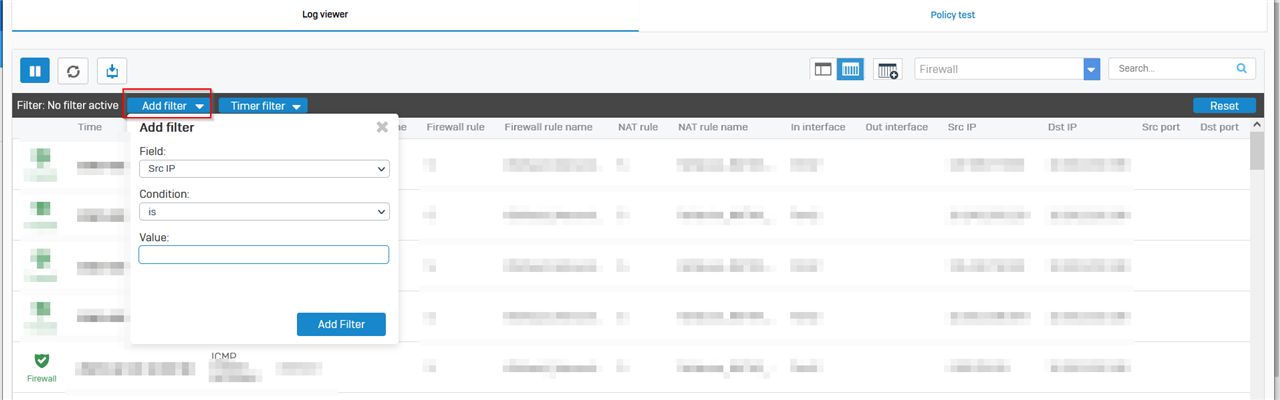
Hi Nick KEY If you are referring XG Live Log Viewer filter then the below option will help to add a filter as per your requirements. If below not the one which you are referring in your query then please share more info with snapshot where you are trying to search above details.
Regards,
Vishal Ranpariya
Technical Account Manager | Sophos Technical Support
Sophos Support Videos | Knowledge Base | @SophosSupport | Sign up for SMS Alerts |
If a post solves your question use the 'This helped me' link.

Hey Nick KEY ,
You can use the following key string to search: dstport="8472"
ref screenshot below:
Also moved the thread to the correct forum i.e. UTM Firewall !
Thanks & Regards,
_______________________________________________________________
Vivek Jagad | Team Lead, Global Support & Services

Sophos Community | Product Documentation | Sophos Techvids | SMS
If a post solves your question please use the 'Verify Answer' button.
Hey Nick KEY ,
For IP address there are following strings:
1.) srcip="X.X.X.X"
2.) dstip="X.X.X.X"
Thanks & Regards,
_______________________________________________________________
Vivek Jagad | Team Lead, Global Support & Services
Sophos Community | Product Documentation | Sophos Techvids | SMS
If a post solves your question please use the 'Verify Answer' button.
Yes that's correct Nick KEY
Thanks & Regards,
_______________________________________________________________
Vivek Jagad | Team Lead, Global Support & Services
Sophos Community | Product Documentation | Sophos Techvids | SMS
If a post solves your question please use the 'Verify Answer' button.
you'll be identify only the packets dropped and accepted ! so see if the destination port/ip packets are accepted or dropped ?
Thanks & Regards,
_______________________________________________________________
Vivek Jagad | Team Lead, Global Support & Services
Sophos Community | Product Documentation | Sophos Techvids | SMS
If a post solves your question please use the 'Verify Answer' button.

Yes I want to know which ports is dropped from 172.10.10.1 to 20.20.100.12
I put on the filtering following
srcip="172.10.10.1" and try to connect
It show me now
UDP 172.10.10.1:500--->20.20.100.12:500
TCP 172.10.10.1:49688--->20.20.100.12:6501
UDP 172.10.10.1:49689--->20.20.100.12:6502
TCP 172.10.10.1:49690--->20.20.100.12:6502
What should I now define as services???
Yes I want to know which ports is dropped from 172.10.10.1 to 20.20.100.12
I put on the filtering following
srcip="172.10.10.1" and try to connect
It show me now
UDP 172.10.10.1:500--->20.20.100.12:500
TCP 172.10.10.1:49688--->20.20.100.12:6501
UDP 172.10.10.1:49689--->20.20.100.12:6502
TCP 172.10.10.1:49690--->20.20.100.12:6502
What should I now define as services???
In that case I'd suggest, open a putty session > login with the root
under the cd /var/log directory and execute the following cmd:
#cat /var/log/packetfilter.log | grep <srcip=x.x.x.x> | grep <dstip=xxxx>
Thanks & Regards,
_______________________________________________________________
Vivek Jagad | Team Lead, Global Support & Services
Sophos Community | Product Documentation | Sophos Techvids | SMS
If a post solves your question please use the 'Verify Answer' button.
I put on the filtering following
srcip="172.10.10.1" and try to connect
It show me now
UDP 172.10.10.1:500--->20.20.100.12:500
TCP 172.10.10.1:49688--->20.20.100.12:6501
UDP 172.10.10.1:49689--->20.20.100.12:6502
TCP 172.10.10.1:49690--->20.20.100.12:6502
What should I now define as services???
Alright so in the following example:
TCP 172.10.10.1:500--->20.20.100.12:500
this is your srcip - 172.10.10.1 | srcport - 49688 | dstip - 20.20.100.12 | dstport - 6501
services are 49688 & 6501
now try to filter out the service/ip you are looking for !
Thanks & Regards,
_______________________________________________________________
Vivek Jagad | Team Lead, Global Support & Services
Sophos Community | Product Documentation | Sophos Techvids | SMS
If a post solves your question please use the 'Verify Answer' button.
can I create a service from 48000:49999?
Yes, you can > under the Definitions & users > Service definitions
UDP Port 500 service is used for IPsec
TCP Port 6501/6502 are used for endpoint communication.
https://www.auditmypc.com/tcp-port-6501.asp
https://www.auditmypc.com/tcp-port-6502.asp
Thanks & Regards,
_______________________________________________________________
Vivek Jagad | Team Lead, Global Support & Services
Sophos Community | Product Documentation | Sophos Techvids | SMS
If a post solves your question please use the 'Verify Answer' button.
if the packets are dropped, then no need to create it !
by default any service which is not explicitly allowed in the firewall rules, will be dropped Nick KEY
Thanks & Regards,
_______________________________________________________________
Vivek Jagad | Team Lead, Global Support & Services
Sophos Community | Product Documentation | Sophos Techvids | SMS
If a post solves your question please use the 'Verify Answer' button.
Yes you can !
Thanks & Regards,
_______________________________________________________________
Vivek Jagad | Team Lead, Global Support & Services
Sophos Community | Product Documentation | Sophos Techvids | SMS
If a post solves your question please use the 'Verify Answer' button.

