This discussion has been locked.
You can no longer post new replies to this discussion. If you have a question you can start a new discussion

High httpproxy memory usage with 9.713 and 9.714

Hello,

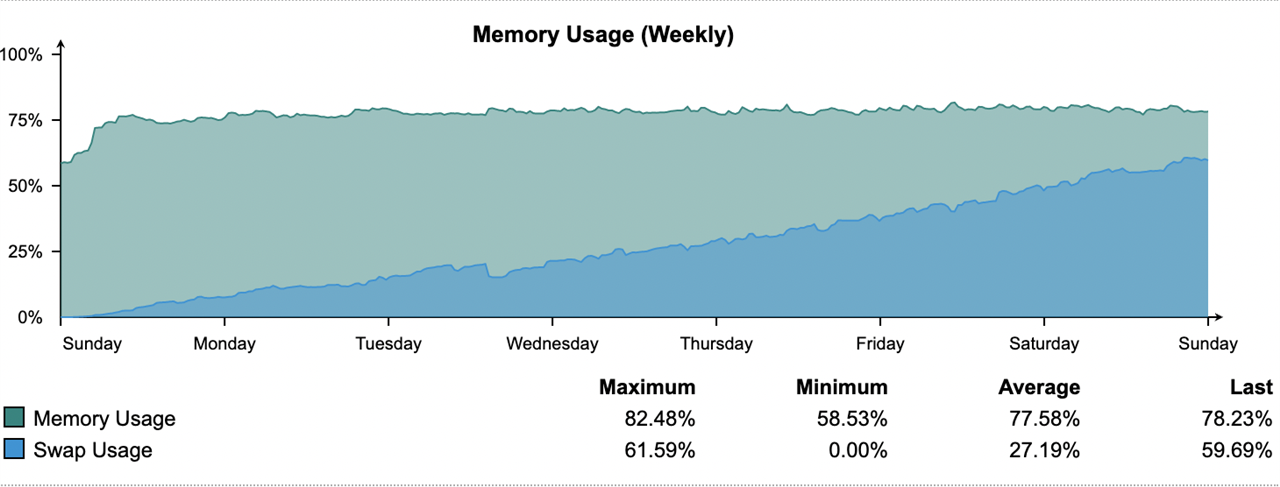
I have a pair of virtual UTMs which have run for years with about 4G of RAM allocated to them. After the upgrade from 9.712 to 9.713 in Nov I noticed my swap usage climbing beyond its normal 10-15% level. The culprit was the httpproxy proces so I added about 1/2G to the VMs which returned the swap usage to about 15%. This past week I updated to 9.714 and observed the httpproxy process growing much larger driving swap usage into the 60% range.

The two systems run with almost identical configurations which change very little over time. Our usage patterns have not changed much either. I have not noticed anything in the release notes suggesting a significant change that should require more memory, so my suspicion at this point is that the httpproxy process has a memory leak.

The graph below shows 9.714 after a restart last week. Here is the current httpproxy memory/swap usage:

  PID USER      PR  NI  VIRT  RES  SHR S   %CPU %MEM    TIME+  SWAP COMMAND                                                                                                      
 4776 httpprox  20   0 6202m 1.6g 3996 S      1 38.4  46:09.01 4.4g httpproxy
                                                                                                     

--Larry


This thread was automatically locked due to age.

Top Replies

  • in reply to Jay Jay +1 suggested

    Yep, I noticed that as well. It looks like a memory leak & thus part of why I started this thread.

    In my case, adding memory isn't really a good option, so I've added the following work-around to restart the process once it grows past 3GB:

    Add to /etc/crontab-static:

    # Kill httpproxy when it grows too large

    03 * * * * root mem=`ps ax -o vsz,cmd|grep -v grep|grep httpproxy|awk '{print $1}'`;if [[ $mem -ge $((3*1024*1024)) ]];then kill `ps ax -o pid,cmd|grep -v grep|grep httpproxy|awk '{print $1}'`; fi

    The process is restarted once the system notices that it's missing, which happens fairly quickly.

    To get the changes added to the running crontab, make a change in the UI. For example, Management / Up2Date / Configuration / Pattern download interval

    --Larry

    Jump to answer
Parents
  • I'm still on 9.710. After ~ 13.5 days, here's my stats

    UTM vm has 8GB of ram assigned.  Seems about inline with your 4.5GB assignment; 64bit mode enabled as well.

    I bumped the ram up to 16GB (from 8GB), so we'll see what it looks like after a week or two of usage.

  • Just keep in mind the version difference, as things changed in 9.713. That may be an associated thing.

    Edit:  I should mention that it's not a 64-bit install that changed, it's 64-bit mode for what I mentioned above.  Not the same as bit version installed.  ;)

    XG 19.5 GA 64-bit | Intel Xeon 4-core v3 1225 3.20Ghz
    16GB Memory | 500GB SSD HDD | GB Ethernet x5

Reply
  • Just keep in mind the version difference, as things changed in 9.713. That may be an associated thing.

    Edit:  I should mention that it's not a 64-bit install that changed, it's 64-bit mode for what I mentioned above.  Not the same as bit version installed.  ;)

    XG 19.5 GA 64-bit | Intel Xeon 4-core v3 1225 3.20Ghz
    16GB Memory | 500GB SSD HDD | GB Ethernet x5

Children
No Data