This discussion has been locked.
You can no longer post new replies to this discussion. If you have a question you can start a new discussion

Virtual MAC on Interface changes back on HA Mode

Hi!

I am currently operating two Sophos UTM behind a router which is running great.

For redundancy reasons I now want to add another pair to operate in HA mode.

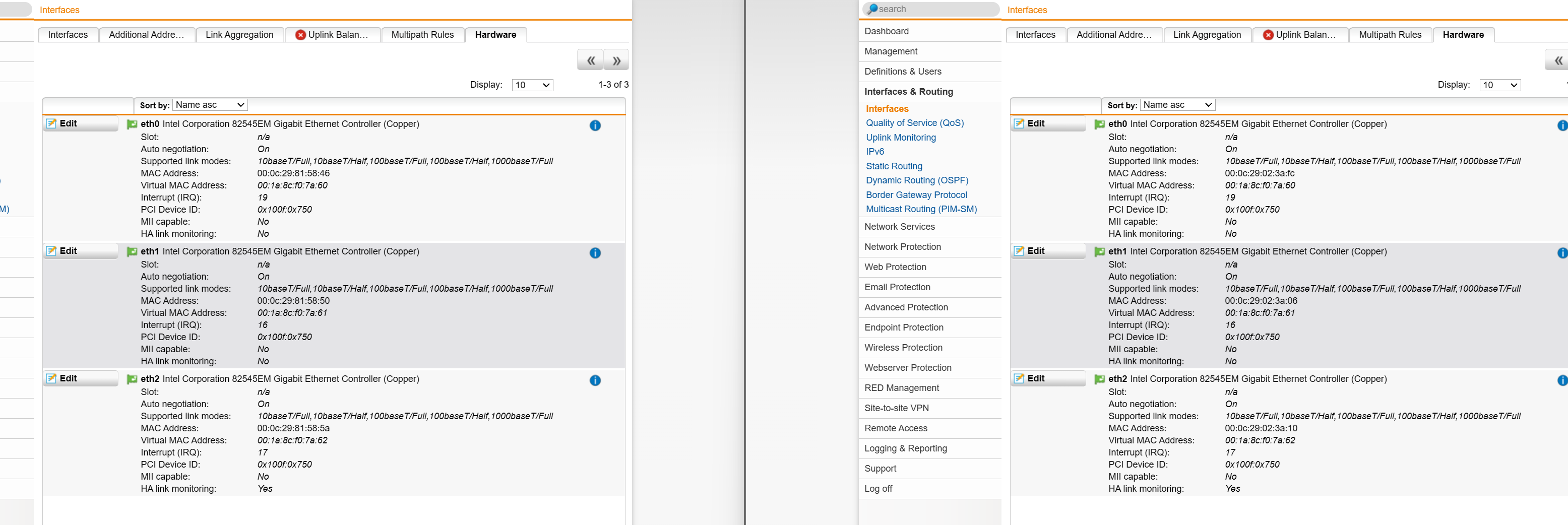
The issue: All UTM's use the SAME Interface MAC when switching to HA mode.

I can manually adjust the virtual MAC (Interface > Hardware) but after some times it's automatically chaning back to default.

Now I have two Sophos UTM (pairs in HA mode) with the same virtual MACs - my router & network of course doesn't like this.

I found an old article that it seems chaning the virtual MAC is no supported in HA mode.

Is there any solution / workaround available?

Thanks

Best regards


This thread was automatically locked due to age.

Top Replies

  • Hi Josef,

    admittedly the error is very rare and happens only in certain situations, however since several people ran into int - it's simply the result of straightforward thinking and installation.

    Since you asked here are the
    steps to reproduce:  

    • get four systems. ensure they all have different MACs (for HW that's an easy one, for virtual they must not be cloned or at least be set to "automatic" collision-free MAC assignment by the VM host). We'll call them A1, A2, B1 and B2
    • join LAN, WAN and optionally DMZ of all 4 systems i.e. by using 3 (virtual) switches.
    • setup A1. As bare minimum assign IPs to LAN, WAN and optionally DMZ
    • do not use virtual MACs here
    • export configuration from A1 and import it to B1
      this is crucial for getting the error as it exports/imports the ASG_ID
    • adapt B1 as needed, i.e. hostname and IPs for LAN, WAN and DMZ
    • optionally  for debugging: ssh into the systems and verify that ASG_ID is indeed the same on both systems
    • join A2 to A1 in active/passive HA and join B2 to B1
    • BANG, both (actually all 4) WAN interfaces share the same MAC, so the A and the B cluster cannot reach WAN.
      same happens for DMZ

    culprit is here:

    sub generate_virtual_mac {
      my $eth_id = shift;
      my $uniq_id = shift;
      $eth_id =~ s/eth//;
    
      $uniq_id <<= 5;
      $uniq_id += $eth_id;
    
      return sprintf("00:1a:8c:f0:%.2x:%.2x", $uniq_id >> 8, $uniq_id & 0xFF);
    }

    Avoiding the error is easy: Instead of the "do not use virtual MACs here" read "do use virtual MACs here".
    Note that your virtual MACs must not start with "00:1a:8c:f0:" and of course be unique.
    When changing the ASG_ID change at least one of the last 11 bits (i.e. add "1" to the ID).

    Jump to answer
Parents
  • Hallo Patrick and welcome to the UTM Community!

    Reading between the lines, I guess that you are in Cluster mode, not Hot-Standby - correct?

    Are both clusters in the same subnet?

    Cheers - Bob

     
    Sophos UTM Community Moderator
    Sophos Certified Architect - UTM
    Sophos Certified Engineer - XG
    Gold Solution Partner since 2005
    MediaSoft, Inc. USA
Reply
  • Hallo Patrick and welcome to the UTM Community!

    Reading between the lines, I guess that you are in Cluster mode, not Hot-Standby - correct?

    Are both clusters in the same subnet?

    Cheers - Bob

     
    Sophos UTM Community Moderator
    Sophos Certified Architect - UTM
    Sophos Certified Engineer - XG
    Gold Solution Partner since 2005
    MediaSoft, Inc. USA
Children