IPv6 Howto: configure freenet6 as tunnel broker

This is a small how to on how I configured freenet6 for ipv6 tunnel broker on astaro. You will either need 6to4 or a tunnel broker. 6to4 works with live internet addresses on the WAN side and I have a dynamic IP so tunnel broker seemed easier to accomplish. I am new to IPv6 stuff and am testing as I am writing so any corrections are welcome. A few comments and observations are added in the posts below.

1. Go to freenet six registeration page and register. Freenet6 website was giving me error for verification code on the website but worked when i left the verification text blank. It might work for you or not, its just an FYI just in case. You wiill shortly get an email with your username and password that you chose during registeration. For our needs, we will need to register otherwise the setup won't work with anonymous access. The difference between anonymous and registered access is that for anonymous you only get one IP and with registered, you get a whole /56 subnet. Very nice.

2. Go to ipv6-->tunnel broker and change authentication to user, this will let you put in your username and password and click apply. You will connect to freenet6 shortly, be patient.

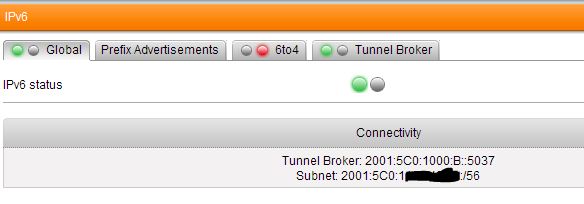
3. Goto ipv6-->Global and you will see that you are connected with information about your tunnel broker and the subnet assigned to you. All you are interested in is this subnet.. The subnet will be like 2001:ABCD:ABCD:ABCD::/56 This means that you can add any number from 1 to FFFF after the :: as your IP address(this is for simplicity otherwise a /64 network can have 18,446,744,073,709,551,616 IP address). Screenshot 1 shows the IP subnet assignment.

4. Now go to astaro interfaces tab and edit the internal interface and add the IPv6 IP address. I like assigning the first IP to my routers etc so in this case the astaro IPv6 IP would be 2001:ABCD:ABCD:ABCD::1 Make sure you leave the netmask as 64. Screenshot 2 shows the IP assigned.

5. You have 2 options at this point, you can either edit your DHCPv6 and let it assign the IPs or manually assign the IP yourself. DHCP and windows ipv6 screenshot 3 and 4. 

EDIT: Since I first wrote this, astaro folks were kind enough to automatically add your tunnel broker IPs to DHCP server. So basically under network services-->dhcp, add a new dhcp server and select address type as IPv6 on internal interface and all the correct fields will automatically populate. Nice!!

6. Add a packet filter rule for ipv6. I added an allow all rule for testing but I have nothing behind this firewall but my laptop so its ok. DO NOT DO THIS for a production firewall. Screenshot 5

Thats it, you should be surfing now using ipv6. IPv6 internet at this time reminds me of the internet in windows 3.1 days. Hardly anything to see so you will run IPv4 and IPv6 together. Therefore do not disable ipv4 on your  client otherwise you won't be able to browse the ipv4 sites. You will also loose connectivity to your astaro box if you don't have it defined in the dns and are using 192.168.***.*** IP address to access it if you disable ipv4. So don't disable it.

 Good luck and have fun!
Parents
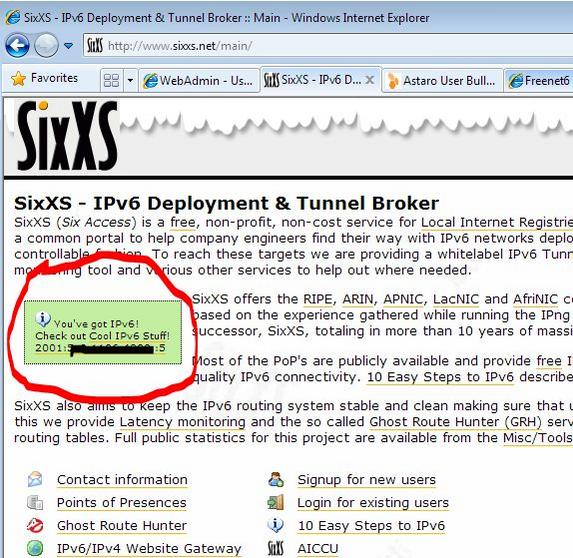
  • Here is a screenshot from sixxs.net recognizing my connection as ipv6. Notice the IP address, it is the same that I assigned to my windows client. No NAT involved, pretty neat stuff.
  • The setup for ipv6 is too complicated. Most IT people (myself included) don't want to read any documentation and they don't realize how much different IPv6 is compared to IPv4.

     If you are going to be using a tunnel broker, I think there should be a wizard of some sort that atleast assigns your internal network an IPv6 IP address automatically from the subnet assigned by the tunnel broker. It would also be nice if the dhcp is also passed this information and the ranges are predefined for the particular subnet. That way clients can connect automatically once the tunnel broker is defined and user and password is entered. Right now too much manual configuration is required for the user to get all the IPs matching. 

    Maybe a simple warning message when enabling tunnel broker that suggests that using the tunnel broker would also assign an IP to the internal NIC of the firewall from the tunnel broker's assigned ipv6 subnet. That way atleast the firewall side is preconfigured and then on the global tab along with the subnet assigned by the tunnel broker, a simple range is also suggested for the clients. Something to think about.

    That being said, astaro is moving in the right direction in the ipv6 arena. Different people are going to have different needs and it is hard for me to think of those needs. Hopefully more people will try ipv6 and provide more feedback soon.

    Kind Regards
    Bill.
  • Hi Bill ,

    nicely wrote but it seems this is not working for india

    List of IPv6 tunnel brokers - Wikipedia, the free encyclopedia
    will try with other free provider who support /Coverage india
    even i was not able to access their web sites 


    thanks
  • Interesting, I didn't think that they wouldn't cover different countries. I thought all it would do was make your ping times higher since your tunnel has to be connected to the closest POP to you. Try connecting anonymously and see if it gives you an IP under IPv6-->Global. You can also try their windows client from their website to check connectivity.[:S]

    Edit: You can't even connect to http://www.gogo6.com? Astaro only supports freenet(gogo6) and sixxs at this time.
  • Hi 

    2010:02:02-08:41:55 acenn httpproxy[7737]: id="0002" severity="info" sys="SecureWeb" sub="http" name="web request blocked" action="block" method="GET" srcip="192.168.2.150" user="" statuscode="502" cached="0" profile="REF_DefaultHTTPProfile (Default Proxy)" filteraction="REF_DefaultHTTPCFFAction (Default content filter action)" size="2180" time="64823 ms" request="0xa502200" url="www.gogo6.com/" exceptions="" error="Connection to server timed out" category="9998" reputation="neutral" categoryname="Uncategorized"

    but Categorized is unchecked 

    i search with google and get 3/4 sites all gave error (need to investigate)


    so disable proxy and it work with pf 
    i download client have to go office will this later  

    thx
  • Thanks Bill ,

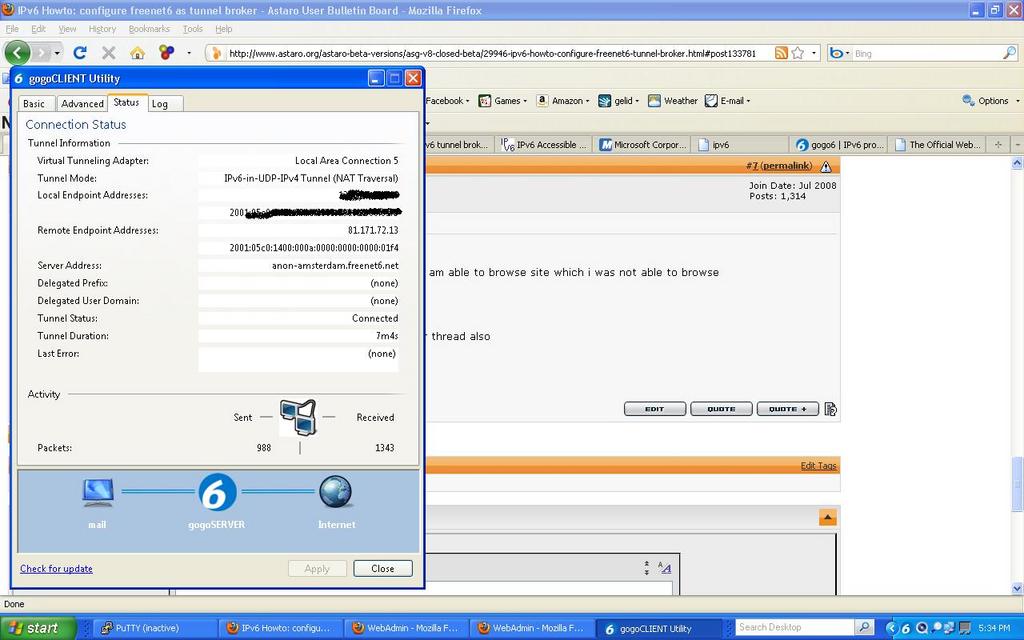
    now i am able to connect using  ipv6 (gogo client)client but i found that now i am able to browse site which i was not able to browse 

    but i cant see any log of ipv6 sites in http/s 


    what can u please tell me what need to be test as i ask this question in other thread also 

    thx
  • At this time ipv6 is purely packet filter based. Which means that you will have to create a packet filter rule to allow or deny traffic and all your logs will be in the packet filter log. Http proxy has no effect on ipv6.
  • At this time ipv6 is purely packet filter based. Which means that you will have to create a packet filter rule to allow or deny traffic and all your logs will be in the packet filter log. Http proxy has no effect on ipv6.


    This is completely wrong. The HTTP-Proxy fully supports IPv6 except IPv6 authentication servers (SSO).
Reply Children