This discussion has been locked.
You can no longer post new replies to this discussion. If you have a question you can start a new discussion

XG Firewall Apple TV+ Connection Issues

Ok, so I decided to give Apple TV+ a try.  I am aware of how finicky Apple products can be, but decided to give it a whirl anyway.  Perhaps I'm beating a dead horse on this.

The first issue was the XG blocking QUIC, once I allowed QUIC, streaming seemed to work fine.  Then things started going off the rails.  I now get intermittent issues where Apple Music and Apple TV+ cannot connect.  Apple TV+ provides the following message "Content Unavailable".  This occurs no matter if I use an iPad, iMac or Android box.

I use Android boxes with the Apple TV+ app installed.

Apple Music and Apple TV+ drop out every 15 or 20 minutes and they remain gone for several minutes before miraculously connecting.  During the Apple down time, the Apple TV+ connection tests pass connecting to the internet but fail with connection to Apple.  I can stream using Disney+ with full 4k HDR10 without a single hiccup at any time and no rule exemptions.  My Speedtest shows absolutely no issues with my fibre line.

I have tried a number of "troubleshooting" steps with disabling one thing or the other.  This became extremely time consuming since the XG takes a very long time to update a firewall rule.  To speed things up, I have created the following rule at the top of my rules list:

  • LAN to WAN
  • Allow any service
  • Allow any source
  • Allow any destination
  • Web Policy = "Allow All"
  • Malware scanning disabled
  • Use web proxy instead of DPI
  • App Control = "Allow All"
  • IPS = "None"

Believe it or not, with the above rule the Apple TV+ and Apple Music still refuse to connect.

At this stage I am at a complete loss as to how to troubleshoot this further.  I cannot see how the XG might be interfering with the connection.  

I should add that I am attempting to troubleshoot this from my iMac by testing the Apple TV+ app on it.

As I finish typing this post, Apple TV+ & Apple Music both came back online.


This thread was automatically locked due to age.

Top Replies

  • Hi,

    all apple device will not put up with decrypt and scan, they need an exception or a rule that allows their traffic through. I have a specific rule for the Apple devices that only allows them to connect to Apple sites. If you review thew SSl/TLS exception list you willl find it has exceptions for APPLe networks. Further the XG calssification system mis-classifies some of the Apple traffic which depends on how strict your rules are might be causing part of your issue.

    My network has mac mini.MBPs, ipad , timemachine and iPhones all using the FQDN except rule for IP4 traffic and IP addressing for IPv6 traffic. As Wayne advised QUIC is not used and is blocked.

    Ian

    Edit:- and I forgot an Apple TV.

    Jump to answer
Parents
  • Ok, I just noticed something strange in the FW logs.  Things are busy here and I've been a bit distracted.  

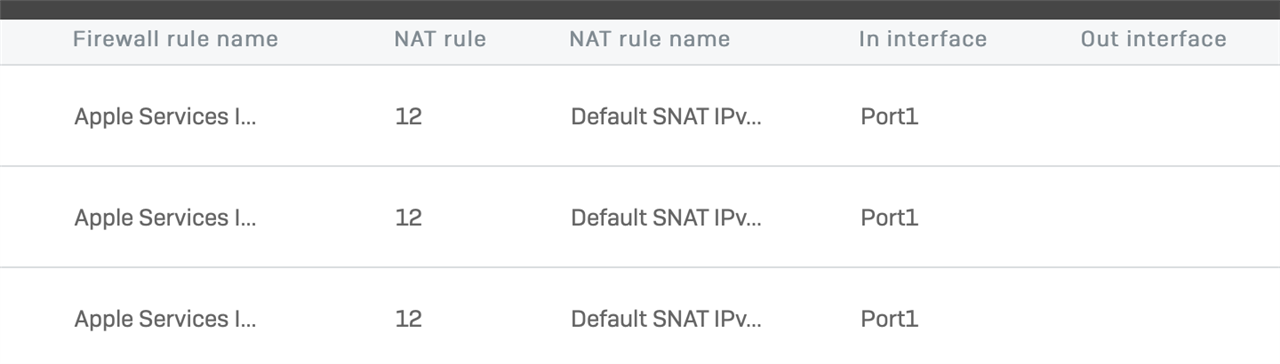
    For the newly created Apple Services rule, it shows that the packets were accepted by the rule, then handed to NAT rule 12 (default NAT).  The "In Interface" is listed as "Port 1" but there is no "Out Interface" listed.  All my other LAN to WAN FW rules list both Port 1 and Port 2 for in and out interfaces.

    Going through the logs, none of the TCP 443 traffic for the Apple Services FW rule is making it to Port 2.  Under the same rule, other ports such as UDP 123 and 5223 TCP are going from Port 1 to Port 2.  For some reason only the TCP 443 traffic is not making it to Port 2.

    NAT rule 12 is just the default rule which allows all the ports from the other rules through.

    What is causing this seemingly strange behaviour?  This would obviously cause connection issues.

    If I enable "Any" services for that rule, TCP 443 packets still do no make it to Port 2.  

    Are these packets actually not making It out, or am I misreading the logs?  I would seem that creating the custom rule for Apple Services has made things worse?

Reply
  • Ok, I just noticed something strange in the FW logs.  Things are busy here and I've been a bit distracted.  

    For the newly created Apple Services rule, it shows that the packets were accepted by the rule, then handed to NAT rule 12 (default NAT).  The "In Interface" is listed as "Port 1" but there is no "Out Interface" listed.  All my other LAN to WAN FW rules list both Port 1 and Port 2 for in and out interfaces.

    Going through the logs, none of the TCP 443 traffic for the Apple Services FW rule is making it to Port 2.  Under the same rule, other ports such as UDP 123 and 5223 TCP are going from Port 1 to Port 2.  For some reason only the TCP 443 traffic is not making it to Port 2.

    NAT rule 12 is just the default rule which allows all the ports from the other rules through.

    What is causing this seemingly strange behaviour?  This would obviously cause connection issues.

    If I enable "Any" services for that rule, TCP 443 packets still do no make it to Port 2.  

    Are these packets actually not making It out, or am I misreading the logs?  I would seem that creating the custom rule for Apple Services has made things worse?

Children