This discussion has been locked.
You can no longer post new replies to this discussion. If you have a question you can start a new discussion

Sophos Firewall: v19.0 GA: Feedback and experiences

Top Replies

  • I have been running V19 on my personal firewall's since the public beta started. Here are my thoughts so far. I also upgraded a cluster of XG230's to test on tomorrow as well.

    * Performance-Based Link Selection

    Works great until the firewall is under load. When the CPU starts getting above 60-70%, this feature doesn't work as it should. The firewall itself will start inducing latency and jitter on links as it gets loaded down, which give false information to the service responsible for the SD-WAN routing. It seems Sophos does not have any type of CPU prioritization in SFOS to guarantee the firewall will have enough core resources to do what it is supposed to do, even if the CPU is approaching it's max.

    * Zero-Impact Transitions

    Again, great feature and it seems to work really well, but not when the firewall is under load.

    * DPI

    No performance improvements on non XGS hardware. It actually increased RAM and CPU utilization slightly on 2 different units. Still no way to disable the DPI engine from looking at inter-vlan traffic and slowing it down, like encrypted SMB that is going across VLAN's at a small site that utilizes the XG as the layer 3 device. Sophos still thinks SMB should have a layer 3 switch for inter-vlan routing, instead of just making a feature to allow the admin to exclude certain traffic from all forms of inspection. The "other guys" allow this. Hopefully Sophos will at some point. It's disappointing because it's nice to know what is flowing between VLAN's, but to do it at true wire speed of let's say 1G, you'd need an XGS 2100 at least, if it's encrypted traffic.

    Overall, I do think it's a great build, but I do wish they would close some product gaps a lot sooner than they do (like the logging that still sucks and the lack of a live flow monitor like UTM. Live Connections isn't even CLOSE to UTM's flow monitor).

    I will post another update once I have a cluster of XGS devices updated to see how they do. I will probably wait until MR1 though.

    Mike

    Jump to answer
Parents
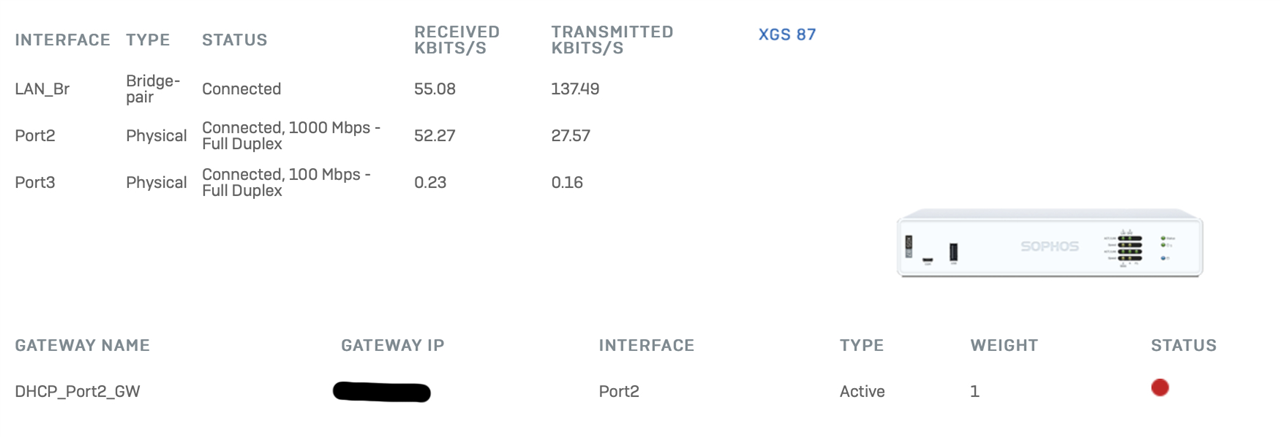
  • Upgraded from EAP2 to GA and have a strange error: it says my GW is down, but everything seems to be getting through:

    The IP address of the gateway responds to ping, and traffic basically just gets through, but I've got a big red dot here and in the Gateway Detail page, and in the Control Center I've got a red interfaces icon. I have an SD_WAN profile set up with no SD_WAN routes, just to monitor the QoS, and the Latency, Jitter, and Packet Loss, and all of these indicators are normal.

    I also note in the System Logs that Interface 2 (WAN) went down and up twice within about 10 seconds about 10 minutes after I'd rebooted with the GA, which was about 20 minutes ago.

  • Reboot did not fix it. Still same problem: GW Status is down (red) on multiple screens, but it's working.

  • Do a packet capture on your WAN for port ICMP and check, if the gateway actually answers or not. 

    __________________________________________________________________________________________________________________

  • FIXED IT: I edited the failover rule -- changing nothing -- and saved it and the gateway came back up.

    Before that I'd checked, per your advice, and there were no pings going out from the XGS. Kicking the failover rule fixed it. After kicking the failover rule, I now see two pings going out each minute with a payload of "Connectivity Test".

Reply
  • FIXED IT: I edited the failover rule -- changing nothing -- and saved it and the gateway came back up.

    Before that I'd checked, per your advice, and there were no pings going out from the XGS. Kicking the failover rule fixed it. After kicking the failover rule, I now see two pings going out each minute with a payload of "Connectivity Test".

Children
No Data