This discussion has been locked.
You can no longer post new replies to this discussion. If you have a question you can start a new discussion

Top Replies

  • The specific change you mention was a result of a security review we carried out on the OTP functionality. It is not good practice to provide methods to recover existing secrets because this makes it much easier to create cloned tokens that could be used without the knowledge of the original user to gain access to their account. Recovering OTP on an account by deleting the existing secret and creating a new one is more secure because even if it is done by the wrong person, the original user will realize the error the next time they try and log in using their old token.

    You see the same behaviour in most websites that offer OTP options like this - the only way to recover if you lose your OTP is to re-initialize with a new secret.

    Your point about including more specifics about this in the release notes is valid. We try to keep the release notes brief so that customers can read them all quickly and identify areas that may concern them where they can dig in to documentation to find out more. Sometimes we make them too brief. We'll take your feedback into account.

    [I updated my original post because I mistakenly thought I was reading the v19 EAP1 forum. Apologies for any confusion.]

    Jump to answer
Parents
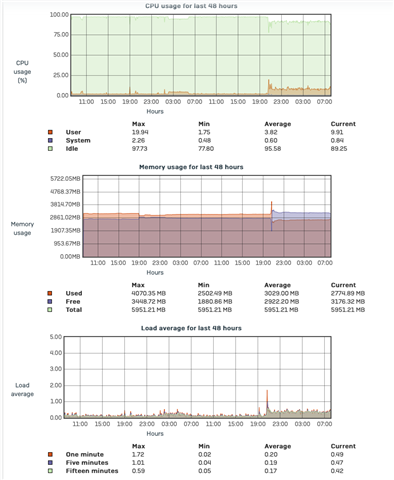
  • Higher CPU usage after upgrade. Last week was 4.9%, after upgrade running steady at 22%.

  • Mine has increased significantly, prior to upgrade around 5%, after upgrade 7-18%,currently shows 12%. A well spec'ed home system.

    Ian

    Edit:- added pretty picture of the issue.

    XG115W - v19.5.1 mr-1 - Home

    If a post solves your question please use the 'Verify Answer' button.

  • Checked my appliances and none have a significant upgrade of performance. But i am using only hardware. 

    __________________________________________________________________________________________________________________

  • Hi,

    I think there was a comment about additional features in the software version, would that be the cause and what are the additional features?

    ian

    XG115W - v19.5.1 mr-1 - Home

    If a post solves your question please use the 'Verify Answer' button.

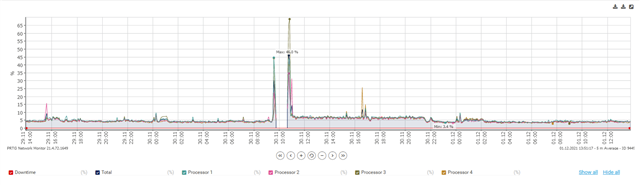
  • I can confirm a higher CPU usage baseline on a virtualized XG, previously on 18.5.1 it was around 4% now it is around 7-8% with 18.5.2. I'm not experiencing any problems though. I'm not seeing an increased CPU baseline on an SG430 or XGS136, FWIW.

  • The increased CPU usage I am seeing is on my home XG so it is Home Edition but is running on hardware (an old SG450). Once we see a bit more feedback and start moving our work XG and customer XGs I will report back on CPU usage for them.

  • Hm. Just checked again and my CPU usage is back to previous levels. It remained consistently raised all day until about 21:30 then dropped back down again.

  • I've seen this kind of thing before and haven't figured it out: sometimes the CPU usage goes up for hours at a time and then return to more normal. My first thought is that some process is doing something like recreating one of its databases in the background, but that probably doesn't make sense. (I'm thinking of major MacOS upgrades that can often burn CPU for the first day or so because of updates to indexing, uploads to iCloud/iPhotos, etc. Probably not the same kind of mechanism going on here.)

  • I might have found something. I noticed openssl repeatedly in top on the virtualized XG that's showing increased CPU. So I went on and investigated. It appears that every 20 seconds openssl is trying to generate something:


    while : ; do pgrep -lf openssl ; sleep 0.5; done
    
    4956 openssl genrsa -aes128 -out /tmp/hbtrust.901Y38Gn_m/server.key -F4 -rand /dev/urandom -passout pass:ozaywt5Xxlu1F8_d5X 4096
    4956 openssl genrsa -aes128 -out /tmp/hbtrust.901Y38Gn_m/server.key -F4 -rand /dev/urandom -passout pass:ozaywt5Xxlu1F8_d5X 4096
    4956 openssl genrsa -aes128 -out /tmp/hbtrust.901Y38Gn_m/server.key -F4 -rand /dev/urandom -passout pass:ozaywt5Xxlu1F8_d5X 4096
    4956 openssl genrsa -aes128 -out /tmp/hbtrust.901Y38Gn_m/server.key -F4 -rand /dev/urandom -passout pass:ozaywt5Xxlu1F8_d5X 4096
    4956 openssl genrsa -aes128 -out /tmp/hbtrust.901Y38Gn_m/server.key -F4 -rand /dev/urandom -passout pass:ozaywt5Xxlu1F8_d5X 4096
    ~20 seconds
    5130 openssl genrsa -aes128 -out /tmp/hbtrust.rOckAvqxgb/server.key -F4 -rand /dev/urandom -passout pass:eq4Kntm2LePbMIItgw 4096
    ...
    5130 openssl genrsa -aes128 -out /tmp/hbtrust.rOckAvqxgb/server.key -F4 -rand /dev/urandom -passout pass:eq4Kntm2LePbMIItgw 4096
    ~20 seconds
    5347 openssl genrsa -aes128 -out /tmp/hbtrust.tZT4TgMZWx/server.key -F4 -rand /dev/urandom -passout pass:9jvJJ83hprZ4KlQQAzyc4Q 4096
    ...
    5347 openssl genrsa -aes128 -out /tmp/hbtrust.tZT4TgMZWx/server.key -F4 -rand /dev/urandom -passout pass:9jvJJ83hprZ4KlQQAzyc4Q 4096
    ~20 seconds
    5607 openssl genrsa -aes128 -out /tmp/hbtrust.U5TMYmug4p/server.key -F4 -rand /dev/urandom -passout pass:Dy4tYYloBN_W3A3h8SWZ 4096
    ...
    5607 openssl genrsa -aes128 -out /tmp/hbtrust.U5TMYmug4p/server.key -F4 -rand /dev/urandom -passout pass:Dy4tYYloBN_W3A3h8SWZ 4096
    
      PID  PR  NI  VIRT  RES  SHR S %CPU %MEM    TIME+  COMMAND
     6873  20   0  5960 2252 2044 R 99.4  0.1   0:02.01 openssl
    

    You get the pattern.

    I'm not seeing that on HW Appliances running 18.5.2.

  • I see the same thing on my VM. Hardware version like you mentioned does not have this issue.

  • Its trying to generate encrypted key and until it successfully generates, it keeps trying every 20secs. Generally it should be successful pretty fast and in first go. We tried reproducing on our VM setup and could not reproduce the issue.

    Please try to provide access to your system.

  • How would you like to access system? I can provide access......let me know.

Reply Children
No Data