This discussion has been locked.
You can no longer post new replies to this discussion. If you have a question you can start a new discussion

Not Able to ping Internet from Sophos XG 115w

Dear Support Team,

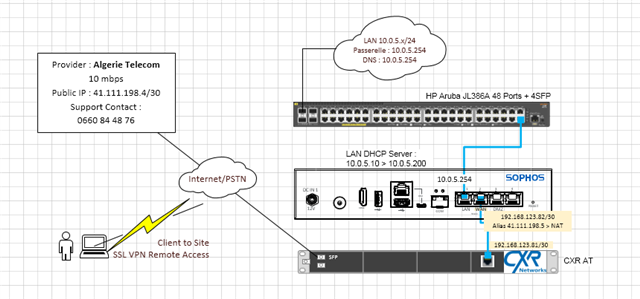
my sophos XG has been configured to provide internet access to clients, everything is working well for the client,(internet access, remote SSL VPN)

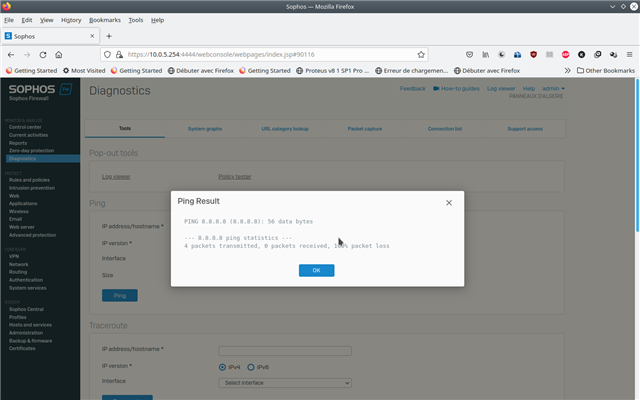
my issue is that the device didn't ping from the diagnostic page to any address on the internet, also the update firmware is failing,

thank you for helping,


This thread was automatically locked due to age.
Parents
  • Hi,

    please check the dns settings of the XG.

    ian

    XG115W - v19.5.1 mr-1 - Home

    If a post solves your question please use the 'Verify Answer' button.

  • Hi,

    DNS Settings are OK, clients are accessing internet

    the issue is that  the sophos  device cannot access Internet from the Administration Portal

    Karim,

  • Hi,

    which version do you use currently?
    Which output do you get from
    - diagnostics / Tools / Ping -- 8.8.8.8
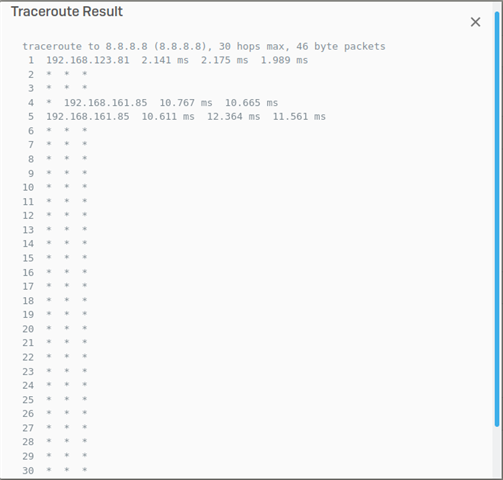
    - diagnostics / Tools / Traceroute -- 8.8.8.8
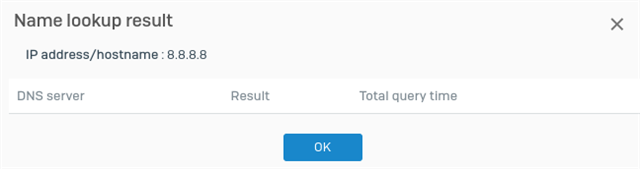
    - diagnostics / Tools / Name lookup -- 8.8.8.8


    Dirk

    Systema Gesellschaft für angewandte Datentechnik mbH  // Sophos Platinum Partner
    Sophos Solution Partner since 2003
    If a post solves your question, click the 'Verify Answer' link at this post.

  • Hi,

    version is XG115w (SFOS 18.5.1 MR-1-Build326)  

  • Hi : What is the observation in TPCDUMP and Drop packet on XG CLI when you generate PING or any traffic from XG CLI itself? Is it getting dropped or getting forwarded out to the correct WAN Interface? 

    Regards,

    Vishal Ranpariya
    Technical Account Manager | Sophos Technical Support

    Sophos Support Videos | Knowledge Base  |  @SophosSupport | Sign up for SMS Alerts |
    If a post solves your question use the 'This helped me' link.

  • please tell us more about IP 192.168.123.81 and 192.168.161.85
    what are these devices? Where are they located?
    If you don't mask your internal traffic at the WAN interface, possible your LAN-segments are routable and the transfer-subnet not..
    Are there other Ways out of your LAN (2nd  ISP, other routers, ...)?

    Try the ping & traceroute 8.8.8.8 tests  again and select the internal interface as source.


    Dirk

    Systema Gesellschaft für angewandte Datentechnik mbH  // Sophos Platinum Partner
    Sophos Solution Partner since 2003
    If a post solves your question, click the 'Verify Answer' link at this post.

  • Hi,

    192.168.123.81 is my default GW for the sophos, wich is ISP router, 

    192.168.161.85 is located on the ISP network,

    i'm using NAT with a public IP provided by the ISP, the public IP is configured as an alias on the WAN interface of Sophos firewall

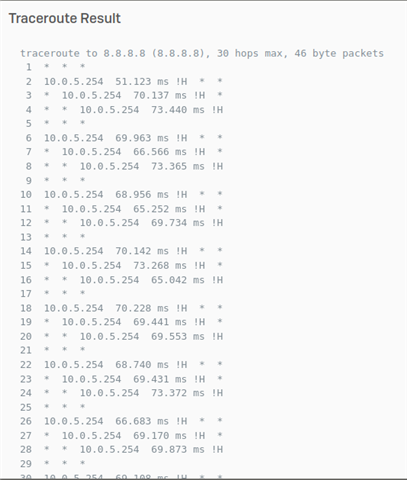
    ping and traceroute to 8.8.8.8.8 using the internal interface as source is also failing,

    i have only one Internet connection

    here is the traceroute screenshot from LAN IP of sohops 

  • Hi,

    using the public which is assigned to the external interface of your isp router will not work. You need to put the isp router into bridge mode to be able to use the public IP address.

    ian

    XG115W - v19.5.1 mr-1 - Home

    If a post solves your question please use the 'Verify Answer' button.

Reply
  • Hi,

    using the public which is assigned to the external interface of your isp router will not work. You need to put the isp router into bridge mode to be able to use the public IP address.

    ian

    XG115W - v19.5.1 mr-1 - Home

    If a post solves your question please use the 'Verify Answer' button.

Children