This discussion has been locked.
You can no longer post new replies to this discussion. If you have a question you can start a new discussion

SSL Cert uploaded to the XG not showing as trusted

Hi All,

I am clearly missing something here, but Google is not my friend on this one as I cannot find out what. I am trying to install an SSL cert to use in WAF and Mail.

I created the CSR

Downloaded the request

Requested the SSL from GoDaddy

I have downloaded every format option after my cert was approved and issued from GoDaddy, and no matter which format I use, I do not get a green check. None of my formats have a Private key. I add the PEM and the password, but still no green check.

Thanks for your help

Stu


This thread was automatically locked due to age.

Top Replies

  • FormerMember
    FormerMember in reply to Stuart Hamilton1 +1 verified

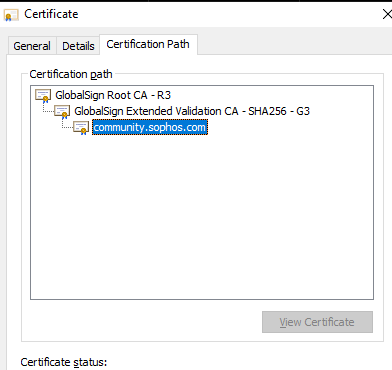
    You can always open the .crt formate of the certificate in windows, and check the Certification path. Verify whether the intermediate and Root CAs are present in Certificate > Certificate Authorities.

    Mostly it's the Intermediate CA certificate that is not present which causes the uploaded certificate to appear invalid as per my general observation with Lets Encrypt and DigiCert. But you once verify with yours. You can always get these CA certificates from Godaddy. (Private key is not required for the CA certificate) 

    Jump to answer
Parents
  • FormerMember
    0 FormerMember

    Hi Stuart, Thanks for reaching out to Sophos Community.

    Firewall generates the secret key and stores it along with the CSR.

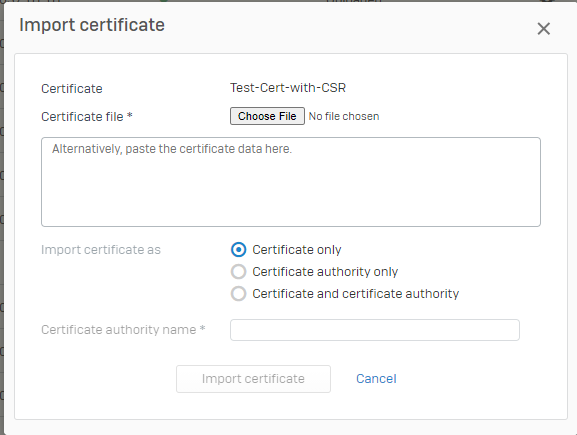
    If the CSR was created on the Firewall, Then you'll have an option to upload the certificate in the CSR. You don't need to upload the certificate separately. 

    If you're already doing this step and still the certificate is showing up as invalid, then ensure that the Intermediate and the Root CA certificates are present on XG.

Reply
  • FormerMember
    0 FormerMember

    Hi Stuart, Thanks for reaching out to Sophos Community.

    Firewall generates the secret key and stores it along with the CSR.

    If the CSR was created on the Firewall, Then you'll have an option to upload the certificate in the CSR. You don't need to upload the certificate separately. 

    If you're already doing this step and still the certificate is showing up as invalid, then ensure that the Intermediate and the Root CA certificates are present on XG.

Children