This discussion has been locked.
You can no longer post new replies to this discussion. If you have a question you can start a new discussion

Setting up VLAN for ISP connection

I switched to an ISP that requires VLAN tagging the WAN connection which I've done by adding a VLAN interface for the ethernet port the connection to the ISP is with the appropriate VLAN tag. Everything works as expected. However, on the physical interfaces page I now have the WAN interface that's configured for IPv4, so it shows up in the WAN link manager as being down. If I try to disable the IPv4 configuration and save it, I get the message "You must configure at least one IP family". I thought may I can set the Network zone to "None" but that gives the dialog to "Unbind interface" which is not what I want to do.

Is there any way to set this up so that physical interface isn't setup for IPv4 thus showing up as a gateway?


This thread was automatically locked due to age.

Top Replies

  • in reply to shred +4 verified

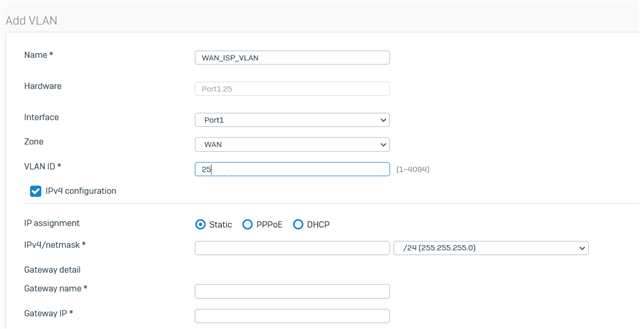
    Hi shred: On the Physical Interface select zone as in LAN - with any fake LAN which is not getting conflict with any existing network of XG ( so it will not reflect in WAN link manager). Later on add VLAN over this Physical LAN Interface and for that VLAN section select zone as in WAN with required VLAN tag and that will only show that VLAN interface inside the WAN Link manager. I hope this will help you to achieve your requirement posted in the thread.

    Here in the below snapshot, I have chosen an interface for reference from my setup, a similar tweak you may apply on your actual interface where you wanted to achieve tihs. 

    Reference snapshot:


    Add VLAN on this LAN Port as per below ( where zone is now WAN for this VLAN Interface):

    Jump to answer
Parents Reply
  • I'm on MR-5-Build586 but this has been the behavior of Sophos XG for as long as I can remember. To enable a port, it has to be assigned to a "Network zone" which then requires an IPv4 or IPv6 configuration. There seems to be no way to just enable the port without a zone or IPv4/6 config then setup a VLAN on that port.

    ---

    Sophos XG guides for home users: https://shred086.wordpress.com/

Children
No Data