This discussion has been locked.
You can no longer post new replies to this discussion. If you have a question you can start a new discussion

block all internet DNS services except 3

Hello,

      We want our lan users to not be able to change their dns settings on their computers or browsers to use other dns services available on the web.  We want to only allow access to these two dns servers : 208.67.222.222 and 208.67.220.220 (these are opendns servers).

     How can we setup a firewall rule to block all dns services, except for if that service is reaching to A) the sophos firewall itself, or B) these 2 IP's 208.67.222.222 and 208.67.220.220


This thread was automatically locked due to age.

Top Replies

  • Hello,

    There's two ways to solve this issue:

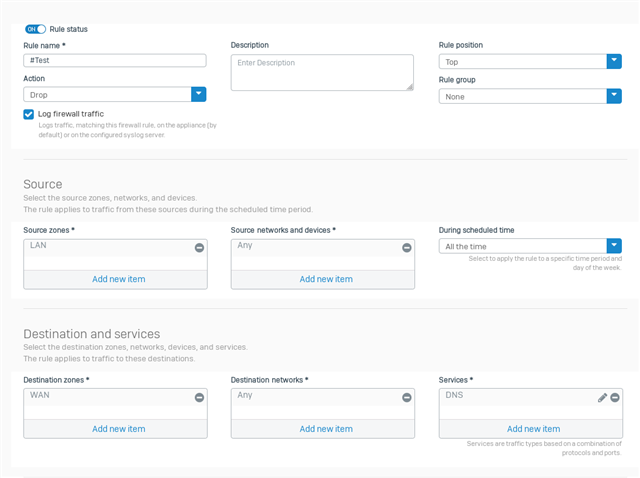
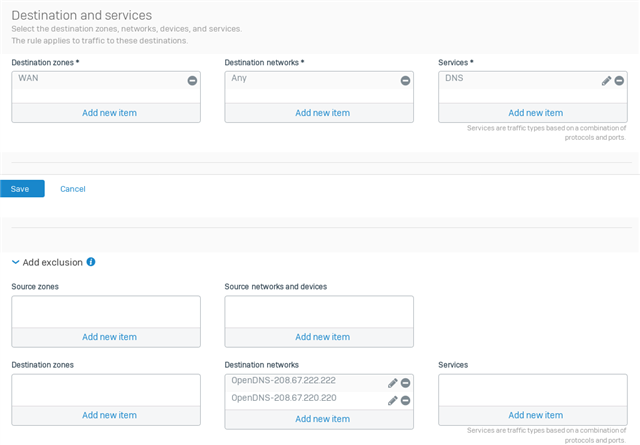
    1) On v18, you can create a new Firewall Rule on top of all others such as this example:

    EDIT: small error on the Picture above, I forgot to change from "Accept" to "Drop". Be aware.

    EDIT2: Fixed.

    This Firewall Rule will block access over (TCP/UDP on Port 53) for the entire WAN, but the Exclusion will allow the DNS Requests go through If It's for OpenDNS.
    The issue with this rule is: If a user tries to change DNS Server, It won't be able to connect to pretty much anything until she/he switches back to either OpenDNS or the Firewall Itself.

    * Remember to change the Source/Destinations to your desired ones;

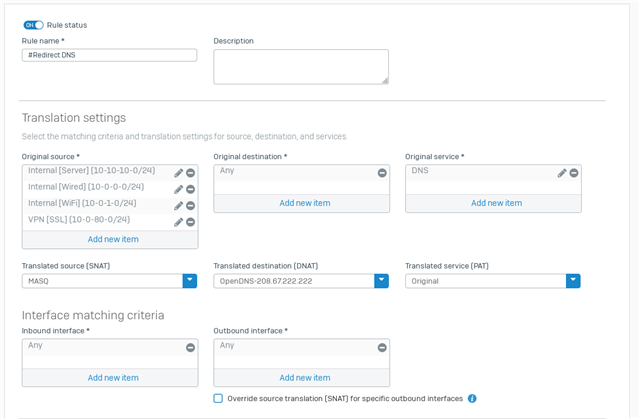
    2) Or as a second option, you can use a NAT Rule, and redirect all DNS Requests that are being sent to the Internet to OpenDNS; This is a better approach since even If the user tries to change It's DNS Server, the DNS Request will be sent and answered through the DNS Server you choose for the DNAT.

    Here's an example:

    Remember to use your WAN Interface at "Outbound Interface".

    Thanks!

    Jump to answer
Parents
  • Hi,

    you set the DNS in the XG DHCP that you wish to use and you do not add DNS to any firewall rule.

    Ian

    XG115W - v19.5.1 mr-1 - Home

    If a post solves your question please use the 'Verify Answer' button.

  • Thanks, but we don't use dhcp some clients, and the standard allow lan to wan traffic doesn't block dns, this would allow users to reach dns servers if they manually type them into their devices.  Need to block all except some

  • So you aren't really managing your user access with specific ports in firewall rules?

    Your top LAN to WAN firewall rule would be block DNS.

    You set the DNS you want to use in the XG DNS settings.

    Ian

    XG115W - v19.5.1 mr-1 - Home

    If a post solves your question please use the 'Verify Answer' button.

  • correct, very little outbound traffic is blocked by service type as of now.

    I don't want to specify all the allowed dns servers in the dhcp server.  I want to allow some extra ones that I don't put in the dns server.  

    btw, if firewall says block all dns, but dhcp says use this xyz dns.. which takes precedence?

  • So you're not actually controlling user access with firewall rules that specify certain ports?

    Block DNS would be your top LAN to WAN firewall rule.

    In the XG DNS settings, you select the DNS server you wish to use.

    Ian


    e3-1225v5 - V18.5.x 6GB RAM, 4 USB ports, and a 20W power supply.
    3 AP55s and 2 APX120s are on vacation until a software update is available.
    Use the 'This helped me' link if a post answers your query.

Reply
  • So you're not actually controlling user access with firewall rules that specify certain ports?

    Block DNS would be your top LAN to WAN firewall rule.

    In the XG DNS settings, you select the DNS server you wish to use.

    Ian


    e3-1225v5 - V18.5.x 6GB RAM, 4 USB ports, and a 20W power supply.
    3 AP55s and 2 APX120s are on vacation until a software update is available.
    Use the 'This helped me' link if a post answers your query.

Children
No Data