This discussion has been locked.
You can no longer post new replies to this discussion. If you have a question you can start a new discussion

multiple LAN ranges on same interface

Hi there. Newbie here. I don't get it.

I have two ip ranges in my network 10.0.0.0/24 and 192.168.1.0/24

I've setup the XG210 with the 192.168.1.0 range as LAN and everything works fine except I can't reach the 10.0.0.0 range from 192.168.1.0 range.

How can I remedy this ?

Thanks, Marc


This thread was automatically locked due to age.

Top Replies

  • My knowledge of doing this with an XG is limited but in the absence of any other responses I will add these comments and suggestions.

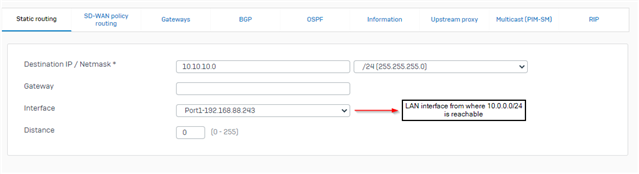
    Static route would not work. If the XG doesn't have an IP in the 10.0.0.0 subnet, there is not way for it to discover hosts and know how to route the traffic.

    What you are trying to do with the IP alias, is hairpin traffic - traffic going in and then back out of the same interface. Have a search for hairpin NAT in the XG section and you may be able to get this to work. I've set one up but it isn't the easiest of things to do if you don't have a good understanding of networking.

    What I don't understand from the details you have supplied is why you don't just setup a new LAN interface on the XG with a 10.0.0.0/24 address. This would be much simpler and a lot easier to manage traffic between the two subnets going forward.

    Jump to answer
Parents Reply Children
No Data