This discussion has been locked.
You can no longer post new replies to this discussion. If you have a question you can start a new discussion

Error activating XG Home Use - device not found

Hi community,

let me resort to collective intelligence, as I'm 2nd day XG Firewall user. Install and configuration went fairly well, however activation doesn't really work for me.

Couple days ago I requested XG Home Edition license to try it at home.

I have sent me serial number XXXXXXXFWK2AD.

Now trying to register it, I see all kinds of errors:

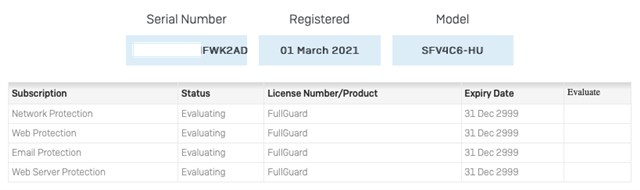
  1. On licensing portal I see it as 
  1. When I try to register in firewall GUI – it says

Serial Number : XXXXXXXFWK2AD

Product Type : UTM. (why it it UTM ?? it's XG Firewall)

Model : SF01V


  1. Registration attempt fails with

Sorry: only one 30-day free trial is allowed.

Error ID: XG-00108

Tracking ID 3092b03b-394e-496d-9c14-3f0b532feee8: please make a note of this.

licensing.log says device not found
response : {"errorCode":"ITSERVICELAYER_DEVICE_NOTFOUND_ERROR","message":"Device not found","statusCode":404,"trackingId":"02edac98-9dd2-420f-9c9b-5783d32b80c8"}

I see, that deviceid in log file did change once.  

How would you solve it ? Is there a way to "reset" serial number ?


This thread was automatically locked due to age.
Parents Reply Children
  • Thanks Emmanuel, 
    Well, I solved licensing issue by re-deploying VM from scratch. It was somewhat cumbersome, because I had to register firewall appliance manually on MySophos first, using Home Edition serial ID, and only then activation on XG VM worked. So that challenge is soved now.
    BTW, hyperlink from Home Edition request form only gets you ISO, for barebone installs I assume. So I downloaded VM version directly.

    So now Sophos XG works, but it's very unstable and performance is terrible, but that's topic for a separate post. 

    Best regards,
    Alex

  • Hi Alex,

    the ISO gives a better install than the VM version.

    Ian

    XG115W - v19.5.1 mr-1 - Home

    If a post solves your question please use the 'Verify Answer' button.

  • Aha, so proposal is to create new VM and boot/install it from ISO ? Do I get you right, Ian ?

    Alex

  • Correct, just make sure you get two NICs linked correctly so you can access the GUI.

    give it 6gb, and 4 cpus with at least 60gb of disk preferably more.

    finally lock the resources to the XG.

    ian

    XG115W - v19.5.1 mr-1 - Home

    If a post solves your question please use the 'Verify Answer' button.