
This discussion has been locked.
You can no longer post new replies to this discussion. If you have a question you can start a new discussion

Multiple PUBLIC IP leashed line setup for NAT

Hi .
I'm having trouble trying to get one of the Public IP(Alias) to be nat onto voice subnet interface.
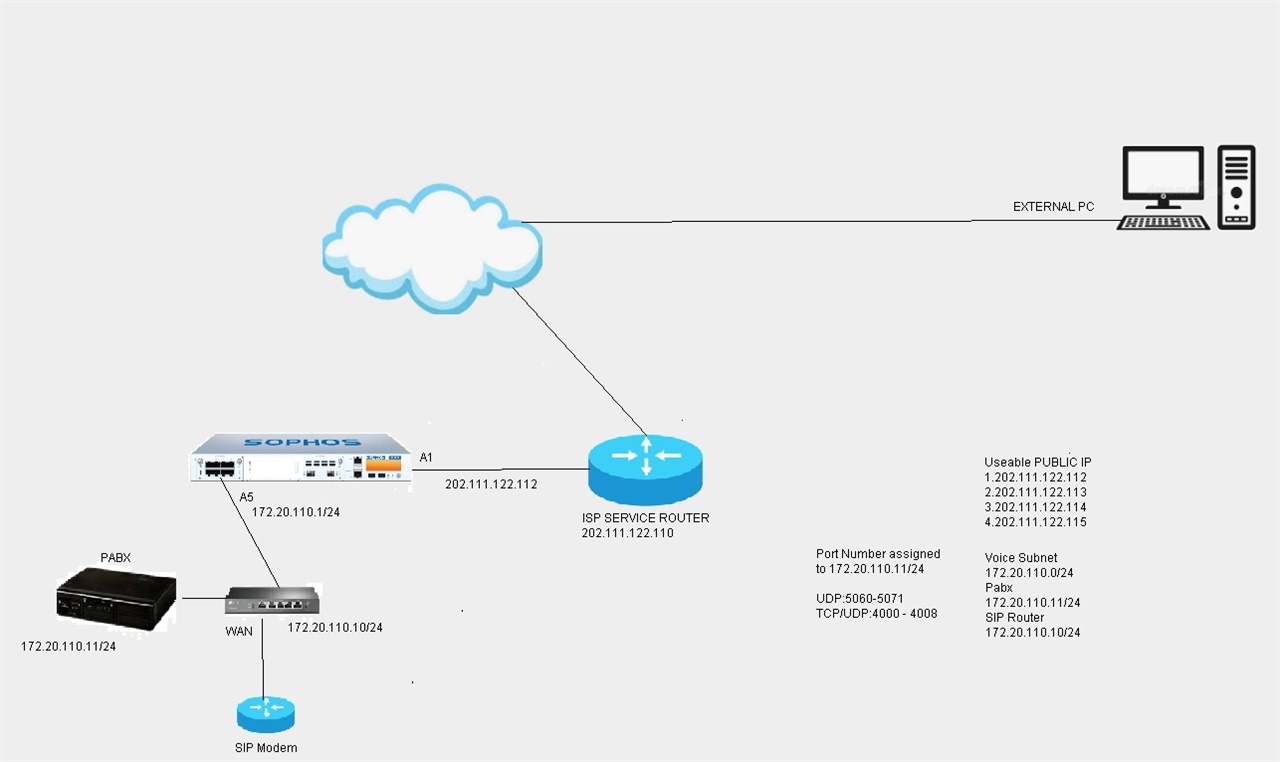
Here's the diagram below.
Network Diagram.
Here's what i configure for the Leased IP Line.

For voice LAN interface Subnet i configure as below.

As for rule. I did it as below.
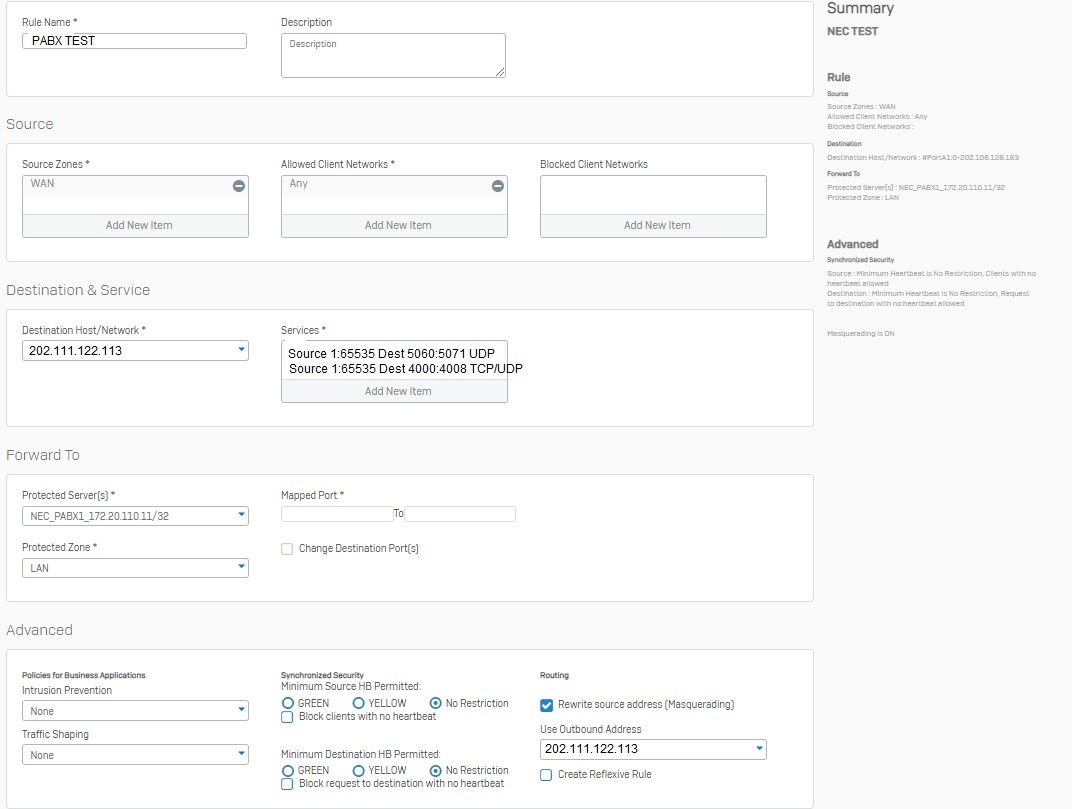
I have trouble reaching 202.111.122.113 via 4000 to 4008.

May i know which settings i did wrong or is there something i left out ?


This thread was automatically locked due to age.

Top Replies

  • in reply to HardikR +2 suggested

    I've found the issue. The problem indeed came from the tplink router itself.
    Today i remove the router and plug a laptop straight to the lan port of the firewall under interface A5.
    I even configured the laptop static with an ip 172.20.110.11/24 matching the Pabx system's ip.
    I downloaded port listener on the laptop and have it listen on port 4001 and other ports each time to test the connection.
    Everything went through from externally without issue.
    The public ip had actually successfully nat to the internal ip .
    The only problem is the tplink router isn't returning the packets back . It's dropping the packets at some point.

    Jump to answer
Parents
  • FormerMember
    0 FormerMember

    Hi ,

    Thank you for reaching out to Sophos Community.

    Assuming you're able to make a successful connection on 202.111.122.113 with 5060:5071 ports.

    To check further with the 4000:4008 port, you may first try to change 'Use Outbound Address' under Masquerading to default MASQ.

    If that doesn't help then try disabling Masquarading once.

    You may check traffic flow in the console by using the below command.

    ==> Login to SSH > 4. Device Console

    console> tcpdump 'port <port number>

    eg: console> tcpdump 'port 4000

  • Hi. Thx for the reply. connection to 202.111.122.113 with 5060 to 5071 did not worked either even after i did the DNAT rule.
    I've been checking the logs from Log viewer. By using my home internet connection to remotely reach 202.111.122.113.
    I crossed checked my home internet src ip :public ip 222.112.114.22 icmp and tcping towards destination ip:202.111.122.113 .
    Seems to me all relevant ports from 4000 to 4008 and icmp was actually allowed.
    However this only stops at 202.111.122.113. 
    When i tried to search src ip:172.20.110.11 . There was nothing.
    There's actually a TPLINK router TL-R600VPN router with ip 172.20.110.10/24 after interface A5 .
    I do suspect that the router do not have a static route on it. It does not know where's the exit interface.

Reply
  • Hi. Thx for the reply. connection to 202.111.122.113 with 5060 to 5071 did not worked either even after i did the DNAT rule.
    I've been checking the logs from Log viewer. By using my home internet connection to remotely reach 202.111.122.113.
    I crossed checked my home internet src ip :public ip 222.112.114.22 icmp and tcping towards destination ip:202.111.122.113 .
    Seems to me all relevant ports from 4000 to 4008 and icmp was actually allowed.
    However this only stops at 202.111.122.113. 
    When i tried to search src ip:172.20.110.11 . There was nothing.
    There's actually a TPLINK router TL-R600VPN router with ip 172.20.110.10/24 after interface A5 .
    I do suspect that the router do not have a static route on it. It does not know where's the exit interface.

Children
No Data