
This discussion has been locked.
You can no longer post new replies to this discussion. If you have a question you can start a new discussion

Connect client to Symantec Protection Center via Sophos

Dear all

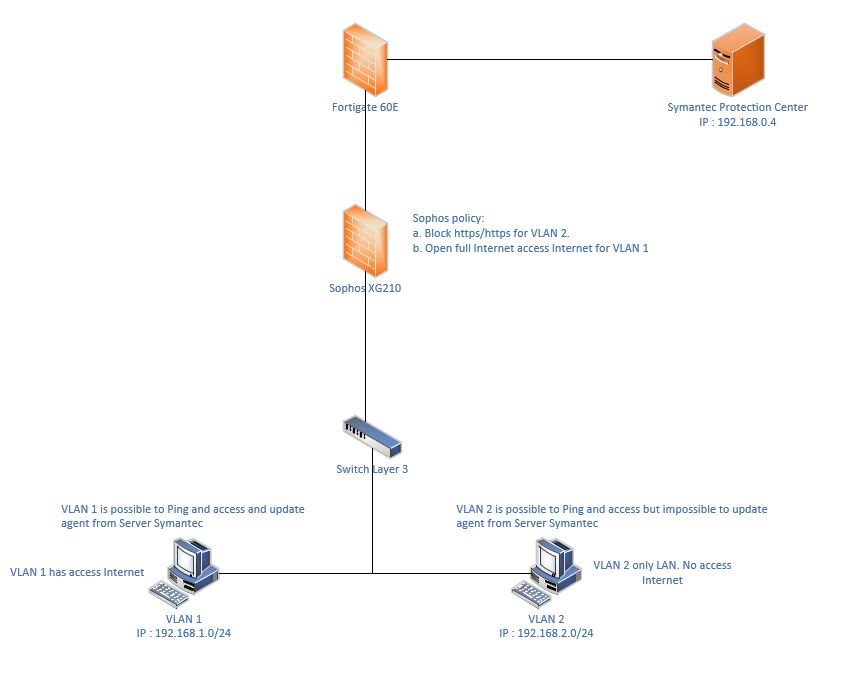
I have a diagram below:

I have 3 VLAN :

VLAN 1 has IP: 192.168.1.0/24. This VLAN is possible to access full Internet (Open full services on Sophos firewall)

VLAN 1 has IP: 192.168.2.0/24: This VLAN   only uses LAN only ( Block HTTP and https

VLAN 3 has IP: 192.168.0.0/24: This is VLAN for Server

On Sophos firewall. I only create 2 policies for VLAN 1 and VLAN 2 as above.

My VLAN 1 is possible to update Symantec package from Symantec Protection Center but VLAN 2 is impossible to update.
If I open full internet for VLAN 2 then possible to update.
I tried to create a new policy on Sophos and accept VLAN 2 to Symantec Server via HTTP and HTTPS but still impossible to update.
Could you help me to resolve or guide me on what should I do?

Thanks


This thread was automatically locked due to age.

Top Replies

  • FormerMember
    FormerMember in reply to Minh Pham Cong +1 verified

    It seems that some communication is taking place on port 443 from the client to your Symantec server.

    To verify this further, You can run this command on CLI "drop-packet-capture 'host <SourceIP> and port 443" (Option 4 > Console) and run the update. This will give you the reason and the packets which were dropped.

    For this, You can either clone the existing rule or create a new one, Keep the VLAN 2.0/24 in source, Symantec server's IP in destination, and allow HTTP & HTTPS. This way, you're only granting Port 80 and 443 access to Symantec server from VLAN2.

    Hope this helps

    Jump to answer
Parents Reply Children
No Data