This discussion has been locked.
You can no longer post new replies to this discussion. If you have a question you can start a new discussion

Blocking Among Us through the XG

We run fairly large network at a school of roughly 2000 users.

We have been having students playing Among Us on the network lately.

I am trying to figure out a way to block the traffic - I have traced the network traffic down (atleast for US servers) to a members.linode.com server string.

I have tried the following ways of blocking traffic with no success:

- Added to blocked category on rule for specific users

- Added to blocked web URL group

- Blocked at Netspace Proxy level

The traffic still gets through.

I am wondering if anyone has had success blocking traffic for this game or tried blocking it via Application Control. We currently don't use it widely but I have blocked a few categories for students (e.g gaming, proxy vpn etc)

Any help would be appreciated.


This thread was automatically locked due to age.

Top Replies

  • Hi,

    I've managed to block Among Us on both Android/IOS with a custom IPS signature, I didn't tested It with the steam version since I don't have It, but I believe It will also work.

    While playing Among Us Online, It will establish a connection to the servers through UDP over a high port. (Such as 22023.)

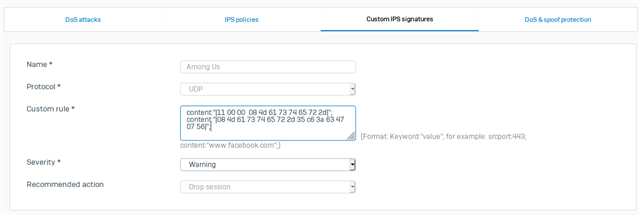
    You will have to create a custom IPS signature such as this one: (If you need help on this look at this document from Sophos.)

    Example:

    Here's the Custom rule content:

    Edit: Here's the three signatures I've found, you can use any of them to block Among Us.

    • content:"|4d 61 73 74 65 72 2d 36 2d 4f|";
    • content:"|4d 61 73 74 65 72 2d 34 2d 4f|";
    • content:"|4d 61 73 74 65 72 2d 33 2d 4f|";

    Or you can play up with pcre and do something like:

    • /\x4d\x61\x73\x74\x65\x72\x2d(\x36|\x34|\x33)\x2d\x4f/gmi

    Example in plain-text:

    • pcre:"/Master-(6|4|3)-O/";

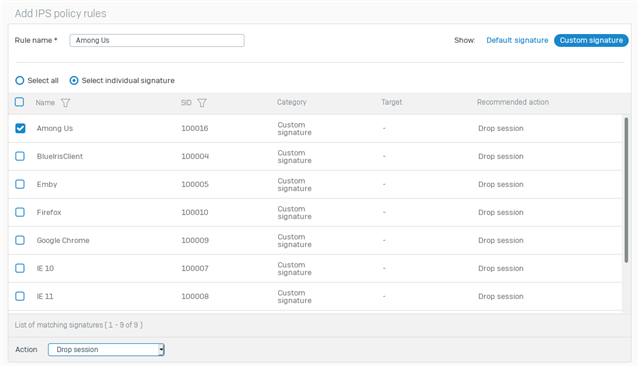
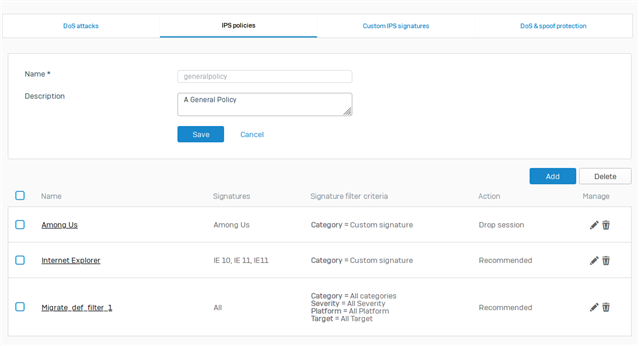
    After It you can apply on a IPS policy:

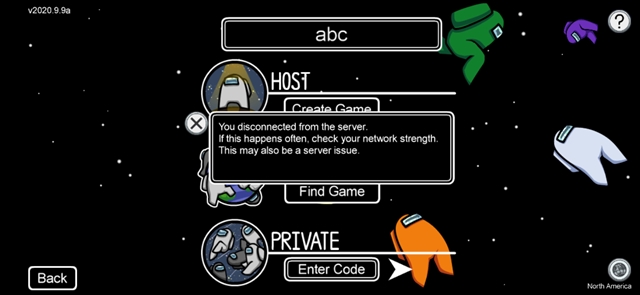
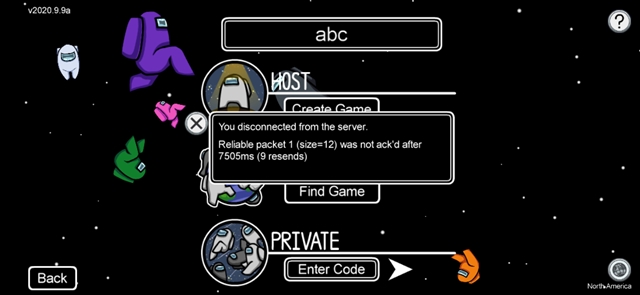
    Here's how It should look like for the user after creating and applying the custom IPS signature on the traffic.

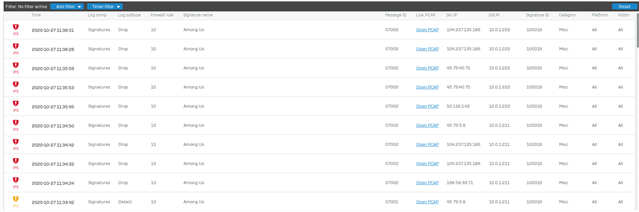
    And here's how It looks like on the Log Viewer.

    Thanks!

    Jump to answer
Parents
  • Hi,

    that server is not the item you should be blocking but the URL used to connect to the application that runs on that server. The server appears to be a hosting company of some sort, not the actual game host.

    Ian

    XG115W - v19.5.1 mr-1 - Home

    If a post solves your question please use the 'Verify Answer' button.

  • Hi Ian, 

    Thanks for your reply.

    I had initially had the same thought however when tracing traffic from the app itself (I have a copy for "testing" purposes) all I get is that server address and a local host address.

    Do you know of any software or processes that make tracking down traffic in situations like this easier? The Diagnostic Viewer is decent but it doesn't always show the relevant traffic and Wireshark is a pain to use.

    Also yep, I know it can be played in browser - have most of those blocked.

    My issue is mostly kids running it from steam in offline mode (steam is blocked but you can still launch games regardless) or standalone launcher.

Reply
  • Hi Ian, 

    Thanks for your reply.

    I had initially had the same thought however when tracing traffic from the app itself (I have a copy for "testing" purposes) all I get is that server address and a local host address.

    Do you know of any software or processes that make tracking down traffic in situations like this easier? The Diagnostic Viewer is decent but it doesn't always show the relevant traffic and Wireshark is a pain to use.

    Also yep, I know it can be played in browser - have most of those blocked.

    My issue is mostly kids running it from steam in offline mode (steam is blocked but you can still launch games regardless) or standalone launcher.

Children
  • So, basically they are playing on your school network without using the internet?

    Ian

    XG115W - v19.5.1 mr-1 - Home

    If a post solves your question please use the 'Verify Answer' button.

  • No, they are playing online.

    They just already have the game on their devices so connection to clients like Steam etc isn't required for them to launch the app.

    Technically they would still be able to play locally, which I have less of an issue with.
    I want to prevent connection from getting out however which so far has been a flop.

  • So, if you look in logviewer -> URL report what do you see that would be part of this game?

    Ian

    XG115W - v19.5.1 mr-1 - Home

    If a post solves your question please use the 'Verify Answer' button.