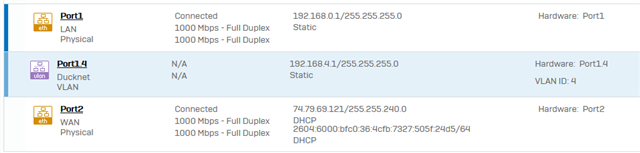
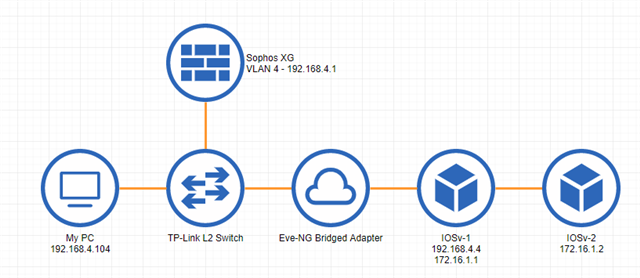
I've set up Eve-NG on a host on the same VLAN as my PC, then set up OSPF to advertise any new networks I add to Eve-NG labs. That part seems to work fine, I can ping through the lab to VMs on different networks. Eve-NG lives on ESXi with configuration to allow forged packets configured as far as I can tell. The next part I'd like to get working is SSH.
I'm not sure what's happening to cause SSH to fail. SSH from my PC it times out, I do not see the inbound SSH attempts with debugging enabled on my IOSv router, and looking at logs from within XG throws a bunch of denied packets stating either "Invalid packet" or "Invalid TCP state." SSH from one IOSv to another works within the lab so that appears to be configured correctly. Interestingly I can successfully ping to hosts that I cannot SSH to.
PS C:\Users\Bryon> ssh 172.16.1.2
ssh_exchange_identification: read: Connection timed out
PS C:\Users\Bryon> ping 172.16.1.2
Pinging 172.16.1.2 with 32 bytes of data:
Reply from 172.16.1.2: bytes=32 time=2ms TTL=254
Reply from 172.16.1.2: bytes=32 time=1ms TTL=254
Topology:
tcpdump:
18:26:57.659145 Port1, IN: ethertype IPv4, IP 192.168.4.104.59004 > 172.16.1.2.ssh: Flags [S], seq 2463688266, win 64240, options [mss 1460,nop,wscale 8,nop,nop,sackOK], length 0
18:26:57.659145 Port1.4, IN: IP 192.168.4.104.59004 > 172.16.1.2.ssh: Flags [S], seq 2463688266, win 64240, options [mss 1460,nop,wscale 8,nop,nop,sackOK], length 0
18:26:57.660112 Port1.4, OUT: IP 192.168.4.104.59004 > 172.16.1.2.ssh: Flags [S], seq 2463688266, win 64240, options [mss 1460,nop,wscale 8,nop,nop,sackOK], length 0
18:26:57.660127 Port1, OUT: ethertype IPv4, IP 192.168.4.104.59004 > 172.16.1.2.ssh: Flags [S], seq 2463688266, win 64240, options [mss 1460,nop,wscale 8,nop,nop,sackOK], length 0
18:26:57.662913 Port1, IN: ethertype IPv4, IP 192.168.4.104.59004 > 172.16.1.2.ssh: Flags [.], ack 1819393893, win 65392, length 0
18:26:57.662913 Port1.4, IN: IP 192.168.4.104.59004 > 172.16.1.2.ssh: Flags [.], ack 1, win 65392, length 0
18:26:57.665800 Port1, IN: ethertype IPv4, IP 192.168.4.104.59004 > 172.16.1.2.ssh: Flags [P.], seq 0:33, ack 1, win 65392, length 33
18:26:57.665800 Port1.4, IN: IP 192.168.4.104.59004 > 172.16.1.2.ssh: Flags [P.], seq 0:33, ack 1, win 65392, length 33
18:26:57.966417 Port1, IN: ethertype IPv4, IP 192.168.4.104.59004 > 172.16.1.2.ssh: Flags [P.], seq 0:33, ack 1, win 65392, length 33
18:26:57.966417 Port1.4, IN: IP 192.168.4.104.59004 > 172.16.1.2.ssh: Flags [P.], seq 0:33, ack 1, win 65392, length 33
18:26:58.567591 Port1, IN: ethertype IPv4, IP 192.168.4.104.59004 > 172.16.1.2.ssh: Flags [P.], seq 0:33, ack 1, win 65392, length 33
18:26:58.567591 Port1.4, IN: IP 192.168.4.104.59004 > 172.16.1.2.ssh: Flags [P.], seq 0:33, ack 1, win 65392, length 33
18:26:59.663516 Port1, IN: ethertype IPv4, IP 192.168.4.104.59004 > 172.16.1.2.ssh: Flags [.], ack 1, win 65392, length 0
18:26:59.663516 Port1.4, IN: IP 192.168.4.104.59004 > 172.16.1.2.ssh: Flags [.], ack 1, win 65392, length 0
18:26:59.768380 Port1, IN: ethertype IPv4, IP 192.168.4.104.59004 > 172.16.1.2.ssh: Flags [P.], seq 0:33, ack 1, win 65392, length 33
18:26:59.768380 Port1.4, IN: IP 192.168.4.104.59004 > 172.16.1.2.ssh: Flags [P.], seq 0:33, ack 1, win 65392, length 33
18:27:02.168587 Port1, IN: ethertype IPv4, IP 192.168.4.104.59004 > 172.16.1.2.ssh: Flags [P.], seq 0:33, ack 1, win 65392, length 33
18:27:02.168587 Port1.4, IN: IP 192.168.4.104.59004 > 172.16.1.2.ssh: Flags [P.], seq 0:33, ack 1, win 65392, length 33
18:27:03.665942 Port1, IN: ethertype IPv4, IP 192.168.4.104.59004 > 172.16.1.2.ssh: Flags [.], ack 1, win 65392, length 0
18:27:03.665942 Port1.4, IN: IP 192.168.4.104.59004 > 172.16.1.2.ssh: Flags [.], ack 1, win 65392, length 0
18:27:06.969409 Port1, IN: ethertype IPv4, IP 192.168.4.104.59004 > 172.16.1.2.ssh: Flags [P.], seq 0:33, ack 1, win 65392, length 33
18:27:06.969409 Port1.4, IN: IP 192.168.4.104.59004 > 172.16.1.2.ssh: Flags [P.], seq 0:33, ack 1, win 65392, length 33
18:27:11.665775 Port1, IN: ethertype IPv4, IP 192.168.4.104.59004 > 172.16.1.2.ssh: Flags [.], ack 1, win 65392, length 0
18:27:11.665775 Port1.4, IN: IP 192.168.4.104.59004 > 172.16.1.2.ssh: Flags [.], ack 1, win 65392, length 0
18:27:16.570010 Port1, IN: ethertype IPv4, IP 192.168.4.104.59004 > 172.16.1.2.ssh: Flags [R.], seq 33, ack 1, win 0, length 0
18:27:16.570010 Port1.4, IN: IP 192.168.4.104.59004 > 172.16.1.2.ssh: Flags [R.], seq 33, ack 1, win 0, length 0
I added this rule to try and help but it didn't seem to help. I see only outbound traffic hitting it. Ducknet is the zone, interface 1.4. Ducknet_v4 is the network 192.168.4.0/24. Eve-NG Networks is the network 172.16.0.0/16.
I'm more than happy to provide any information I've left out, tried to throw anything I could think of that will help but I'm new to firewalls in general so I'm sure I forgot something. Thanks!
This thread was automatically locked due to age.