This discussion has been locked.
You can no longer post new replies to this discussion. If you have a question you can start a new discussion

Allow Access to internal through Sophos XG

Hi everyone,

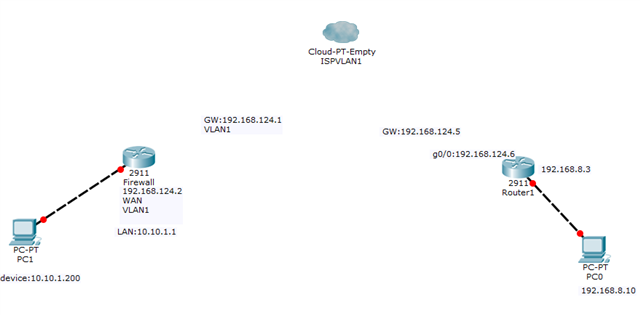
Below is a rough sketch on my network. VLANs have been set on and by the ISP on their side. VLAN1 is for data. Which means PCs on the left should communicate with those on the right and vice.

From the right I can only ping upto the Sophos which is 10.10.1.1(via static routes). Beyond that, I cannot ping. I hope to get the left side to get DHCP ip addresses from the left side. 

Please help. 


This thread was automatically locked due to age.

Top Replies

  • All right,

    I think we are getting somewhere.

    Remember, the first issue was I couldn't ping internal resources behind the Sophos XG? Well, the solution was this:

    Under Hosts and Services->, I created two hosts. 1) The_Last_Network (a.k.a the branch office network 192.168.8.0) and 2) Our_Network (a.k.a HQ 10.10.1.0)

    Then I created a firewall rule, basically, 

    Source

    LAN, The_Last_Network

    Destination

    LAN, Our_Network, Any Services

    And Vwala, I could ping internal resources.

    Problem 2, was to get DHCP to work.

    so Under Adminstration-> Device Access->Local service ACL exception rule->Add

    Source zone: LAN

    Source Netowrk/ Host: TheLast_Network
    Destination Host: HQ (10.10.1.1)

    Services: All of them

    After this I no longer get issues in the packet Capture concerning port 67 and 68
    Which is good, except my user PC is not receiving an IP address.

    Jump to answer
Parents Reply
  • Hi Emmanuel,

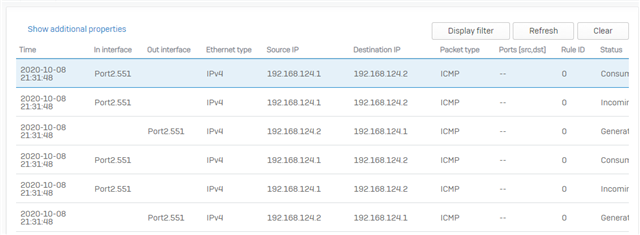
    Thanks for responding. I have attached the packet capture. I don't know what it means, but I filtered the display to show ICMP.

    I Think since the sites are connected through VLANs, it should be LAN to LAN. But I have tried all possible combinations of these but no success. Please help.

Children
No Data