This discussion has been locked.
You can no longer post new replies to this discussion. If you have a question you can start a new discussion

Endpoint slow down internet speed

Hello,

We got a dedicated optical fiber 1gb Down/up .

With the endpoint installed, the speed download seems to be block around around 150 to 300 mb/s. Upload is correct.

IF i uninstall it, then the speed go back to normal with around 900 mb/s. Tests are made through NPERF. 

I tried a to play with settings on sophos central but none of them seems to make it work normally.

Does someone experiencing this issue or does know how to fix it ?


Note: Please see the following Blog Post for the latest update regarding this issue


This thread was automatically locked due to age.

Top Replies

  • It is worth repeating, that there will always be a percentage decrease when you're doing web scanning and lookups "in-line" for browser process traffic. As you say, this only affects processes classified as browsers, not all processes are subjected to so much inspection hence why application speed test tools are unaffected, web browser tests are.

    Depending on the config you have, there is:

    1. Decryption of the browser traffic to be able to inspect HTTPS. 

    This may or may not be on but this is possibly the most intensive feature.
    HKEY_LOCAL_MACHINE\SOFTWARE\Sophos\Management\Policy\ThreatProtection\[latestrevision]\web_protection\
    https_decrypt_enabled = 1 would signify from the endpoint it is enabled.
    "SSL/TLS decryption of HTTPS websites" is the policy option in Central.

    2. Scanning the content before it hits the browser, this relies on https_decrypt_enabled being enabled for HTTPS traffic. If it's HTTP, which maybe accounts for 20% of traffic it is still being processed. 
    "Scan downloads in progress" is the policy option in Central.

    3. Making lookups to SXL to check the domains/urls being accessed.
    "Block access to malicious websites" is the policy option in Central.
    Also if Web control is enabled in policy, these lookups are also made regardless of it being for protection to get the category for the site.

    So when decryption of traffic is enabled, there is more work to be performed, as more data becomes available before it hits the browser to process, plus you have the overhead of the decrypt.  At this point lack of CPU power could be a factor as much as internet speed to make the SXL lookups from SSPService.exe.

    So only when all 3 features:

    • "Block access to malicious websites"
    • "Scan downloads in progress"
    • "Web control"

    are off does SophosNetFilter.exe process exit and there is 0 impact on web browser traffic. Of course if you disable "Network Threat Protection", that closes it down as well but that is far more than needs to be disabled.  This essentially disables all of the Network Threat Protection features rather than just the protection for the browsers.

    The Core agent 2022.4 has an improvement in speed but as far as I am aware, this requires the endpoint flag modernweb.offloading.enabled under

    HKEY_LOCAL_MACHINE\SYSTEM\CurrentControlSet\Services\Sophos Endpoint Defense\EndpointFlags

    to be set to 1.  Sophos slowly rolls the flag out post release to ensure when enabling a new feature or significant change there is no issue with it.  So although you might have 2022.4, your account may not have the flag set yet.

    Hope that helps.

    Jump to answer
Parents
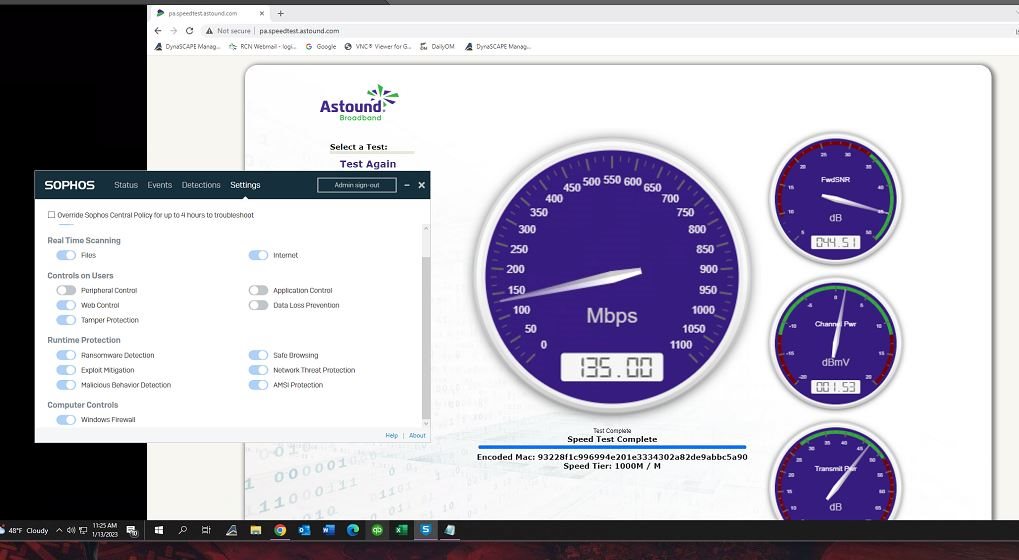
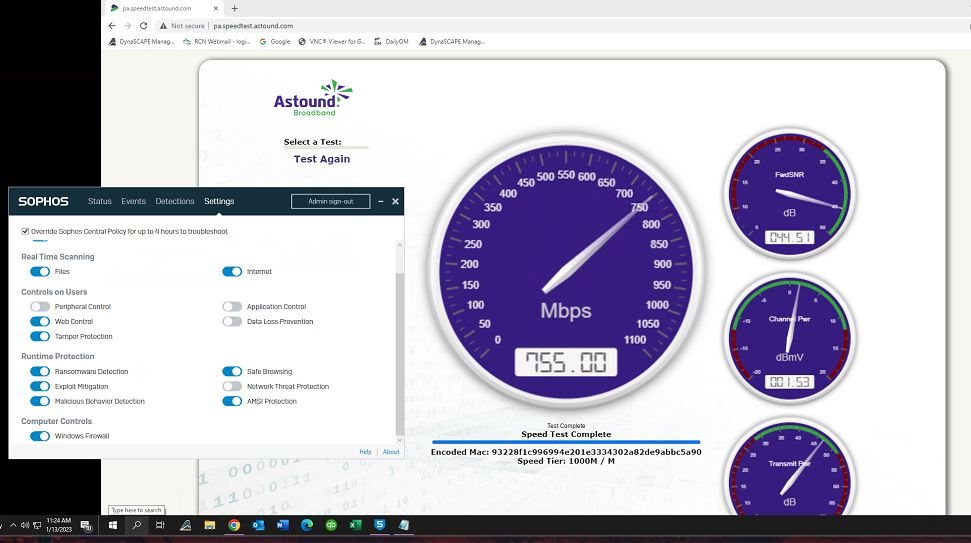
  • I work for an MSP and Sophos Endpoint continues to be a massive headache for us with this type of nonsense. Over 2000 endpoints.  We just onboarded a new client and they immediately felt something was off after fully deploying Sophos Endpoint Intercept X Advanced.  A client with a 1GB internet connection.  These pictures speak for themselves and we even did this with a direct connection to the ISP cable modem, bypassing all internal hardware equipment.  Client is on latest version 2022.4.0.4.

    Something needs to be done about this and I don't want to hear BS about browsers or command line testing.  I cannot contact a client and tell them, well look, it checks out fine via some command line test.  There is a problem with this feature of the product and fully disabling multiple features, including Network Threat Protection cannot be an option.  Fix this before we end up in a discussion about leaving Sophos for good.


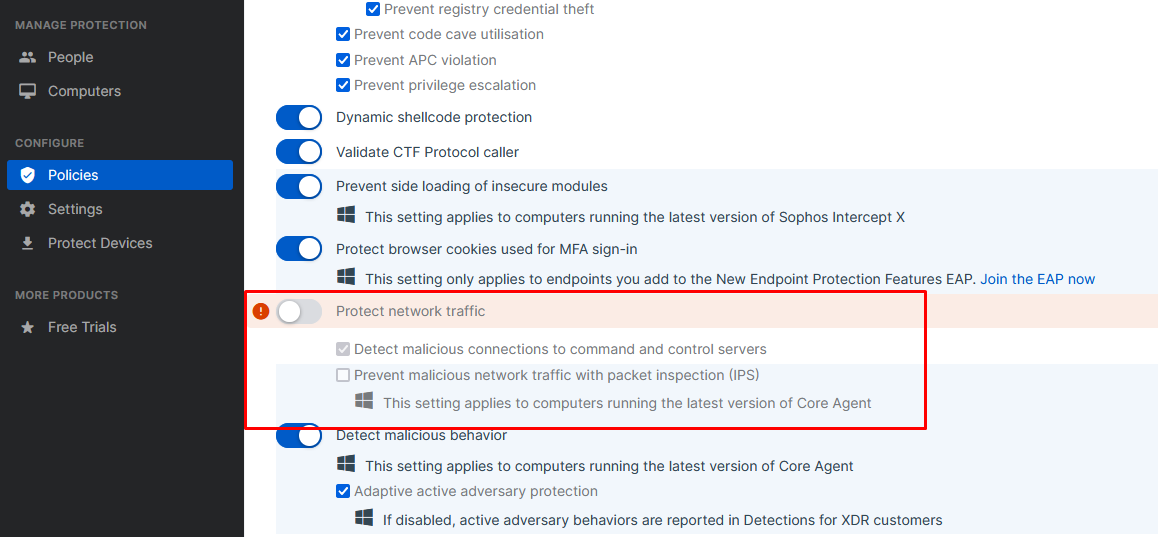
  • I was having these problems even with version 2022.4.0.4, I even opened a support case, in my case it only improved by disabling Protect network traffic, but the idea is not to be disabling components, but the strange thing is that after that I went back to Activate it and the problem no longer occurred, since yesterday I no longer presented degradation, I really don't know what is happening with Sophos, but this is becoming more and more problematic.

Reply
  • I was having these problems even with version 2022.4.0.4, I even opened a support case, in my case it only improved by disabling Protect network traffic, but the idea is not to be disabling components, but the strange thing is that after that I went back to Activate it and the problem no longer occurred, since yesterday I no longer presented degradation, I really don't know what is happening with Sophos, but this is becoming more and more problematic.

Children
No Data