This discussion has been locked.
You can no longer post new replies to this discussion. If you have a question you can start a new discussion

After installing Sophos, the Tasy Java Management System is slow

Good afternoon.

After installing Sophos Intercept X Advanced with XDR on a machine, the computer and our Tasy Java Management System (Philips) are very slow.

We performed some global exclusions with Tasy directories, as well as server IPs exclusions.

Even so, computers are slow.

Does anyone here use this management system and managed to get a configuration that works effectively?


Thank you very much in advance.


Rodolfo Alves Antunes Miranda


This thread was automatically locked due to age.

Top Replies

  • Do you find that the SophosFileScanner.exe process, i.e., the "worker" (larger mem usage than the "host" SophosFileScanner.exe) is talking CPU time with real-time scanning enabled?  If so, this would suggest scanning is taking place of files.

    If that's the case, I would disable tamper protection and create the DWORD LogLevel, set to 4, under the key: 
    HKEY_LOCAL_MACHINE\SOFTWARE\Sophos\Sophos File Scanner\Application
    Then restart the Sophos File Scanner service.

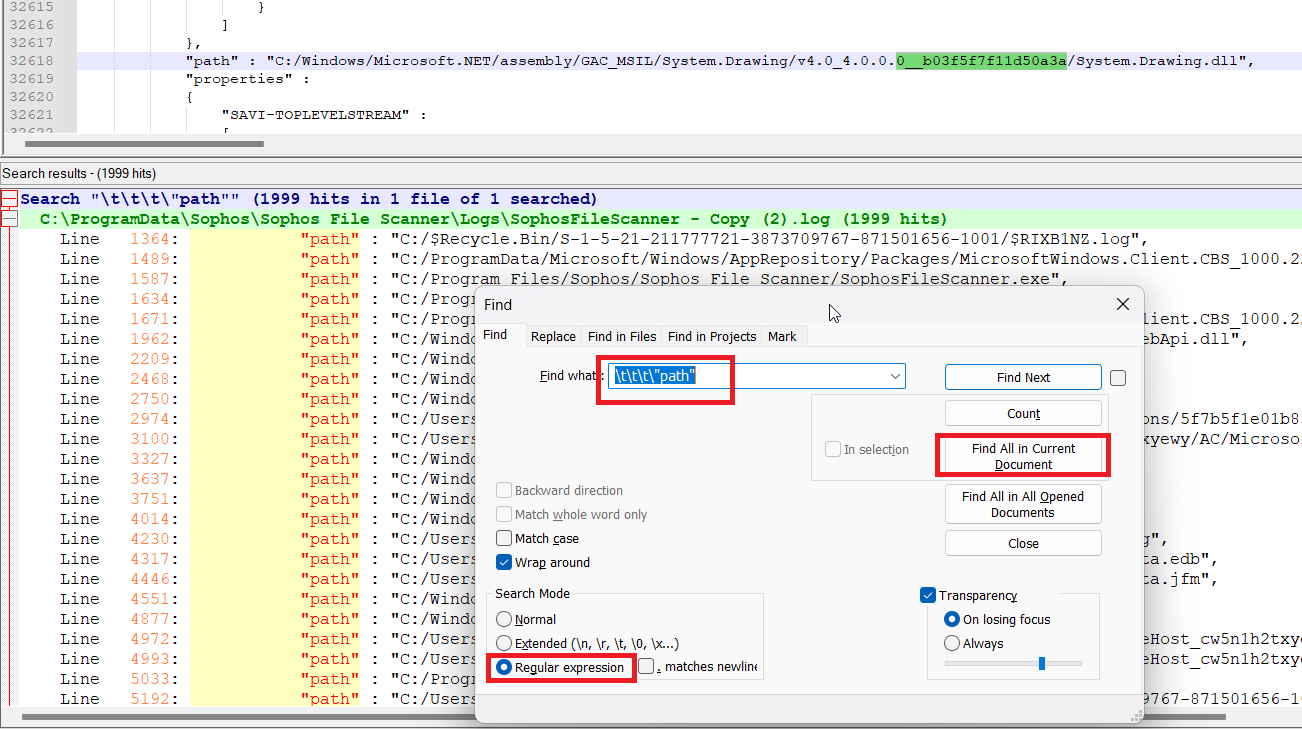
    The log file: C:\ProgramData\Sophos\Sophos File Scanner\Logs\sophosfilescanner.log, after a while of the problem taking place can be opened in Notepad++
    I would search for all lines which start:

    \t\t\t"path"

    That is 3 tabs before the "Path".  These are scan responses. E.g.

    The search results will give you an idea of what is being scanned if that is helpful.

    Or I suppose you could tail the log in real-time with a filter:

    gc "C:\ProgramData\Sophos\Sophos File Scanner\Logs\SophosFileScanner.log" -wait -tail 1 | where {$_ -match '\t\t\t\"Path"'}

    or to filter out the log file, as it's constantly changing:

    gc "C:\ProgramData\Sophos\Sophos File Scanner\Logs\SophosFileScanner.log" -wait -tail 1 | where {$_ -match '\t\t\t\"Path"' -and $_ -notmatch 'SophosFileScanner.log"'}

    Jump to answer
Parents
  • Good morning, Kushal Lakhan.
    Thanks for the feedback.
    I performed the "Basic Troubleshooting KBA" as directed. After disabling "Real-time Scan" the problem no longer occurred.
    I believe the problem is occurring in the verification of files while the Tasy software is running. In addition to this, computer utilization also improved after turning off "Real-time Scan".
    We have already created some global exceptions with the software and servers directories, but the problem still occurs. In case you want to check the exceptions, I can forward them by DM.

Reply
  • Good morning, Kushal Lakhan.
    Thanks for the feedback.
    I performed the "Basic Troubleshooting KBA" as directed. After disabling "Real-time Scan" the problem no longer occurred.
    I believe the problem is occurring in the verification of files while the Tasy software is running. In addition to this, computer utilization also improved after turning off "Real-time Scan".
    We have already created some global exceptions with the software and servers directories, but the problem still occurs. In case you want to check the exceptions, I can forward them by DM.

Children