This discussion has been locked.
You can no longer post new replies to this discussion. If you have a question you can start a new discussion

Intercept X limiting internet on computers

We installed Sophos Intercept X on 75 computers on one client. Customer complains that internet browsing has been slow since then and downloads take a long time.

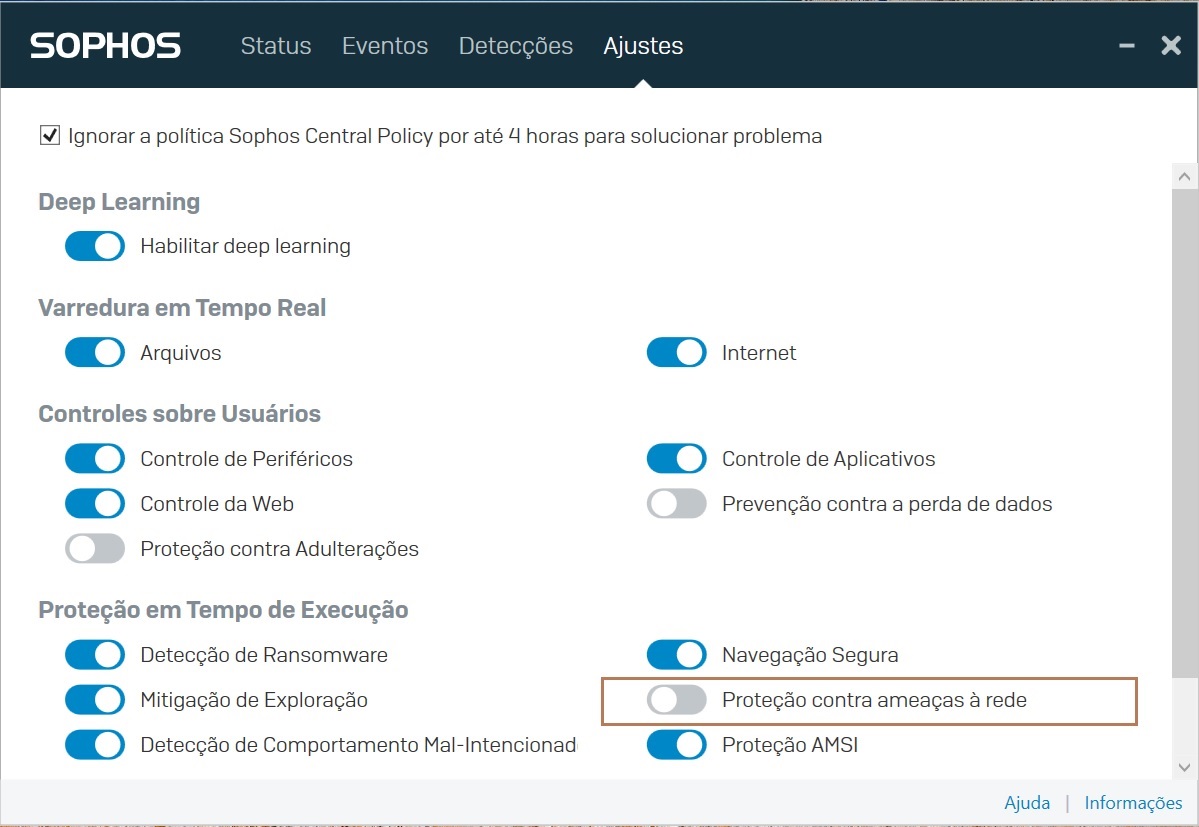
The issue is resolved when the "Protection against Network Threats" function is disabled, directly in Endpoint, I attach an image that shows this.

Has anyone here gone through this? Well, honestly, this is new to me and not even Sophos support here in Brazil knows exactly how to handle this.
 Thanks.


This thread was automatically locked due to age.

Top Replies

  • I suspect it's not the option you mention specifically that needs to be disabled.  That is disabling more than you need.

    Network Threat Protection (NTP), sometimes referenced as MTD, is the component that protects the browsers from connecting to malicious sites and implements web control if enabled in policy (not enabled by default). 

    The component also prevents non browser processes from connecting to know malicious addresses, e.g. C2 servers and provides network connection information to the behavioural engine, download reputation for files downloaded via a browser process and also IPS. 

    It does many things!

    So to visualise it:

    • NTP/MTD (The component)
      • Malicious traffic detection
      • IP Events for behavioural.
      • Web Protection and Web Control (see below as it's the feature most relevant to the question)
      • IPS (SophosIPS.exe process, child of SophosNetFilter.exe, when enabled)
      • Download Reputation  (This is just a DLL loaded by the browser process)


    Web Protection has 2 sub components in the Threat Protection policy:

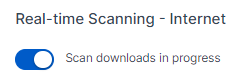
    • Content scanning (Downloads in progress)


      • Malicious site lookups.

      Then there is web control, enabled/disabled in the Web Control policy.

      Both Web Protection features and Web Control are implemented by the process SophosNetFilter.exe which is a child process of the Sophos Network Threat Protection service. 

      When you disable the option you checked it pretty much disables all of the above, it will certainly stop the SophosNetFilter.exe process and why I believe it helps.

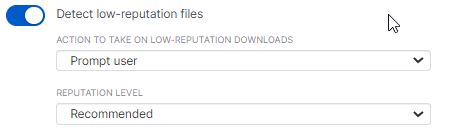
      On top of the above, there is the inspection option:

      This is if SophosNetFilter.exe should decrypt web traffic from browsers to perform inspection. This is not enabled by default.

      So I would suggest:

      1. Try disabling SSL/TLS inspection if enabled.  Does that speed things up?

      2. If not, try disabling Web Control, Scan downloads in progress and  Block access to malicious websites.  This will stop the SophosNetFilter.exe process, I suspect it's fine then.  Do leave the other features enabled though.

      Thanks.

      Jump to answer
    Parents
    • Seeing the same thing here at my company. All of our mac clients on Intercept X are just fine (we are a 90% mac shop), but the few on PC are seeing their internet browsing throttled back to 10-20% of normal speed (our symmetrical Gb speed is typically 100-200 Mb on any PC). The interesting thing is that this is not happening with other apps that go across the WAN. Presto, our hight speed (UDP) file transfer server that our artists access across the WAN is experiencing no slowdown at all. The slowdown is only occurring with internet browsers (Chrome, Firefox, IE, etc..)

    • That makes sense as it’s only the traffic from browser processes subjected to web protection and control.

      Network traffic from other processes is considered but not to the same degree. The SophosNetFilter.exe process,the child process of the sophosntpservice.exe is where the work takes place. 

      I would imagine that with ssl/tls inspection enabled in the threat protection policy it would have to be slower than without if you have that option enabled.

      it is my understanding that the next release improves the speed and this is due next week sometime at least for the early groups.

    Reply
    • That makes sense as it’s only the traffic from browser processes subjected to web protection and control.

      Network traffic from other processes is considered but not to the same degree. The SophosNetFilter.exe process,the child process of the sophosntpservice.exe is where the work takes place. 

      I would imagine that with ssl/tls inspection enabled in the threat protection policy it would have to be slower than without if you have that option enabled.

      it is my understanding that the next release improves the speed and this is due next week sometime at least for the early groups.

    Children
    No Data