This discussion has been locked.
You can no longer post new replies to this discussion. If you have a question you can start a new discussion

Firefox (especially Gmail) cannot complete some requests: no responses are returned (zero bytes), assume that because of Endpoint Agent

It is almost impossible to use Gmail (mail.google.com) in Firefox. There are no problems in Chrome on the same machine.

In the browser developer console / Network tab I see some requests are without responses (zero bytes responses). Some with SSL_ERROR_BAD_MAC_ALERT

GMail app constantly shows yellow warning: "Ups... the system encountered a problem. Retrying in ..." .  "Retry now" link doesn't help.

Similar errors discussed recently: https://community.sophos.com/sophos-central/f/discussions/133650/ssl_error_bad_mac_alert-pr_end_of_file_error


This thread was automatically locked due to age.

Top Replies

  • Is this Windows?

    I assume this behaviour has to be related to web protection and control, is that the case? 

    If it's Windows, do you have a process called SophosNetFilter.exe?  If so, you are using "modern web" and the new endpoint architecture which is capable of HTTP decryption.

    The question then is, do you have HTTP decryption enabled?  At the client you can check in the registry:

    HKEY_LOCAL_MACHINE\SOFTWARE\Sophos\Management\Policy\ThreatProtection\[revision]\web_protection

    https_decrypt_enabled = 1 or 0

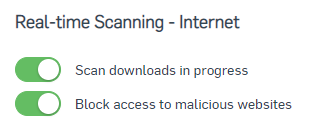
    To rule out Web Protection and Control, you can disable web protection and control by disabling in the Threat Protection policy:

    and if you have Web Control enabled in the Web Control policy you can disable that. Once the policy arrives at the client, the SophosNetFilter.exe process will terminate.

    Jump to answer
Parents Reply Children
  • If the issue continues to persist, could you turn off the "Sophos Network Threat Protection" component through the Sophos UI? 

    The NTP component will be involved in all of the web interceptions that occur on the endpoint so I only recommend doing so temporarily, or where absolutely necessary.

    There is an update which will be released this month to address a related issue. This update will hopefully resolve the problem discussed in this thread as well. I will let you know here if I receive a more definitive time frame. 

    Kushal Lakhan
    Global Community Support Engineer
    Connect with Sophos Support, get alerted, and be informed.
    If a post solves your question, please use the "Verify Answer" button.
    The New Home of Sophos Support Videos!  Visit Sophos Techvids
  • Along with changing DNS settings, some additional guidance related to firefox has been shared in the following document. 
    - SSL/TLS decryption of HTTPS websites

    1. Enter 'about:config' in the address bar and press Enter.

      A warning page may appear. Click Accept the Risk and Continue to go to the about:config page.

    2. Set 'security.enterprise_roots.enabled' to True.

      This tells Firefox to trust the Windows root certificate store.

    If your issue continues to persist, I recommend opening a case with Sophos Support so that we can look into the issue further and make compatibility changes for the future. 

    Kushal Lakhan
    Global Community Support Engineer
    Connect with Sophos Support, get alerted, and be informed.
    If a post solves your question, please use the "Verify Answer" button.
    The New Home of Sophos Support Videos!  Visit Sophos Techvids
  • Hello, I done this Change but it doesent helped me.

    Do you have another idea?