Good afternoon,
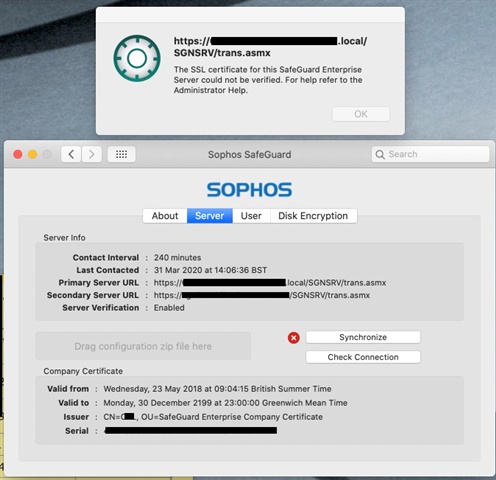
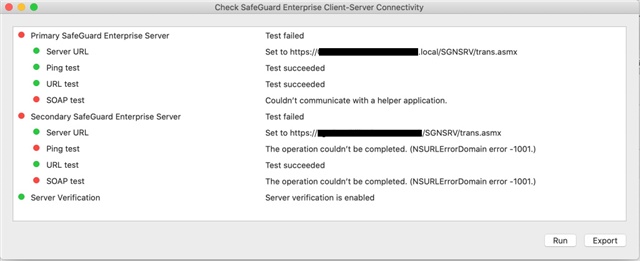
We are experiencing the attached errors on boot up with an iMac.
Can you please advise?
Thanks and kind regards, Dan Petford
This thread was automatically locked due to age.

Good afternoon,
We are experiencing the attached errors on boot up with an iMac.
Can you please advise?
Thanks and kind regards, Dan Petford


If the cert was expired - then the Windows machines would also fail to sync. The most likely issue is that it is a local cert. Macs require that the cert have a CA that is in their keychain - so the corporate ones like DigiCert and stuff. Go take a look at the ssl cert on the sgn server and see what the CA is. If it is a self-signed cert or the CA is the local AD - then the Macs won't trust it.
I think we've managed to resolve this now. I found a spare iMac to test with and, suspecting that I'd installed the wrong certificate on the problematic iMac, installed SafeGuard on the test one but with a different certificate from our SGN server. SafeGuard on the test iMac is working perfectly, so I'm pretty sure I just need to replace the certificate on the other iMac to resolve the issue.
Thanks for pointing us in the right direction
Dan W
I think we've managed to resolve this now. I found a spare iMac to test with and, suspecting that I'd installed the wrong certificate on the problematic iMac, installed SafeGuard on the test one but with a different certificate from our SGN server. SafeGuard on the test iMac is working perfectly, so I'm pretty sure I just need to replace the certificate on the other iMac to resolve the issue.
Thanks for pointing us in the right direction
Dan W