This discussion has been locked.
You can no longer post new replies to this discussion. If you have a question you can start a new discussion

insecure default exception

Hello,

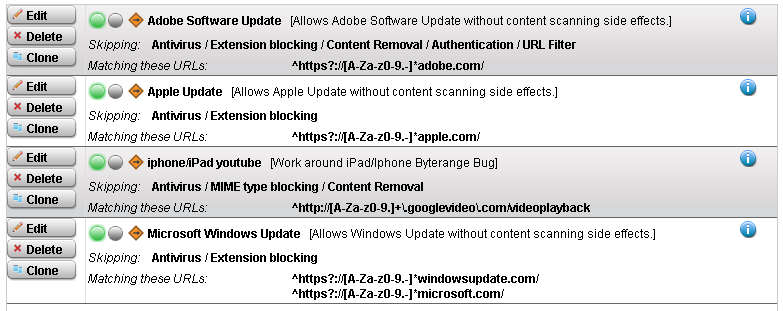
maybe I misunderstand the predefined regular expressions which exclude Microsoft URLs from the antivirus filter, but it seems to me as if the could be compromised by using the right domain name. The ASG has a predefined exception "Microsoft Windows Update [Allows Windows Update without content scanning side effects.]" which skips "Authentication / Antivirus / Extension blocking / URL Filter / Content Removal" from URLs matching this regular expressions:

^https?://[A-Za-z0-9.-]*windowsupdate.com/
^https?://[A-Za-z0-9.-]*microsoft.com/

According to this expression I can simply create a website e.g. http://www.a-virus-from-microsoft.com and upload any malware on this site. The ASG will never scan the content because the domain ends with microsoft.com.
The problem could be solved by changing these URLs to: 

^https?://windowsupdate.com/
^https?://microsoft.com/
^https?://[A-Za-z0-9.-]*\.windowsupdate.com/
^https?://[A-Za-z0-9.-]*\.microsoft.com/

The same problem exists with the adobe.com and apple.com exception.

It would be great if Astaro would change this with the next version.


This thread was automatically locked due to age.

  • I looked on mine and I don't have any regular expressions in the exception list.  For the Windows Update exception it requires that the domain be either windowsupdate.com or microsoft.com.  What version of ASG are you using?
  • I looked on mine and I don't have any regular expressions in the exception list.  For the Windows Update exception it requires that the domain be either windowsupdate.com or microsoft.com.  What version of ASG are you using?


    sorry, I forgot to mention the version. I found the problem on a ASG 8.002 which was installed with version 8.001 and the automatically updated with u2d.

    I've attached a screenshot of my default exceptions.
  • I looked on mine and I don't have any regular expressions in the exception list.  For the Windows Update exception it requires that the domain be either windowsupdate.com or microsoft.com.  What version of ASG are you using?


    I've check the problem on an ASG 7.5.x and it looks as if it's even more worth. The ASG 7.5.x also uses regular expressions for URL matching but only has a bare keyword (the domain name) in the default configuration. As a result of this it's very simple to transfer a virus without being scanned. For example simply try this:

    Place the Eicar virus testfile http://www.eicar.org/download/eicar.com on any website you like, if you try to download this file through the ASG it will complain about the virus. After that simply rename the file to microsoft.com and try downloading it again - you will see it will go through.
  • Wow, rather than putting it on a different website, I simply put in an exception with target domain set to eicar.com that skips antivirus and extension blocking and it downloaded it just fine.  I never realized that.

    Thanks for the info!
  • Great work, Paketschubser!  Thanks for your contribution - This should be changed immediately!

    Cheers - Bob
    PS Some others for those who would like to copy-n-paste into your Exceptions.
    ^https?://adobe.com/
    ^https?://[A-Za-z0-9.-]*\.adobe.com/
    ^https?://apple.com/
    ^https?://[A-Za-z0-9.-]*\.apple.com/
    ^https?://macromedia.com/
    ^https?://[A-Za-z0-9.-]*\.macromedia.com/
    ^https?://ontrack.com/
    ^https?://[A-Za-z0-9.-]*\.ontrack.com/
    ^https?://avery.com/
    ^https?://[A-Za-z0-9.-]*\.avery.com/
     
    Sophos UTM Community Moderator
    Sophos Certified Architect - UTM
    Sophos Certified Engineer - XG
    Gold Solution Partner since 2005
    MediaSoft, Inc. USA
  • Good catch Paketschubser-

    I'll nudge folks and see what I can do about changing the defaults.

    BUT, it looks like the suggested regex will block sites like https://microsoft.com.  Someone much better at Regex than I am suggested:

    https?://([A-Za-z0-9.-]*\.)?microsoft.com/

    I suggest users review all of the exceptions (and the transparent mode skiplist, and other proxy exclusions in the browsers, etc). and remove any not needed in your environment.  You may want to block any of those you take out of the exceptions to prevent putting a high load on the proxy when evil things like the Adobe download manager try to run.


    Now, stepping out of my Astaro role and onto my soapbox (in my purely personal, professional security paranoid role):
    In a perfect world... I don't think these exceptions should be active in a business environment, and I think all of these sites should be expressly blocked (and Mozilla, OpenOffice, etc. too).  Only your hardened patch management and central security systems (AV controllers and such) should be allowed access to the required download sites.  The clients shouldn't be trusted to download their own updates, nor should the bandwidth (no matter how much you have) be squandered on downloading the same packages dozens (hundreds, thousands) of times.


    Jack
  • Wait a moment. In my v7 I see this text in exception:

    Target Domains:
    windowsupdate.com
    microsoft.com
    au.download.windowsupdate.com
    download.windowsupdate.com

    So, target domainsnot URL! I think regex are not applied here... am I wrong? [:O] Is this different in v8?

    Edit: Sorry, I have seen in this moment the screenshot, in v8 the domains are replaced by urls. So, v7 is "bug free", isn't it?
  • Wait a moment. In my v7 I see this text in exception:

    Target Domains:
    windowsupdate.com
    microsoft.com
    au.download.windowsupdate.com
    download.windowsupdate.com

    So, target domainsnot URL! I think regex are not applied here... am I wrong? [:O] Is this different in v8?

    Edit: Sorry, I have seen in this moment the screenshot, in v8 the domains are replaced by urls. So, v7 is "bug free", isn't it?


    That's what I thought too, but it turns out not to be true.  Regex is applied even to the target domains section.  That's what I was talking about in my earlier post.
  • That's what I thought too, but it turns out not to be true.  Regex is applied even to the target domains section.  That's what I was talking about in my earlier post.


    I think that the behaviour changed from v7 to v8, I'm quite sure that in v7 regex are not used...
  • Though v7 doesn't seem to explicitly use regex, I think it's gotta be buried in there somewhere, either that or the filters are broken.  When I created a domain filter of eicar.com it allowed a *file* through called eicar.com.  It sounds really like the problem's with the filter being applied to the whole packet instead of the source domain of the packet, at least in v7.