This discussion has been locked.
You can no longer post new replies to this discussion. If you have a question you can start a new discussion

Prefill password in Sophos VPN

Hi,

I have to enter a password in Sophos VPN. The first part is always the same and the second is changing every 30 seconds.

Can I prefill Sophos VPN with username and the first part of the password?

Cheers

Clothia


This thread was automatically locked due to age.

Top Replies

  • Yes, just looked it up, seems to be almost the same as what the KeeOTP plugin did.

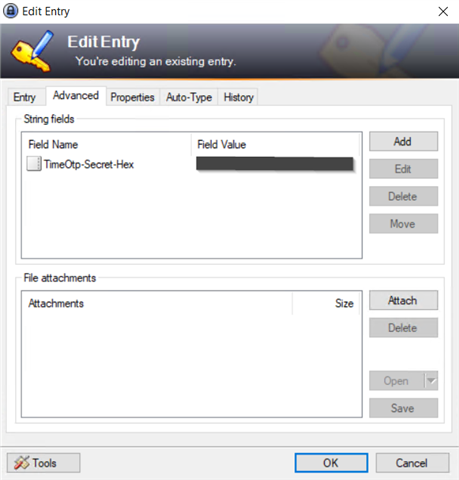
    You need to go to the advanced settings of the entry in Keepass and enter a String field like this:

    I believe the value of the secret found in UTM is the HEX value, so you would need to name the field: TimeOtp-Secret-Hex with the value copied from the OTP of your UTM-account.

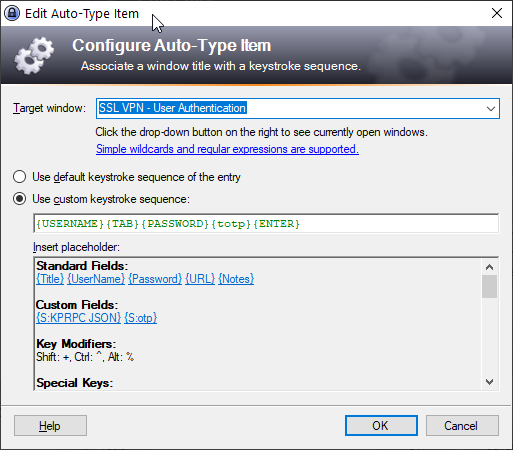
    Then you go to the Auto-Type tab in the same entry and you can configure it like so:

    The Target Window can be chosen from all current open windows, so make sure to first have the VPN-client ask you to login, then configure this Auto-type entry.

    In my examply I used the placeholder {totp} (which is for KeeOTP), instead you can use {timeotp}

    In this example, with the screen open and the cursor in the username field, it will fill in the {USERNAME} press {TAB}, fill in the {PASSWORD} followed by the {timeotp} and then hits {ENTER}.

    I have a bit more details on my blog about this.

    Jump to answer
  • I open my SSL VPN client and press CTRL-ALT-A and it fills in the credentials. At the end it opens The Keepass entry for some strange reason.

    Plus I am rejected from Sophos login, because of wrong credentials.

    If I am adding the password (CTRL+C - CTRL+V) and use AuthPoint to get the 6 digits it works.

  • Try to add an autotype entry with the same settings but then for notepad application.

    You can then SEE what is being sent. If you don't want to show the password, then you can just leave out {password} but especially you will want to see {timeotp} and match if this is correct with what your authenticator app is generating.

    If they are different, then first check the time on both the firewall and the device with the authenticator app. Also if time is correct on both, then double check that you have actually a HEX secret and not maybe a Base32 Secret. If your secret only consists of A-Z in capitals and the numbers 2-7 then you should use BASE32 and not HEX. If you secret contains 0-9 and A-F characters then its Hex.

    See the Keepass website for more information on how to configure one or the other.


    Managing several Sophos UTMs and Sophos XGs both at work and at some home locations, dedicated to continuously improve IT-security and feeling well helping others with their IT-security challenges.

    Sometimes I post some useful tips on my blog, see blog.pijnappels.eu/category/sophos/ for Sophos related posts.

  • I can see the OTP on a new line, probably you have {USERNAME}{TAB}{PASSWORD}{ENTER}{TIMEOTP} still. You can manually adjust the order to {USERNAME}{TAB}PASSWORD}{TIMEOTP}{ENTER}

    Also you can check in notepad whether the 6-digit number is the same as the one from your authenticator device.


    Managing several Sophos UTMs and Sophos XGs both at work and at some home locations, dedicated to continuously improve IT-security and feeling well helping others with their IT-security challenges.

    Sometimes I post some useful tips on my blog, see blog.pijnappels.eu/category/sophos/ for Sophos related posts.

  • I do have timeotp-enter and the number is not the same as from my authenticator device.

    Strange.

  • You'll most likely need to choose another field name (with a different source), see keepass.info/.../placeholders.html


    Managing several Sophos UTMs and Sophos XGs both at work and at some home locations, dedicated to continuously improve IT-security and feeling well helping others with their IT-security challenges.

    Sometimes I post some useful tips on my blog, see blog.pijnappels.eu/category/sophos/ for Sophos related posts.