
This discussion has been locked.
You can no longer post new replies to this discussion. If you have a question you can start a new discussion

Slow bandwidth file transfer Vlan to Vlan

Hello, i'm experiencing an issue with my XG105w.


I have multiple Vlans in my network created with the xg105w, and when i transfer a file from 1 server being in the Vlan 1 to another server being in another Vlan, the transfer speed is limited at 60MB/s (480Mbps) (cf. screenshot below):
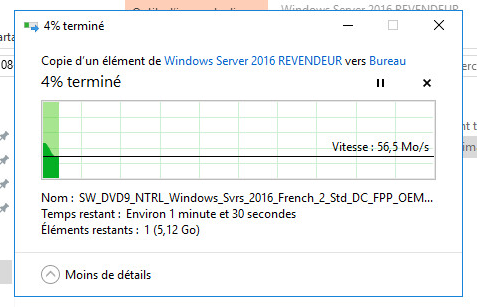
 ,

but if i transfer a file between 2 servers in the same VLAN, the speed is OK at 120MB/s (1Gbps) as shown below:
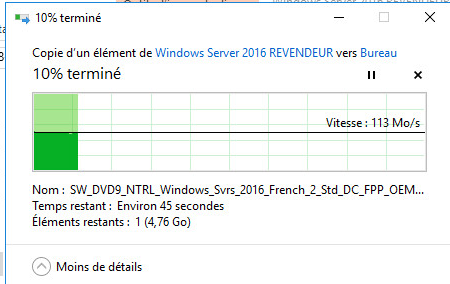


Do you have any ideas ?


Thanks.

Viken


This thread was automatically locked due to age.
  • Hi Viken,

    I was investigating internally if there is any hardware limitation with VLANs in the XG but, I am yet discover anything alike. According to the investigation, we did through the forums we do not capture any relative logs that can cause the slow throughput with inter-VLAN transfers. I would suggest you one last step before suspecting it to be associated with anything local. Take SSH to the XG and go to option 4. Device console and execute the following command: 

    system firewall-acceleration show

    If this module is enabled, then try to disable it and check the throughput. 

    Any help?

    Sachin Gurung
    Team Lead | Sophos Technical Support
    Knowledge Base  |  @SophosSupport  |  Video tutorials
    Remember to like a post.  If a post (on a question thread) solves your question use the 'This helped me' link.

  • Hi Sachin,


    I disabled system firewall-acceleration, and i tested a file transfer between VLAN 20 and VLAN 1, the transfer is a bit better (~560Mbps instead of 480 with firewall-acceleration enabled) but still too slow compared to the 1Gbps transfer speed from Vlan 1 to Vlan 1.


    Thank you,


    Viken

  • Hi Viken,

    Is VLAN 1 the native VLAN? The routing within VLAN1 will take place through the switch which reduces two hops and an inter-VLAN routing will require packet to traverse from the XG increasing two next hops; please correct me if I am mistaken. So I suspect that the speed variation is a technical bottleneck.

    Thank you,

    Sachin Gurung
    Team Lead | Sophos Technical Support
    Knowledge Base  |  @SophosSupport  |  Video tutorials
    Remember to like a post.  If a post (on a question thread) solves your question use the 'This helped me' link.

  • Hi Sachin, Yes the VLAN 1 is the native LAN configured physically on the port 1 of the xg105w. So, if i understand what you are saying, there will be no solution for this issue ? Because in reality it doesn't seem to be an issue but a normal thing, right ? Thank you. Viken
  • I suspect it. Can you arrange a router to replace XG and check the throughput between VLAN 1 and VLAN 10 for a file transfer? 

    Cheers

    Sachin Gurung
    Team Lead | Sophos Technical Support
    Knowledge Base  |  @SophosSupport  |  Video tutorials
    Remember to like a post.  If a post (on a question thread) solves your question use the 'This helped me' link.

  • Try this: Log in to console and choose 4.

    Enter command:

    console> set advanced-firewall bypass-stateful-firewall-config add source_network X.X.X.X source_netmask 255.X.X.X dest_network Y.Y.Y.Y dest_netmask 255.X.X.X

     and vice versa

    console> set advanced-firewall bypass-stateful-firewall-config add source_network Y.Y.Y.Y source_netmask 255.X.X.X dest_network X.X.X.X dest_netmask 255.X.X.X

    Or refer to https://kb.cyberoam.com/print.asp?id=2017 this was the case for me. E.g. by-pass the statefull packet inspection SPI in the firewall for your interconnected LAN(s).

    Cheers.

  • Hello,


    I tried the commands you said and the issue is still occurring for me.


    Cheers,

  • Hi Viken,

    I can't think of any other troubleshooting steps that we can suggest you further. The only suggestion is to start a case with support and provide me the case# to monitor it.

    Thanks

    Sachin Gurung
    Team Lead | Sophos Technical Support
    Knowledge Base  |  @SophosSupport  |  Video tutorials
    Remember to like a post.  If a post (on a question thread) solves your question use the 'This helped me' link.