This discussion has been locked.
You can no longer post new replies to this discussion. If you have a question you can start a new discussion

XG IPSEC Error - EST-P1: System did not accept any proposal received.

Hello,

Hopefully some one can help me. I am trying to setup a IPSEC VPN connection with the Sophos XG firewall. I have configured the IPSEC policy for remote access and also the l2tp server. I have setup the Windows 10 Built in VPN client to connect to the firewall, but whenever i connect i get the following error logged in the firewall:

EST-P1: System did not accept any proposal received. Need to reconfigure the connection on either ends

Below is a screenshot of my IPSEC policy settings. 
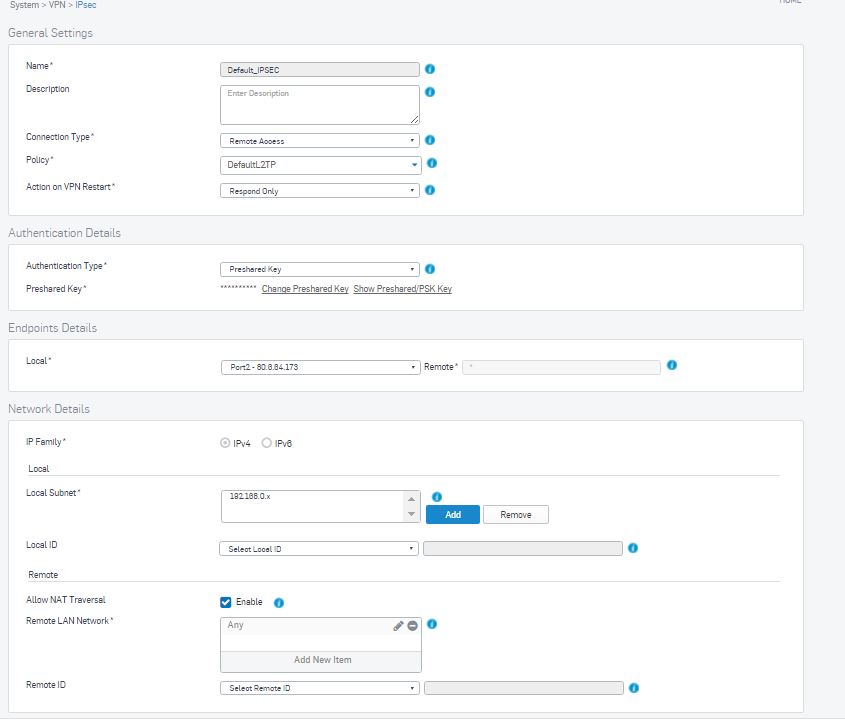
I have tried to authenticate using a local user account and also an Active Directory one. Below is my Windows 10 Client settings
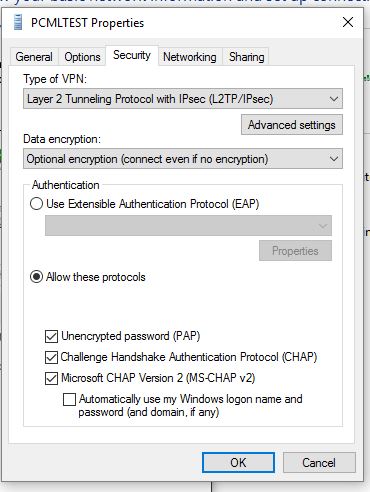
I am trying to use IPSEC with a shared secret 


This thread was automatically locked due to age.
  • Hi John,

    The error "EST-P1: System did not accept an proposal received" is basically stating that Phase 1 negotiations failed as as there was a mismatch in protocols.

    Check out the following knowledge base articles

    As you are using Windows Client I suspect you may not have removed the Kerberos authentication method and possibly not set up the pre shared key on the Windows side.

    Leon Friend

    Sophos Sales Engineer

    Sophos XG Firewall - Certified Architect, Sophos Certified Engineer, Cyberoam CCNSE, Cyberoam CCNSP