This discussion has been locked.
You can no longer post new replies to this discussion. If you have a question you can start a new discussion

Sophos Firewall: v19.5 GA: Feedback and experiences

Release Post:  Sophos Firewall v19.5 is Now Available 

Old v19.0 MR1 thread:  Sophos Firewall: v19.0 MR1: Feedback and experiences 

EAP Sub thread:  SFOS v19.5 Early Access Program 

EAP 19.5 Thread:  Sophos Firewall: v19.5 EAP1: Feedback and experiences 


This thread was automatically locked due to age.

Top Replies

  • This is indeed expected behavior of the FCI feature.  What follows is a Draft of a KB Article I'm writing (feedback welcome).


    In XG 18.0 the DPI proxy was introduced, with many more SSL/TLS scanning options and certificate protection. There are some certificate security concerns with that are blocked in most configurations, however they are allowed without any warning when using DPI mode with the decryption profile "Maximum compatibility". In these cases the XG decrypts and re-signs, creating a new certificate with its own Certificate Authority that hides potential problems that the end user should know about which that would be blocked in other configurations.

    In 19.0 a new feature was added called Forward Certificate Invalidity (FCI). This feature detects certain types of certificate invalidity and "forwards" (tells the user) about them. Because we cannot create a certificate with the same error, so we create one in a special way that we know will cause browsers to warn users. A CA is used that us unique and untrusted, and the certificate Common Name is used as the error message to tell the end user what the problem is. This changes the behavior of DPI mode with Maximum Compatibility. By signing it in the way, browsers will warn users that there is a certificate problem but will allow users to proceed and load the pages as they did in 18.0/18.5.

    The most common issue that FCI catches on the public internet is websites that do not send their entire certificate chain. When a website provides their certificate, they usually provide the certificate, the CA that signed it (usually an intermediate CA), the CA that signed that one, up to the root CA. The root CA is trusted by the browser, and the browser can verify the entire chain.

    However some websites do not provide the chain. They may provide only the certificate, or they provide the certificate and the root CA, but they do not provide the intermediate CA. While this is valid, it is not best practice and sites like ssllabs.com which rate sites will cap their score.

    If a website does not provide the chain they usually implement AIA (Authority Information Access). This is a link within the certificate that says where to download the CA that signed it.

    Some browsers (Chrome 58+, Edge, Safari) will automatically use the AIA to download the intermediate and store it for future use. Firefox 75+ uses a different mechanism called intermediate CA preloading (wiki.mozilla.org/.../Intermediate_Preloading). Older Android (pre Oreo) devices do not support any mechanism. The XG does not currently support AIA.

    If the website does not provide the full chain, the XG behavior depends on the configuration. It is important to note that v19 did not introduce blocking of sites that do not provide the full chain. The XG has always blocked these sites when using normal security, and the resolution below has always worked. The difference is that when using a decryption profile that does not block self signed certificate, invalid issuers, or many other security concerns (such as "Maximum compatibility") we used to allow the connection and sign it in a way that made it appear more secure. Now we allow but sign it in a way that appears insecure.

    How to configure the system to allow access to sites that do not provide a complete certificate chain.

    Method 1 - Do not decrypt
    Configure the domain to not be decrypted. Adding the domain to the Local TLS Exclusion List is the best option for DPI mode. Adding it to a Web Exception will exclude it for both DPI and Proxy mode.

    Method 2 - Add the Intermediate certificate to the XG CA store

    Option 1:
    Test the site in www.ssllabs.com/.../
    You should see that the grade is capped to B and the Certification Path includes an "Extra Download". In the section under Issuer there should be an AIA link.

    Option 2:
    Use a browser that is not going through the XG, or is going through the XG with HTTPS not decrypted so that you get the original certificates as presented by the site. Ask the browser to display the certificate information and the AIA link should be there. How this is displayed is browser specific.

    Once you have the AIA link, download the certificate to your computer. Then in WebAdmin go to Certificates > Certificate Authorities and Add. Choose the file.
    With the Intermediate in the CA store, the page will load in all configurations.

    Jump to answer
  • Same. In the past it's sometimes taken two tries, but this time it failed on four so I cam here to post. No joy. I'd also note it takes a LONG time to upload, but then again it's on an XGS87. I'm only doing the upload to replace the penultimate (SFOS 19.0.1 MR-1-Build350) release, not attempting upload & reboot.

    The email notification I get from the XGS87 after it fails says:

    Message:
    Firmware installation failed. Invalid firmware.

    For others who want to check the checksum, the several Mac-based checksum programs (chksum, shasum) don't give the proper checksum. You need to have OpenSSL installed and use `openssl md5 HW-19.5.0_GA.SF310-197.sig`, which does result in a match so the file is not corrupted on download.

  • Install/upgrade of GA SFOS went flawless!

    I do want to point out a bug that i have reported a long time ago and which still is not resolved.
    It concerns adding / editing Email exceptions:

    1. go to Email > Policies & Exceptions
    2. Add exception
    3. Tick box skip Greylisting
    4. For these sources / hosts
    5. Add FQDN hosts
    6. Save

    Now edit this entry, you cannont see nor edit the FQDN host.

     
    SFVH (SFOS 19.5.1 MR-1-Build278)  - Last (re)boot on Februari 20 2023
    Asus H410i-plus - Pentium 6605 Gold - 250GB M.2 PCIe NVMe SSD - 8GB - 3 ports
    [If any of my posts are helpful to you please use the 'Verify Answer' link]
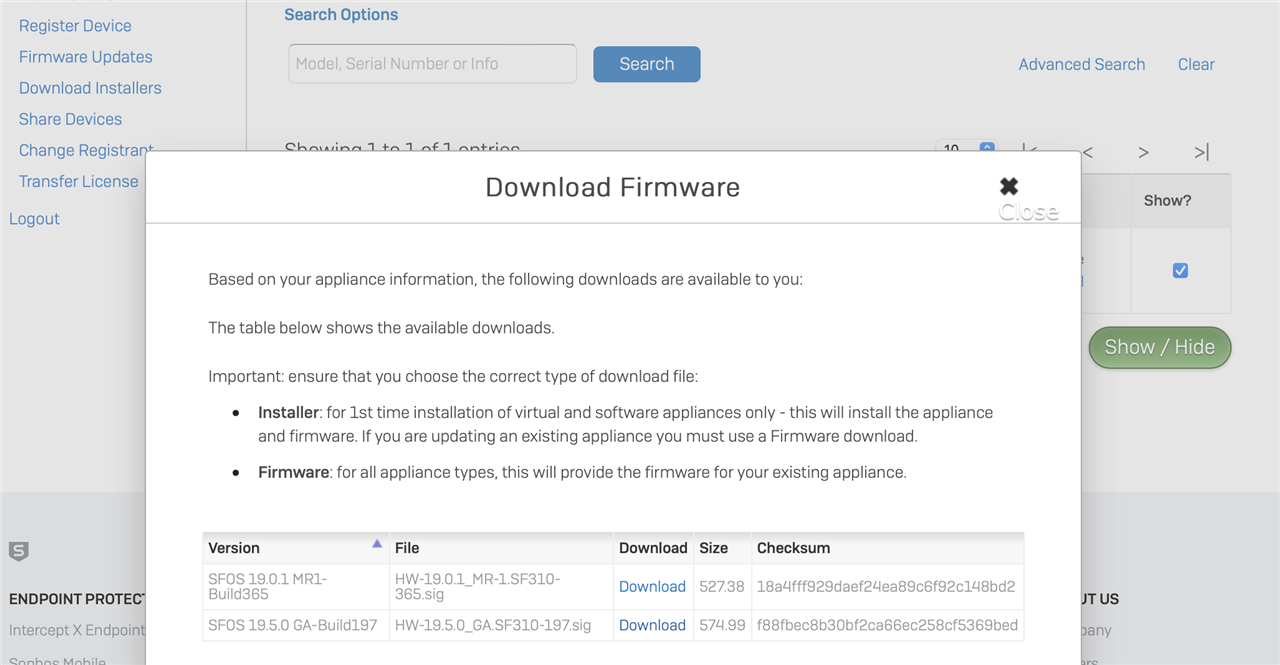
  • Did exactly that. Didn't work for me in four attempts to load into the XGS87 with two different downloads. (Which really didn't matter since they both had the correct checksum, but I downloaded again before checking the checksum.) The download offers me:

    and I select 19.5.0 and I get the correct checksum after download. Still get the Invalid Firmware error when I attempt to upload it to the XGS87.

    I just noticed that it makes a big deal about the difference between Installer and Firmware, but there is no Installer option anywhere in the choices below. It shows me only .sig, which is firmware and which choice has worked for me in the past. (Unless they are erroneously offering the Installer as if it were Firmware.)

  • Hi Ian, Thomas,

    DDNS log suppression was identified as valid improvement , however its not added to this GA. One of future maintenance releases in 19.5 series would pick that up. 

  • BGP not working. On my test device XG210 SFOS 19.5.0 GA-Build 197 does not work BGP with full BGP table. Firewall is not available via the advertised address. In the version of SFOS 19.0.1 MR1-Build365 works normally.

  • Is this a log-suppression issue? That is, are two processes reporting the same message but only one took action, or is it literally updating twice in quick succession? Probably doesn't make a huge difference, but if it's actually updating twice in quick succession but you hide this from us, there could be follow-on problems that occur with certain DDNS providers that we'll have no indications to pass on to Tech Support.

  • This is not a log suppression issue, but software bug issue,

    Please fix.

    log suppression in general is not a good idea because it can mask system faults and needs to be thought through very carefully before being implemented,

    Ian

    XG115W - v19.5.1 mr-1 - Home

    If a post solves your question please use the 'Verify Answer' button.

  • WAN link manager is still broken though not as bad as in the EAP.

    I still need to reboot to get the WAN link manager to test the IPv6 link correctly. Just had a an issue where I needed to reboot to get new external addresses assigned.

    The WAN link manager behaviour is like it was added for a marketing reason, it certainly does not work in a production environment. A network break and a new address is assigned the WAN link manager just seems to ignore the test result or maybe the DHCP renew function ignores the fail message and fails to issue a DHCP renew?

    Ian

    XG115W - v19.5.1 mr-1 - Home

    If a post solves your question please use the 'Verify Answer' button.

  •   Dev team would like to investigate why BGP is not working in your setup.Can you share the support access for your device/s in  Private message to me? Meanwhile some quick info on this setup will help us - Is this migration or fresh install for 19.5 GA? What is the remote end /neighour device for BGP.   The devices provide us 1. config from /conf/routing/ 2. Logs: /log/csc.log , /log/bgpd.log , /log/zebra.log 

  • We had a major problem with bgp. Had to roll back. Will post more tomorrow