This discussion has been locked.
You can no longer post new replies to this discussion. If you have a question you can start a new discussion

Sophos Firewall: v19.5 GA: Feedback and experiences

Release Post:  Sophos Firewall v19.5 is Now Available 

Old v19.0 MR1 thread:  Sophos Firewall: v19.0 MR1: Feedback and experiences 

EAP Sub thread:  SFOS v19.5 Early Access Program 

EAP 19.5 Thread:  Sophos Firewall: v19.5 EAP1: Feedback and experiences 


This thread was automatically locked due to age.

Top Replies

  • This is indeed expected behavior of the FCI feature.  What follows is a Draft of a KB Article I'm writing (feedback welcome).


    In XG 18.0 the DPI proxy was introduced, with many more SSL/TLS scanning options and certificate protection. There are some certificate security concerns with that are blocked in most configurations, however they are allowed without any warning when using DPI mode with the decryption profile "Maximum compatibility". In these cases the XG decrypts and re-signs, creating a new certificate with its own Certificate Authority that hides potential problems that the end user should know about which that would be blocked in other configurations.

    In 19.0 a new feature was added called Forward Certificate Invalidity (FCI). This feature detects certain types of certificate invalidity and "forwards" (tells the user) about them. Because we cannot create a certificate with the same error, so we create one in a special way that we know will cause browsers to warn users. A CA is used that us unique and untrusted, and the certificate Common Name is used as the error message to tell the end user what the problem is. This changes the behavior of DPI mode with Maximum Compatibility. By signing it in the way, browsers will warn users that there is a certificate problem but will allow users to proceed and load the pages as they did in 18.0/18.5.

    The most common issue that FCI catches on the public internet is websites that do not send their entire certificate chain. When a website provides their certificate, they usually provide the certificate, the CA that signed it (usually an intermediate CA), the CA that signed that one, up to the root CA. The root CA is trusted by the browser, and the browser can verify the entire chain.

    However some websites do not provide the chain. They may provide only the certificate, or they provide the certificate and the root CA, but they do not provide the intermediate CA. While this is valid, it is not best practice and sites like ssllabs.com which rate sites will cap their score.

    If a website does not provide the chain they usually implement AIA (Authority Information Access). This is a link within the certificate that says where to download the CA that signed it.

    Some browsers (Chrome 58+, Edge, Safari) will automatically use the AIA to download the intermediate and store it for future use. Firefox 75+ uses a different mechanism called intermediate CA preloading (wiki.mozilla.org/.../Intermediate_Preloading). Older Android (pre Oreo) devices do not support any mechanism. The XG does not currently support AIA.

    If the website does not provide the full chain, the XG behavior depends on the configuration. It is important to note that v19 did not introduce blocking of sites that do not provide the full chain. The XG has always blocked these sites when using normal security, and the resolution below has always worked. The difference is that when using a decryption profile that does not block self signed certificate, invalid issuers, or many other security concerns (such as "Maximum compatibility") we used to allow the connection and sign it in a way that made it appear more secure. Now we allow but sign it in a way that appears insecure.

    How to configure the system to allow access to sites that do not provide a complete certificate chain.

    Method 1 - Do not decrypt
    Configure the domain to not be decrypted. Adding the domain to the Local TLS Exclusion List is the best option for DPI mode. Adding it to a Web Exception will exclude it for both DPI and Proxy mode.

    Method 2 - Add the Intermediate certificate to the XG CA store

    Option 1:
    Test the site in www.ssllabs.com/.../
    You should see that the grade is capped to B and the Certification Path includes an "Extra Download". In the section under Issuer there should be an AIA link.

    Option 2:
    Use a browser that is not going through the XG, or is going through the XG with HTTPS not decrypted so that you get the original certificates as presented by the site. Ask the browser to display the certificate information and the AIA link should be there. How this is displayed is browser specific.

    Once you have the AIA link, download the certificate to your computer. Then in WebAdmin go to Certificates > Certificate Authorities and Add. Choose the file.
    With the Intermediate in the CA store, the page will load in all configurations.

    Jump to answer
  • Hello Bjorn,

    Thank you, can you let me know  the Case ID.

    Regards,


    Emmanuel (EmmoSophos)
    Technical Team Lead, Global Community Support
    Sophos Support VideosProduct Documentation  |  @SophosSupport  | Sign up for SMS Alerts
    If a post solves your question use the 'Verify Answer' link.
  • The v19.5 GA is released on 17 Nov 2022 and should be available to all devices already. But it is not.


    Here is explainded that the time from "Soft Release Phase" to "Available to all" is typically 2 to 5 weeks. (Firewall Firmware Release Process and Timeline)


    Does anyone know the reason for this delay?

  • Hi everyone,
    Have you ever an issue with Cellular WWAN after upgrade to 19.5?

    Recently I have updated my XG125 and XG125w with SFOS 19.0.1 to 19.5 and the problem has occured. Everything seems that works good but I have not Internet connection on my WWAN interface.

    The connection is established, I see connection details on Cellular tab and interface tab but in Wan Link Manager this connection is still down (red dot status)(PING has changed to 8.8.8.8). No Internet. All rules are good.

    When I back to v 19.0.1 everything is good.

    I have no more ideas what would happend with this and what can I to do more in this case.

  • Hi  

    Do you have any of dynamic routing protocols configured? Wanted to check if you are running into any of issues listed in https://support.sophos.com/support/s/article/KB-000044696?language=en_US / NC-113082 or variation of them . Can you PM me the config used for interface and OSPF/BGP/RIP if used? -Shrikant

  • Hi,

    No I have not configured any dynymic routing protocols. Is there simple configuration without any routing settings.

  • Hello Krzysztof Książkiewicz 

    Have you tried disconnect/reconnect on WWAN after migrating to 19.5?

    Can you please share appliance access id via PM?

    Regards,

    Sanket Shah

    Senior Development Manager, Sophos Firewall

  • Hello K-M,

    Team have done investigation for the mentioned issues from the logs we had. As we couldn't debug it in live, we formed some hypothesis around behavior you have mentioned and logs we analyzed from the appliance.

    You have highlighted 2 issues

    1) All connections from internal to WAN broken on reconnecting active gateway (failback event)

    2) Appliance rebooted while you were updating gateway

    1st issue seems to be expected behavior as per the configuration you had at that time.

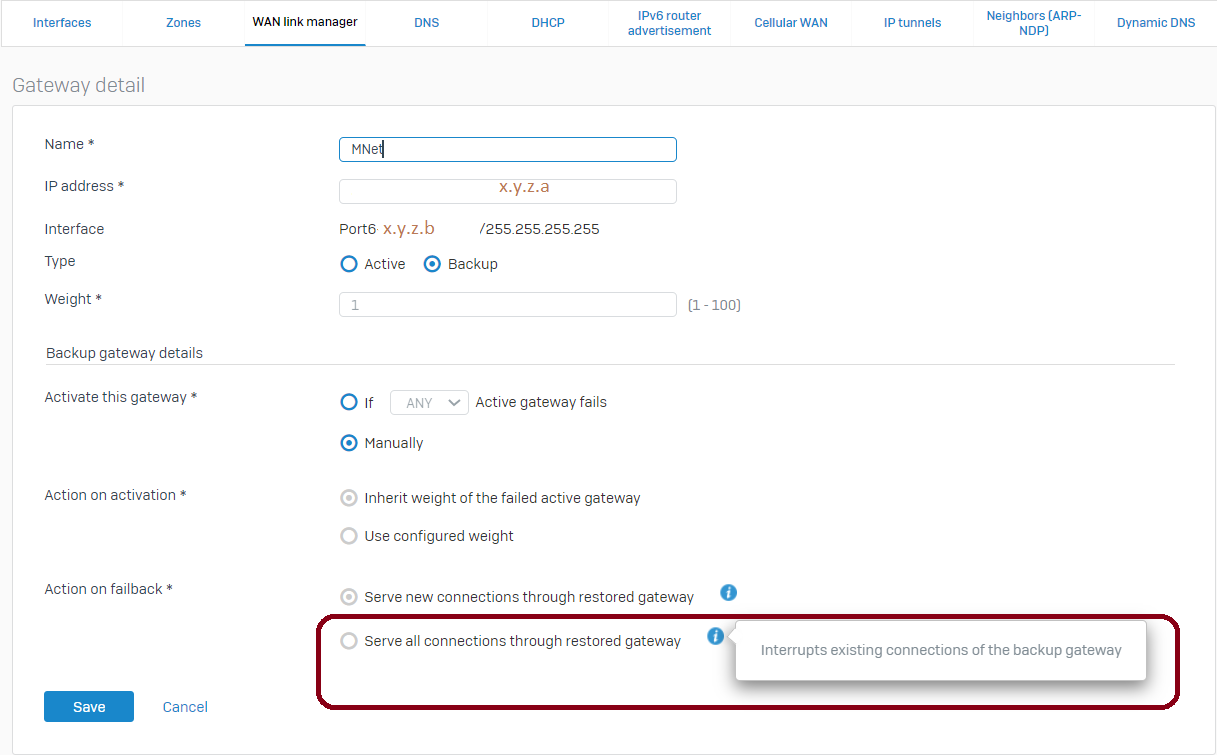
    From the logs of 10th Jan, it looks "Serve all connections through restored gateway" was selected which interrupts existing connections (Image below with highlighted box).

    Generally, admin choose this option if their backup link is too costly or most of the applications are running on UDP. For TCP based traffic (which is stateful by nature), client application (for example, browser) would re-initiate new connection so customer might feel interruption momentarily or permanently (TLS or secure session which might require secure handshake again).

    Default (and less disruptive) option is to choose "Serve new connections through restored gateway". We noticed that you have selected this option currently.

    Reg. 2nd issue about reboot, we observed kernel panic happened at that time. It seems you might be affected with one known issue related to VPN traffic (internally being tracked with NC-108226). Team is actively working on its solution. Once we have pre-fix ready, we would request to apply it in your setup and seek your feedback.

    I would request you to re-test the steps you have mentioned in your initial report after applying this pre-fix (though there is no relation with it and you can try even now as well in non-pick hours as you have mentioned it's production environment). 

    Let me know if you have further query in this regards.

    Regards,

    Sanket Shah

    Senior Development Manager, Sophos Firewall


    Corrected image
    [edited by: sanket.shah at 3:08 PM (GMT -8) on 25 Jan 2023]
  • Hello Luk,

    As per our internal conversation, marking this issue as resolved.

    We ran monitoring script on your XG appliance to capture any abrupt traffic drop. However, we haven't found any suspicious event so far. We also discussed about your deployment and it's possible you might be facing some connectivity issue in your wireless deployment which might be the reason for it and that traffic might not be coming to XG and could be the reason for UI/Internet access issue. It's still hypothesis but from the debug logs, we haven't found anything so far.

    As you are planning to replace existing AP15 with new APX320 in your wifi mesh topology. Hope it will help improve wireless connectivity.

    Feel free to contact me if you face any further issue in this regard.

    Thanks for all your support. 

    Regards,

    Sanket Shah

    Senior Development Manager, Sophos Firewall

  • It would be great to know why, a good reason is Jetzt patchen! Tausende Firewalls von Sophos angreifbar | heise online but Sophos says nothing ....

  • This news article has no relationship to the 19.5 release? What response are you looking for? 

    V19.5 was rather slow in deployment due the upcoming issues found in staging and addressed first. 

    __________________________________________________________________________________________________________________