This discussion has been locked.
You can no longer post new replies to this discussion. If you have a question you can start a new discussion

Issues while creating a hairpin NAT

Hi folks,

another post on my issues about creating a firewall hairpin nat rule.

I have an NTP server on my network and I want devices to use it as a reference time source. I know the device works when I change network devices to query it for time, they update correctly.

When I built my own firewall rule using a linked NAT rule there was lots of queries to the rule but nothing was returned.

So, I have decided to use the XG build a server access rule.

I think one of the questions in the create wizard is wrong
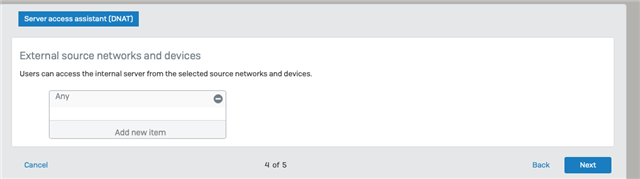
It asks for the external source networks and devices, but never asks for the internal networks. You can add your internal networks which I did.

Next issue is the reflexive rule automatically created does not use the required service as entered in previous pages, just uses ANY which allows all traffic to bypass the specific NAT and linked NAT rules. Again you can change it to the required service.

Next issue is the created firewall rule appears to be wrong.
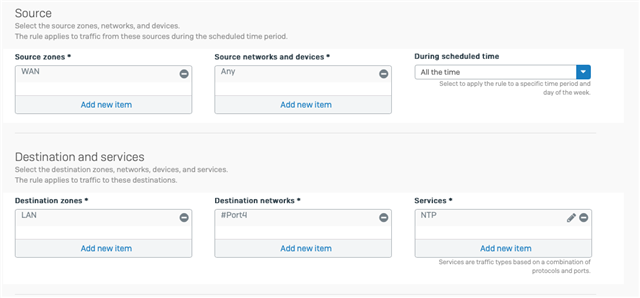
Destination zone is LAN but the destination network is the external interface which is a WAN zone.

The result is the rule does not work.

I have tried creating a FQDN for the external internal access to the NTP, but there is nowhere to add it to the rule along with a number of other issues of trying to add another external url for the same address, the XG does not like it.

Please advise what is required to make the hairpin NAT work. I have read the KBA and followed that document and ended up with the above issues.

Ian

.


This thread was automatically locked due to age.

Top Replies

  • in reply to rfcat_vk +5 verified

    Hopefully this helps someone in the Future.

    NAT on Sophos XG have some really weird issues, one that got me confused for days has the issue below.

    When you create a NAT Policy to Redirect all traffic to a new Destination, the Zone in which the Firewall handles the Outgoing traffic will change.

    First, look at this picture:

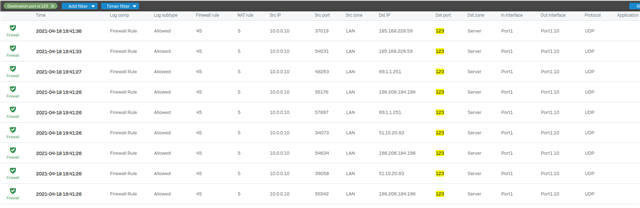
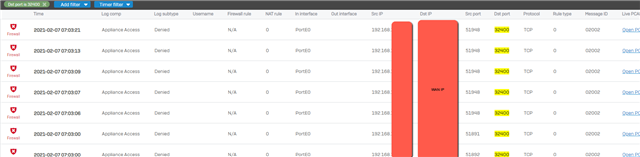
    If you look close at It, you will realize what happened within the Firewall when I've tried to redirect all Outgoing NTP Traffic to a Internal NTP Server.

    The IPv4 that my internal machine is communicating are meant to go for the "WAN" Zone, but instead the Firewall is treating them as the "Server" Zone, which is the Local Zone on where my NTP Server is located - and the same on where my NAT Policy is sending all traffic.

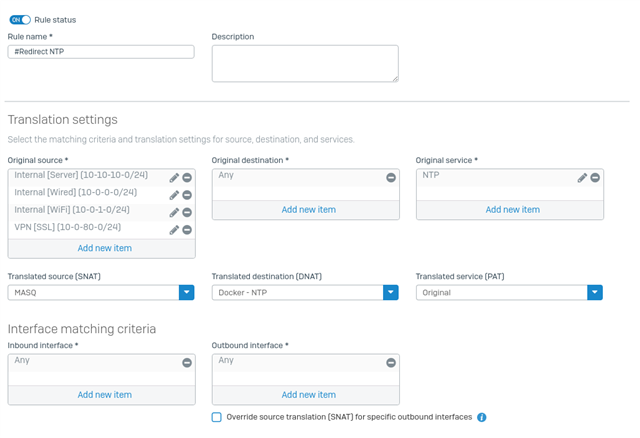
    Here's my NAT Policy:

    If you ever create a NAT Policy which Redirects any Outgoing Traffic for a Local Server, be aware you will also need to create a Firewall Rule which get's applied to the same Zone on where the traffic is being redirect. (But not only that.)

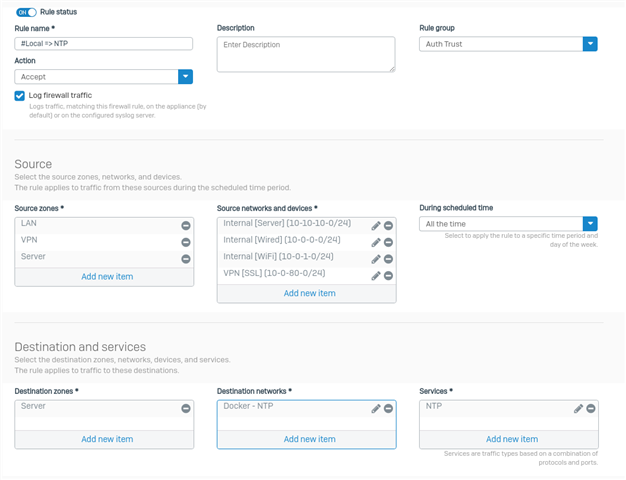
    Which now, we will get to the second issue; Normally you would create a Firewall Rule like this, since you only want to allow traffic to go for your local server and nowhere else;

    This is the Firewall Rule you're expected to create; But It doesn't work.

    Before the NAT get's applied to the Traffic, the Zone of the Outgoing traffic already changed, making the Firewall drop all Outgoing Traffic since It won't match for the "WAN" Zone anymore.

    This is primarily an unnoticed issue, since the default Drop rule of the Firewall have no logging enable.

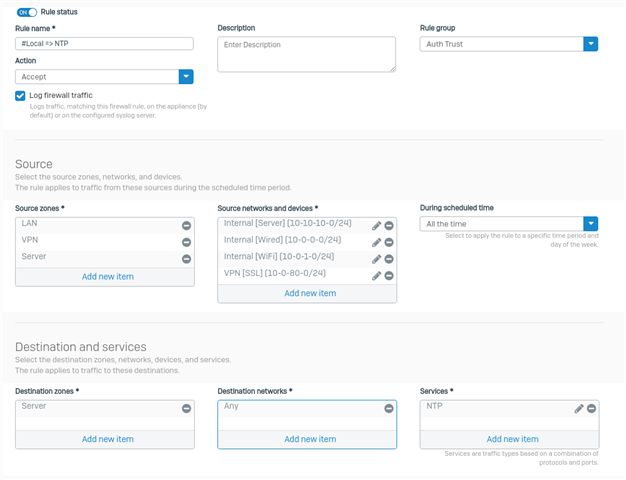
    In which case, you will need to use "Any" as your Destination Network, since as you can see on the Log Viewer above, the Traffic is not being sent to the "WAN" Zone anymore, but It's being sent to the "Server" Zone.

    By creating a Rule like this: (With your Local Zone.)

    Your NAT Policy which Redirects Outgoing Traffic for a Internal server will finally work.

    And the reason on why the "Destination Networks" is "Any" is because the Firewall doesn't treat that traffic (Outgoing Traffic) as the "WAN" Zone anymore, and since there's no other Policy allowing those "WAN" IPv4 Address for your local Zone (Which in my case is the "Server" Zone), the traffic will be dropped.

    By using "Any", all traffic get's accepted by the Firewall Rule and then after It, the NAT Engine pickups It and send the Traffic for the correct Destination from the NAT Policy.

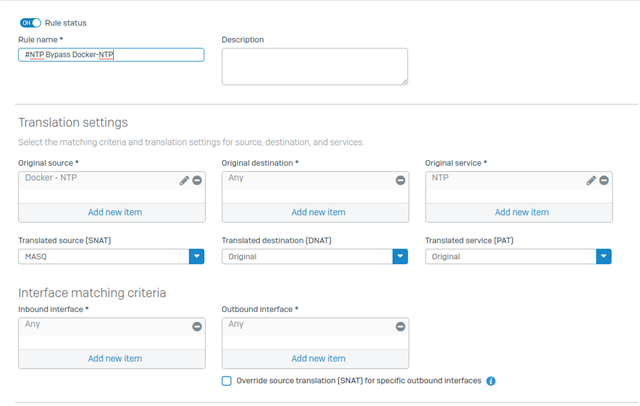
    EDIT: Finishing up, you will need a Secondary NAT Policy - on top of the NAT Policy which is redirecting the Traffic, this Secondary Policy should be created to make the NTP Server Bypass the Redirect and allow It access to the Internet.

    Here's an ex example on how It should look like:

    Again, hopefully this helps someone in the future, also If someone can rewrite all of this in a better manner, I would be very thankfully for It.

    Jump to answer
  • Sitting with the exact same issue the last 3 hours, please advise Sophos, my customer has a webserver that sits on the DMZ and creates connections to itself via the WAN IP.

    -----

    Best regards
    Martin

    Sophos XGS 2100 @ Home | Sophos v19 Architect

  • Another issue is, the internet can access my NTP server via the reflexive rule which is not the aim of the hairpin rule. I have disabled the reflexive rule. My internal device do not appear to be able to access the NTP server via the firewall rule.

    Ian

    XG115W - v19.5.1 mr-1 - Home

    If a post solves your question please use the 'Verify Answer' button.

  • Hello rfcat_vk,

    Thank you for contacting the Sophos Community!

    Can you do a packet capture on the GUI, to see if the traffic is arriving and then what rule is being processed?

    As per the Firewall rule, I used the Wizard and got the correct WAN to WAN.

    Regards,


    Emmanuel (EmmoSophos)
    Technical Team Lead, Global Community Support
    Sophos Support VideosProduct Documentation  |  @SophosSupport  | Sign up for SMS Alerts
    If a post solves your question use the 'Verify Answer' link.
  • Hi emmosphos,

    I do not understand your answer of wan to wan? I am trying lan to lan.

    ian

    XG115W - v19.5.1 mr-1 - Home

    If a post solves your question please use the 'Verify Answer' button.

  • Hello rfcat_vk,

    My apologies, I meant to say that when you use the Wizard you’ll get a WAN to WAN firewall rule, for the automated DNAT rule.

    Regards,


    Emmanuel (EmmoSophos)
    Technical Team Lead, Global Community Support
    Sophos Support VideosProduct Documentation  |  @SophosSupport  | Sign up for SMS Alerts
    If a post solves your question use the 'Verify Answer' link.
  • Hi EmmoSophos,

    please see my original post in the thread, it disagrees with your answer and adds to my confusion.

    Update: the firewall rule allows the internet to access the NTP server, but my internal my internal devices can't.

    Ian

    XG115W - v19.5.1 mr-1 - Home

    If a post solves your question please use the 'Verify Answer' button.


    added internet can still access my NTP while my internal devices can't.
    [edited by: rfcat_vk at 7:04 AM (GMT -8) on 6 Feb 2021]
  • Hi EmmoSophos.

    None of the internal devices hit the firewall rules. Logviewer only shows the NTP server using the IPv6 rule allowing it out and one dumb device that breaks the country rules when it can't connect to the NTP server.

    Ian

    XG115W - v19.5.1 mr-1 - Home

    If a post solves your question please use the 'Verify Answer' button.

  • Looking at the traffic coming from the internet I see the same issue when I build my own rules, the firewall does not appear to know what to do with the traffic, there are no returned packets from the NTP server.

    Ian

    • messageid="00001"
    • log_type="Firewall"
    • log_component="Firewall Rule"
    • log_subtype="Allowed"
    • status="Allow"
    • con_duration="41"
    • fw_rule_id="39"
    • nat_rule_id="7"
    • policy_type="1"
    • user="housemate"
    • user_group="IoT"
    • web_policy_id="0"
    • ips_policy_id="11"
    • appfilter_policy_id="1"
    • app_name=""
    • app_risk="0"
    • app_technology=""
    • app_category=""
    • vlan_id=""
    • ether_type="Unknown (0x0000)"
    • bridge_name=""
    • bridge_display_name=""
    • in_interface="Port1"
    • in_display_interface="IoT LAN"
    • out_interface="Port4"
    • out_display_interface="BIGPOND WAN"
    • src_mac="84:F3:EB:2D:C1:AB"
    • dst_mac="A0:36:9F:6C:96:E8"
    • src_ip="192.168.3.8"
    • src_country=""
    • dst_ip="128.9.176.30"
    • dst_country="USA"
    • protocol="UDP"
    • src_port="5000"
    • dst_port="123"
    • packets_sent="4"
    • packets_received="0"
    • bytes_sent="304"
    • bytes_received="0"
    • src_trans_ip="10.10.10.5"
    • src_trans_port="0"
    • dst_trans_ip=""
    • dst_trans_port="0"
    • src_zone_type="LAN"
    • src_zone="LAN"
    • dst_zone_type="WAN"
    • dst_zone="WAN"
    • con_direction=""
    • con_event="Stop"
    • con_id="1434291968"
    • virt_con_id=""
    • hb_status="No Heartbeat"
    • message=""
    • appresolvedby="Signature"
    • app_is_cloud="0"

    XG115W - v19.5.1 mr-1 - Home

    If a post solves your question please use the 'Verify Answer' button.

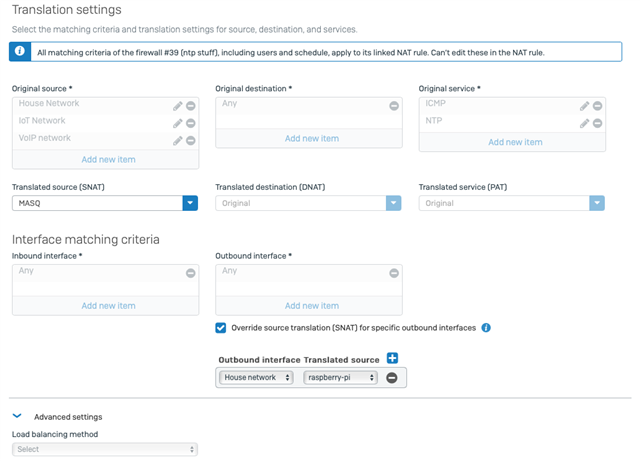
  • I might have fixed my issue, but not using a hairpin created with the wizard, but my own firewall rule. I changed the NAT 

    to use the override -> the internal network with the server on it and the internal server.

    Ian

    XG115W - v19.5.1 mr-1 - Home

    If a post solves your question please use the 'Verify Answer' button.

  • Hi,

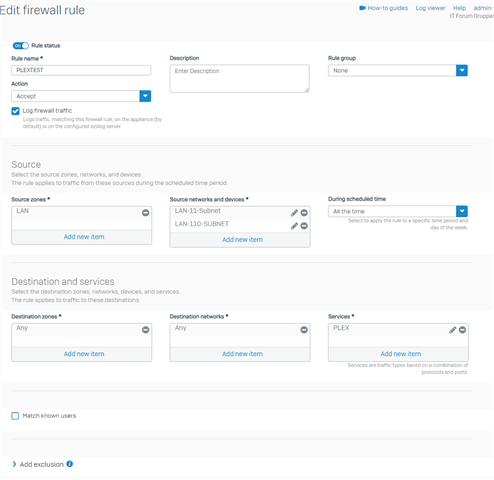
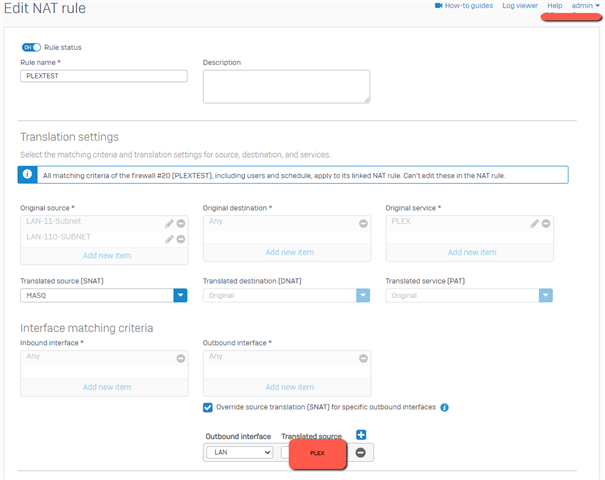
    Have just tried the same, but no luck, in this test I want to get my Plex server accessed from the XG's public WAN IP:

    Routing preceedence is statis route first.

    And the Loopback from the DNAT assistant, does not work either...

    -----

    Best regards
    Martin

    Sophos XGS 2100 @ Home | Sophos v19 Architect