This discussion has been locked.
You can no longer post new replies to this discussion. If you have a question you can start a new discussion

Endpoint slow down internet speed

Hello,

We got a dedicated optical fiber 1gb Down/up .

With the endpoint installed, the speed download seems to be block around around 150 to 300 mb/s. Upload is correct.

IF i uninstall it, then the speed go back to normal with around 900 mb/s. Tests are made through NPERF. 

I tried a to play with settings on sophos central but none of them seems to make it work normally.

Does someone experiencing this issue or does know how to fix it ?


Note: Please see the following Blog Post for the latest update regarding this issue


This thread was automatically locked due to age.

Top Replies

  • It is worth repeating, that there will always be a percentage decrease when you're doing web scanning and lookups "in-line" for browser process traffic. As you say, this only affects processes classified as browsers, not all processes are subjected to so much inspection hence why application speed test tools are unaffected, web browser tests are.

    Depending on the config you have, there is:

    1. Decryption of the browser traffic to be able to inspect HTTPS. 

    This may or may not be on but this is possibly the most intensive feature.
    HKEY_LOCAL_MACHINE\SOFTWARE\Sophos\Management\Policy\ThreatProtection\[latestrevision]\web_protection\
    https_decrypt_enabled = 1 would signify from the endpoint it is enabled.
    "SSL/TLS decryption of HTTPS websites" is the policy option in Central.

    2. Scanning the content before it hits the browser, this relies on https_decrypt_enabled being enabled for HTTPS traffic. If it's HTTP, which maybe accounts for 20% of traffic it is still being processed. 
    "Scan downloads in progress" is the policy option in Central.

    3. Making lookups to SXL to check the domains/urls being accessed.
    "Block access to malicious websites" is the policy option in Central.
    Also if Web control is enabled in policy, these lookups are also made regardless of it being for protection to get the category for the site.

    So when decryption of traffic is enabled, there is more work to be performed, as more data becomes available before it hits the browser to process, plus you have the overhead of the decrypt.  At this point lack of CPU power could be a factor as much as internet speed to make the SXL lookups from SSPService.exe.

    So only when all 3 features:

    • "Block access to malicious websites"
    • "Scan downloads in progress"
    • "Web control"

    are off does SophosNetFilter.exe process exit and there is 0 impact on web browser traffic. Of course if you disable "Network Threat Protection", that closes it down as well but that is far more than needs to be disabled.  This essentially disables all of the Network Threat Protection features rather than just the protection for the browsers.

    The Core agent 2022.4 has an improvement in speed but as far as I am aware, this requires the endpoint flag modernweb.offloading.enabled under

    HKEY_LOCAL_MACHINE\SYSTEM\CurrentControlSet\Services\Sophos Endpoint Defense\EndpointFlags

    to be set to 1.  Sophos slowly rolls the flag out post release to ensure when enabling a new feature or significant change there is no issue with it.  So although you might have 2022.4, your account may not have the flag set yet.

    Hope that helps.

    Jump to answer
  • Hi,
    one of my clients has a Gigabit network, but when we installed sophos endpoint on the devices (4 devices 3 different pc models) the network speed goes from 900 to 200 Mbit/s.
    By disabling sophos from the endpoint central setup page the network speed works normally.
    I read in another ticket that there seems to be a known problem on SNTP, is there a workaround?

  • I like to believe we all can understand we lose 'Speed", when implementing these resources. At what point do we have to say "HEY"......I am losing 2/3 or more of Internet that I(or customers) pay for. Is 2/3 OK...Is 1/2?...There is a point(everyone's level is different)  when the cure is more burdensome than the problem. I really don't like having to pay more for faster internet, because a product I'm using is slowing me down. To keep people happy.... pay more in the front end and get your ass handed to ya in the outcome...Besides this piss and moan session. I keep with Sophos, because it has helped, and took care of many issues, I trust and rely on on the products. But, I came looking for software a few years ago, and found Sophos, I can can also go look again......And Brother David Di Nella from up above, I can clue ya in.....I'm Pissing and moaning about a dozen or less cats I'm dealing with......Yelling it aint fair, with 700+........Well,...I just kinda ......nevermind.....G'Day,Eh....Thank You guys for such sharing, and opportunities to learn.

  • I look at it this way. I know it only affects browser processes. My computer is fine when downloading updates, etc... Running a speed test with the store app is fine. Do I notice the slowdown when actually browsing? Can’t say I do. If I download a 1GB file which is rare, do I care if it takes 30 seconds rather than 20 seconds, would I even notice? How would I know what to expect in the first place? The only time I think I’d notice is if I was handling and sharing GB of data per day via the browser. If that was the case, chances are it would be to the same site so I would make an exclusion as I assume I already trust it.  I suspect there is also a chance that that some of the speed tests just don’t work as accurately with a process in the middle scanning content and making lookups. Fast.com gives me different results for example.  Just my thoughts.

  • Hello all. Same issue here (Belgium customer) We lose significant download speed: should be around 300mbps, getting about 25mbps.

    Started a case, hopefully it's resolved fast. Don't want to turn of network threat protection.

  • When you pay for something, you expect to have it the way it is sell..when you upgrade your internet from 100mb/s to1gb. You do not want to have a speed of 200mb/s. We do download /upload large files. So we can really feel the different. My problem is now solved. I can understand that it's annoying

  • HI Louis I feel ya but you mentioned your problem is now solved care to share what you did?

  • Not really sure i did something to solve the issue but i can use fully my internet speed:

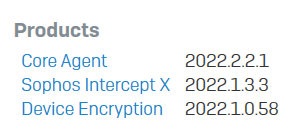
    My core agent is 2022.4.0.4, sophos intercept x is 2022.1.3.3.

    I disabled Block access to malicious websites ( for another reason than speed but maybe it is the solution i don't know)

    I disabled ssl/tls decryption of HTTPS websites. 

    If you have the same version for the core agent and the intercept x , try those settings and give it some time to see if it OK for you.

  • I understand from Sophos support that it is fixed within the Core Agent 2022.4.0.4 which I was told should be deployed by 6th Jan 2023. 

  • Yeah the support agent said the latest Core will fix my issues.  Did you manually update the core or was deployed automatically?

  • I've been told to wait - Which I'm doing! :(